Currently I have a twin screen setup in Arch Linux, like this:
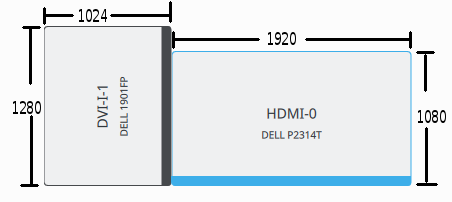
On the left, DELL 1901FP is turned 90 degree counter-clockwise in its portrait mode. On the right, DELL P2314T, a touch screen, is in its regular landscape orientation, with its bottom line aligning with the bottom of the rotated screen on the left.
Here's my xorg.conf for that. (Although one can also setup screen arrangement in KDE/Plasma/Gnome/etc., for KDM/SDDM/GDM/etc. to recognize it in the login screen, it's important to put this in xorg.conf)
# /etc/X11/xorg.conf
# relevant section of screen rotation
Section "Screen"
Identifier     "Screen0"
Device         "Device0"
Monitor        "Monitor0"
DefaultDepth    24
Option         "Stereo" "0"
Option         "nvidiaXineramaInfoOrder" "DFP-2"
Option         "metamodes" "DVI-I-1: 1280x1024_75 +0+0 {rotation=right}, HDMI-0: nvidia-auto-select +1024+200"
Option         "SLI" "Off"
Option         "MultiGPU" "Off"
Option         "BaseMosaic" "off"
SubSection     "Display"
Depth       24
EndSubSection
EndSection
X11 sees a DISPLAY, with an upper-right corner being invisible.
Since the touchscreen is just a regular pointer device (through its driver), when I put my finger on the left border of the touchscreen on the right, the cursor goes all the way to the very left of the DISPLAY. Touchscreen is only useful if the cursor follows my finger. Therefore, we need to do some Input Coordinate Transformation.
Coordinate Transformation Matrix is precisely the needed configuration.
From the documentation above, our goal is to map the following coordinates on the left (X11's default behavior) to the ones on the right:
So that means we are solving the following system:
Here's the solution and the approximate float values:
Now we can put these numbers into the configuration, as the document instructed.
# This does NOT work
xinput set-prop "Advanced Silicon S.A CoolTouch(TM) System" --type=float "Coordinate Transformation Matrix" .652056 0 1024 0 .8436278 200 0 0 1
However, it doesn't work. The cursor stays on the lower right. After some debugging, I found the offsets 1024 and 200 were the culprit. They need to be a percentage, i.e. relative to the full width and height:
# This works
xinput set-prop "Advanced Silicon S.A CoolTouch(TM) System" --type=float "Coordinate Transformation Matrix" .652056 0 .3478261 0 .8436278 .15625 0 0 1
I put it in /usr/share/sddm/scripts/Xsetup (or /usr/share/config/kdm/Xsetup if you haven't upgraded to plasma) as well as ~/.xprofile so it automatically runs every time.
Edit 2016-02-22: I ended up having 3 screens with two in the portrait orientation. SDDM correctly uses metamodes setting in xorg.conf, regardless of the screen power. However, KDE is more sensitive to that so sometimes the layout is messed up. Here's a script to quickly correct that.
#!/bin/sh
# my xorg.conf has this line:
# Option "metamodes" "DVI-I-1: 1280x1024_75 +0+0 {rotation=right}, HDMI-0: nvidia-auto-select +2944+0 {rotation=right}, DP-1: nvidia-auto-select +1024+200"

gksu "xrandr --output DP-1 --primary --auto --pos 1024x200 --output DVI-I-1 --auto --pos 0x0 --rotation right --output HDMI-0 --auto --pos 2944x0 --rotation right"
Leave a Comment
All comments are moderated before publication to prevent spam and scams.