<?xml version="1.0" encoding="utf-8"?>
<feed xmlns="http://www.w3.org/2005/Atom">
  <title>識無吾</title>
  <subtitle>李璨光個人網誌</subtitle>
  <link href="https://blog.tklee.org/zh/feed.xml" rel="self"/>
  <link href="https://blog.tklee.org/zh/"/>
  <updated>2026-08-24T00:00:00Z</updated>
  <id>https://blog.tklee.org/zh/</id>
  <author>
    <name>Tsan-Kuang &quot;TK&quot; Lee 李璨光</name>
  </author><entry>
    <title>關於本站</title>
    <link href="https://blog.tklee.org/zh/posts/0748-about-關於本站/"/>
    <updated>2026-08-24T07:48:15Z</updated>
    <id>https://blog.tklee.org/zh/posts/0748-about-關於本站/</id>
    <content type="html"><![CDATA[
      
<div class="post-teaser-box" data-lang="zh">
<p>歡迎來到李璨光的網誌《識無吾》。關於網誌名稱由來及心路歷程，請見<a href="https://blog.tklee.org/posts/2026-08-17-2307-kNOw-self-%E8%AD%98%E7%84%A1%E5%90%BE/">識無吾</a>一文。本篇主要是網站內容的簡介。</p>
<p>至於網站的設計與使用方法，請見<a href="https://blog.tklee.org/posts/2026-08-22-2212-site-help-and-usage-guide-%E7%B6%B2%E7%AB%99%E4%BD%BF%E7%94%A8%E6%8C%87%E5%8D%97/">使用指南</a>。</p>
</div>
<h1>網站內容</h1>
<p>這裡集結了我從1990年以來的各類文章。每篇文章會按<a href="https://blog.tklee.org/tags/">其主題</a>上標籤。</p>
<p>我主業是軟體工程，副業是音樂作曲，學生時期受過文學與語言學的薰陶與訓練，也曾經歷深刻的自我轉化，所以我最常分享的主題是科技、音樂、文化觀察評論，以及個人的內省。</p>
<p>另外，多年來發表、分享的經驗，也讓我對媒體、平台、社群的互動有些許<a href="https://blog.tklee.org/tags/meta-blog/">後設思考</a>。</p>
<h1>與時俱進</h1>
<p>早期網站版本在內容與後設內容上，都反映出當時的網路生態：我寫的內容、我寫的主題、我為何而寫、我如何呈現，以及我的寫作如何與世界互動，這些都隨著時間而改變。</p>
<p>比方說，在網際網路不發達時期，我寫的內容有不少是為了傳遞一般人<a href="https://blog.tklee.org/posts/1990-01-01-2334-complete-list-of-mozart-s-works-%E8%8E%AB%E6%9C%AD%E7%89%B9%E4%BD%9C%E5%93%81%E7%B8%BD%E8%A1%A8/">不易取得的資訊</a>。之後雖然網路稍普及，但全文搜尋引擎還未成熟，網路的資源要靠人工編成<a href="https://en.wikipedia.org/wiki/Yahoo_Directory">目錄</a>，我的內容也包括<a href="https://blog.tklee.org/posts/1998-06-30-1305-%E8%8E%AB%E6%9C%AD%E7%89%B9%E9%80%A3%E7%B5%90%E5%8F%8A%E8%B3%87%E6%BA%90/">整理有用的網址</a>。</p>
<p>網路科技持續進化的同時，我也期許自己對教育使用者有所貢獻。像是關於<a href="https://blog.tklee.org/posts/1999-10-14-0508-%E7%94%A8%E9%BB%9E%E5%BF%83-%E4%BF%9D%E8%AD%B7%E6%9C%8B%E5%8F%8B%E7%9A%84%E7%B6%B2%E8%B7%AF%E9%9A%B1%E7%A7%81/">廣告信的防堵</a>，特定<a href="https://blog.tklee.org/posts/1999-10-27-0510-%E5%88%A4%E6%96%B7%E6%98%AF%E5%90%A6%E4%B8%ADpretty-park-exe%E7%97%85%E6%AF%90%E5%8F%8A%E8%A7%A3%E6%AF%90%E6%B3%95/">電腦病毒的解法</a>，關於台灣學生<a href="https://blog.tklee.org/posts/2003-01-20-0516-qa-%E5%9C%8B%E4%B8%AD%E9%9F%B3%E6%A8%82%E8%80%81%E5%B8%AB%E4%BE%86%E4%BF%A1%E8%A8%8E%E8%AB%96%E5%AD%B8%E7%94%9F%E6%8A%84%E8%A5%B2%E5%95%8F%E9%A1%8C/">抄襲問題的討論</a>，及與讀者<a href="https://blog.tklee.org/posts/2002-11-01-1536-qa-%E8%8E%AB%E6%9C%AD%E7%89%B9%E6%AD%8C%E5%8A%87%E9%AD%94%E7%AC%9B%E7%9A%84%E8%A7%92%E8%89%B2-%E8%81%B2%E6%A8%82%E5%AE%B6%E5%88%86%E9%A1%9E-%E6%AD%8C%E5%8A%87%E5%88%86%E6%AE%B5%E6%B3%95-%E8%8A%B1%E8%85%94-%E5%A4%9C%E5%90%8E%E8%A9%A0%E5%98%86%E8%AA%BF/">互動討論</a>。</p>
<p>全文搜尋引擎成熟後，大眾較易尋得原始資訊，我分享的重點放在複雜度高些、網上不易找到的整合內容。比方說，早期中文<a href="https://blog.tklee.org/posts/2010-11-24-0850-%E6%97%A9%E6%9C%9F%E4%B8%AD%E6%96%87%E7%B7%A8%E7%A2%BC%E8%BD%89%E6%8F%9B/">亂碼問題的解法</a>，或是我為多鍵盤寫的<a href="https://blog.tklee.org/posts/2008-09-19-2103-modifiers-across-keyboards/">驅動程式</a>，或是如何讓兩人<a href="https://blog.tklee.org/posts/2015-05-07-0243-x11-multi-seat-running-kde-and-gnome/">同時獨立各別使用同一台電腦</a>，以及給作曲者<a href="https://blog.tklee.org/posts/2009-03-31-0425-practical-tips-for-score-part-preparation/">製作演奏用總譜與分譜的實際建議</a>。</p>
<p>今日，AI 可以直接解決許多問題，我也在重新思考分享內容、方式、以及意義。</p>
<h1>本站設計哲學：歷史保存</h1>
<p>這些演變，網站記錄了下來。它見證了世界的變化，更是我個人的成長記錄。</p>
<p>本站透過<strong>以文章為主軸</strong>的設計來保存這段歷史——所有的內容都是一篇帶有日期的文章。舉例來說，您在讀的這篇「關於本站」就是一篇帶有日期的文章；如果我寫了新的「關於本站」，舊的文章仍會被保存下來，而選單只需連結至新文章即可。「留言討論」表單是一篇文章，「使用指南」也是一篇文章。像這樣文章，大多都會標上 <a href="https://blog.tklee.org/tags/meta-blog/">Meta-Blog</a> 的主題標籤。</p>
<p>現實考慮，我的保存工作只能涵蓋我自己的網站；我文章中引用的許多外部資源早已消失。所幸 <a href="https://archive.org/">Archive.org</a> 保存了相當多（雖然不是全部）的內容，供懷舊的考古學家們挖掘。</p>
<p>因此，<strong>失效的舊連結原樣保留</strong>。</p>
<p>老文章經歷不同編輯器、系統、平台、格式，在形式上難免有所失真；這點我沒那麼執著於保留原樣。自己文章的錯別字，我也儘量改正。</p>
<p>倒是早期不成熟的內容與拙劣的文句，我保留下來作為個人歷史的一部分。</p>
<h1>補完計畫</h1>
<p>過去十多年來，社群媒體變成大眾主要交流方式。我大部分的思想交流移到社群媒體，因此自己的網誌有了很長一段空窗期。另外，也有一些文章我原來沒有發表。</p>
<p>我打算漸漸把這些之前未收錄過的內容整理上來，標上原來寫作日期。近期加入的舊文章，會出現在文章總表的收錄時間點，並標上「✨ 新收錄」。</p>
<h1>讀者互動與人工過濾</h1>
<p>早期讀者直接寫信給我，我再轉貼我們交換的內容。後來的網站，可以讓讀者直接留言，並馬上顯示，互動方便許多。</p>
<p>但多年來我的舊網誌系統收到大量的廣告留言，也有詐騙與偷竊密碼的惡意連結。有種對治方式是要求讀者實名登錄後才能留言，但這造成不便，降低隱私性也讓部分讀者猶豫。</p>
<p>因此，這一代新系統，我請讀者用留言表格，我過濾後再公開。</p>
<p>希望這只是人類文明見山不是山的過渡期，有一天我們能真的學會尊重與愛護彼此。<br />
</p>
<p></p>

    ]]></content>
  </entry><entry>
    <title>網站使用指南</title>
    <link href="https://blog.tklee.org/zh/posts/2212-site-help-and-usage-guide-網站使用指南/"/>
    <updated>2026-08-22T22:12:09Z</updated>
    <id>https://blog.tklee.org/zh/posts/2212-site-help-and-usage-guide-網站使用指南/</id>
    <content type="html"><![CDATA[
      
<p>歡迎來到我的網誌！以下是一些能讓您獲得更好閱讀體驗的提示。</p>
<h2>❓ 使用指南</h2>
<p>點擊頁面右上角的問號圖示（?）即可進入本頁面（網站使用指南）。您可以隨時使用瀏覽器的「上一頁」功能返回原處。</p>
<h2>🌐 閱讀語言設定</h2>
<p>我以多語寫作，所以過去常要翻譯自己文章（這些文章會標註為「作者翻譯」），而大部分時候我實在沒有餘力翻。但有了現代科技，我可以不必自己翻了。</p>
<p>本網誌為雙語網站（英文與繁體中文），並支援多種其他語言的即時翻譯。您可以隨時用畫面上方的 <svg xmlns="http://www.w3.org/2005/svg" width="16" height="16" viewBox="0 0 24 24" fill="none" stroke="currentColor" stroke-width="2" stroke-linecap="round" stroke-linejoin="round" style="display: inline; vertical-align: -3px; margin-right: 2px;"><circle cx="12" cy="12" r="10"></circle><path d="M12 2a15.3 15.3 0 0 1 4 10 15.3 15.3 0 0 1-4 10 15.3 15.3 0 0 1-4-10 15.3 15.3 0 0 1 4-10z"></path><path d="M2 12h20"></path></svg> （地球圖示）切換語言。順道一提，點擊地球圖示可以將語言選單縮小，讓版面更為簡潔。</p>
<p>網站會記住您的選擇，直到您重選為止。</p>
<h2>☰ 選單</h2>
<p>點擊左上角的漢堡圖示 ☰ 可以展開網站選單，包含以下功能：</p>
<ul>
<li><svg xmlns="http://www.w3.org/2000/svg" width="16" height="16" viewBox="0 0 24 24" fill="none" stroke="currentColor" stroke-width="2" stroke-linecap="round" stroke-linejoin="round" class="menu-icon"><circle cx="11" cy="11" r="8"></circle><line x1="21" y1="21" x2="16.65" y2="16.65"></line></svg> 搜尋全站（使用 Google）</li>
<li><svg xmlns="http://www.w3.org/2005/svg" width="16" height="16" viewBox="0 0 24 24" fill="none" stroke="currentColor" stroke-width="2" stroke-linecap="round" stroke-linejoin="round" style="display: inline; vertical-align: -3px; margin-right: 2px;"><circle cx="12" cy="12" r="10"></circle><path d="M12 2a15.3 15.3 0 0 1 4 10 15.3 15.3 0 0 1-4 10 15.3 15.3 0 0 1-4-10 15.3 15.3 0 0 1 4-10z"></path><path d="M2 12h20"></path></svg> 語言切換（如前述）</li>
<li><svg xmlns="http://www.w3.org/2000/svg" width="16" height="16" viewBox="0 0 24 24" fill="none" stroke="currentColor" stroke-width="2" stroke-linecap="round" stroke-linejoin="round" class="menu-icon"><path d="M14 2H6a2 2 0 0 0-2 2v16a2 2 0 0 0 2 2h12a2 2 0 0 0 2-2V8z"></path><polyline points="14 2 14 8 20 8"></polyline><line x1="16" y1="13" x2="8" y2="13"></line><line x1="16" y1="17" x2="8" y2="17"></line><polyline points="10 9 9 9 8 9"></polyline></svg> 文章總表（依收錄時間排序的文章與摘要。近期收錄的早期文章會標上「✨ 新收錄」）</li>
<li><svg xmlns="http://www.w3.org/2000/svg" width="16" height="16" viewBox="0 0 24 24" fill="none" stroke="currentColor" stroke-width="2" stroke-linecap="round" stroke-linejoin="round" class="menu-icon"><circle cx="12" cy="12" r="10"></circle><polyline points="12 6 12 12 16 14"></polyline></svg> 時間總軸（以寫作時間呈現所有文章標題）</li>
<li><svg xmlns="http://www.w3.org/2000/svg" width="16" height="16" viewBox="0 0 24 24" fill="none" stroke="currentColor" stroke-width="2" stroke-linecap="round" stroke-linejoin="round" class="menu-icon"><path d="M20.59 13.41l-7.17 7.17a2 2 0 0 1-2.83 0L2 12V2h10l8.59 8.59a2 2 0 0 1 0 2.82z"></path><line x1="7" y1="7" x2="7.01" y2="7"></line></svg> 主題標籤（依主題尋找文章）</li>
<li><svg xmlns="http://www.w3.org/2000/svg" width="16" height="16" viewBox="0 0 24 24" fill="none" stroke="currentColor" stroke-width="2" stroke-linecap="round" stroke-linejoin="round" class="menu-icon"><circle cx="12" cy="12" r="10"></circle><line x1="12" y1="16" x2="12" y2="12"></line><line x1="12" y1="8" x2="12.01" y2="8"></line></svg> 關於本站（關於本網誌新一代的背景與內容）</li>
<li><svg xmlns="http://www.w3.org/2000/svg" width="16" height="16" viewBox="0 0 24 24" fill="none" stroke="currentColor" stroke-width="2" stroke-linecap="round" stroke-linejoin="round" class="menu-icon"><path d="M21 15a2 2 0 0 1-2 2H7l-4 4V5a2 2 0 0 1 2-2h14a2 2 0 0 1 2 2z"></path></svg> 留言討論</li>
<li><svg xmlns="http://www.w3.org/2000/svg" width="16" height="16" viewBox="0 0 24 24" fill="none" stroke="currentColor" stroke-width="2" stroke-linecap="round" stroke-linejoin="round" class="menu-icon"><circle cx="12" cy="12" r="10"></circle><path d="M9.09 9a3 3 0 0 1 5.83 1c0 2-3 3-3 3"></path><line x1="12" y1="17" x2="12.01" y2="17"></line></svg> 使用指南（本頁）</li>
<li><svg xmlns="http://www.w3.org/2000/svg" width="16" height="16" viewBox="0 0 24 24" fill="none" stroke="currentColor" stroke-width="2" stroke-linecap="round" stroke-linejoin="round" class="menu-icon"><path d="M4 11a9 9 0 0 1 9 9"></path><path d="M4 4a16 16 0 0 1 16 16"></path><circle cx="5" cy="19" r="1"></circle></svg> 訂閱內容（提供 RSS）</li>
</ul>
<h2>本站獨特的設計</h2>
<p>這裡集結了我從1990年以來的各類文章。關於本站特殊的設計哲學，文章分類，歷史演化，以及對於過期內容的處理方式，請見<a href="https://blog.tklee.org/posts/2026-08-24-0748-about-%E9%97%9C%E6%96%BC%E6%9C%AC%E7%AB%99/">關於本站</a>一文。</p>


    ]]></content>
  </entry><entry>
    <title>留言</title>
    <link href="https://blog.tklee.org/zh/posts/1830-contact-comment-聯絡留言/"/>
    <updated>2026-08-22T18:30:00Z</updated>
    <id>https://blog.tklee.org/zh/posts/1830-contact-comment-聯絡留言/</id>
    <content type="html"><![CDATA[
      
<p>如果您要對我某篇文章做回應，請直接在該篇文章回應。一般通訊，請填寫下方表格。</p>


    ]]></content>
  </entry><entry>
    <title>識無吾</title>
    <link href="https://blog.tklee.org/zh/posts/2307-kNOw-self-識無吾/"/>
    <updated>2026-08-17T23:07:00Z</updated>
    <id>https://blog.tklee.org/zh/posts/2307-kNOw-self-識無吾/</id>
    <content type="html"><![CDATA[
      
<p>無論您是1990年來就一直關注我文章，還是剛發現這裡，歡迎光臨我的網誌《識無吾》(kNOw self)。</p>
<p>這新名稱蘊含三重意義，同時也是我多年來旅程的寫照。</p>
<p>首先，它代表我對古希臘哲學中「<a href="https://zh.wikipedia.org/zh-tw/%E8%AE%A4%E8%AF%86%E4%BD%A0%E8%87%AA%E5%B7%B1">認識自己</a>」（識吾）的追求。其次，這標題也代表我想讓朋友更「認識我」（識吾），建立有意義的連結。最後，它呼應了佛教中「<a href="https://zh.wikipedia.org/wiki/%E9%9D%9E%E6%88%91">無我</a>」（無吾）的概念，提醒我別忘了萬法流動、不斷變化的本質（識無），縮小自我執念，並與世間所有相互依存的眾生（識無吾）分享我的歷程。</p>
<p>過去十多年來，我在網誌的發表變得斷斷續續。社群媒體的洪流，把我從自己的空間中拉走：為了方便，在熱鬧的數位平台上交換短暫思緒，取代了我長篇的深度反思。但我現在意識到回歸到個人空間的必要性：我需要一個清靜的地方，讓我（以及讀者）能專注於有意義的思緒，而不被其他雜音干擾。</p>
<p>這個回歸，也伴隨了技術上的改革。1990 年以來，我就一直在發表文章，見證通訊媒介的完整演變。我的文字曾經棲身於傳統紙媒、電子郵件群組、電子報以及 BBS。然後乘著 Web 1.0 浪潮，在學術大型主機的使用者空間、<a href="https://zh.wikipedia.org/wiki/%E9%9B%85%E8%99%8E%E5%9C%B0%E7%90%83%E6%9D%91">GeoCities</a>，以及自建伺服器上純手工編寫的 HTML 中開闢了自己的角落，然後透過 <a href="https://zh.wikipedia.org/wiki/RSS">RSS</a> 進行聯播。接著是 Web 2.0——那個充滿互動式內容管理系統（CMS）與無數部落格引擎的時代——直到社群媒體將整個網路世界吞噬。</p>
<p>經歷這麼多代的平台，我最後選擇了回歸根本：靜態檔案（static files），並自製引擎來驅動，將內容與形式分開處理。表面上是回到根本技術，但見山又是山，背後蘊含了數十年軟體工程與分享寫作的<a href="https://blog.tklee.org/tags/meta-blog/">經驗</a>。</p>
<p>演變的不僅僅是平台媒介，全球通訊也發生了翻天覆地的變化。今日雙語發表的經驗和早期很不同了：<a href="https://zh.wikipedia.org/zh-tw/%E7%BB%9F%E4%B8%80%E7%A0%81">Unicode</a> 成了標準，網際網路提升了全球的英語能力，而機器翻譯更是唾手可得。多年來，我自己的主要讀者群，也從中文轉向了英文讀者；我的英文能力與文化敏銳度也有些許成長。</p>
<p>此外，在網路上寫作的實質效用，也發生了轉變。我們現在擁有高智慧搜尋器，以及和能在幾秒鐘內合成答案的 AI。讀者的注意力持續時間急遽縮短，多媒體也迅速取代需要時間來閱讀的文字。當 AI 能夠回答問題，而影片佔據了我們的螢幕時，為什麼還要在個人網站上寫長篇文章呢？</p>
<p>因為這個空間的目的不僅僅是為了傳播訊息，它更是我人生追求歷程的分享：自我觀察、自我修正，以及最終的自我解脫。</p>
<p>這個網誌是我生命各個面向成長的活紀錄：作為軟體專業與科技創客；作為作曲與音樂愛好者；作為多語寫作者；最重要的是，作為一個期許自己明天能比今天更好的凡人。</p>
<p>《識無吾》是我回歸根本的追求。我為此欣喜，也歡迎您駐足。</p>


    ]]></content>
  </entry><entry>
    <title>敵人</title>
    <link href="https://blog.tklee.org/zh/posts/0716-敵人-enemy/"/>
    <updated>2023-10-11T07:16:00.003Z</updated>
    <id>https://blog.tklee.org/zh/posts/0716-敵人-enemy/</id>
    <content type="html"><![CDATA[
      
<p>在戰區的朋友今天傳來消息，她家裡一位行動不便的人來不及逃亡，被炸死了。</p>
<p>九二一地震時，也有許多人自己逃得了，但眼睜睜看著慢一步的親人罹難。這種痛，除了失去親人外，還加上倖存者的罪惡感。</p>
<p>而戰爭帶來的苦難，又比天災更進一步：天地不仁，帶來災難，人類也只能面對；但戰爭卻是人為的，是某些人覺得自己某些利益比他人的生命更寶貴，而覺得可以犧牲他人生命。這種痛，又更上一層。</p>
<p>很多人生日許願時常說要祈求世界和平，好像真的有一位專管生日許願的神，來應允每個人的三個願望。我沒聽過有這樣的神。</p>
<p>生日許願，不應像求阿拉丁神燈，求完了就沒自己事了；而應像新年立願一樣，當做是自己努力的目標。</p>
<p>真想要世界和平，至少先把自己與他人的關係弄好，想辦法減少自己外在的敵人與內在的敵意。</p>
<p>朋友痛失家人生命的離去，我立願以減少自己暴戾之氣作為新生命的開始。<br />
</p>
<p></p>

    ]]></content>
  </entry><entry>
    <title>Streaming Custom Videos in Google Hangouts</title>
    <link href="https://blog.tklee.org/zh/posts/0635-streaming-custom-videos-in-google-hangouts/"/>
    <updated>2019-04-30T06:35:00.002Z</updated>
    <id>https://blog.tklee.org/zh/posts/0635-streaming-custom-videos-in-google-hangouts/</id>
    <content type="html"><![CDATA[
      <p>With this method, I was able to send Google Hangouts any video contents, such as me with a news broadcast background, while the small TV in that background is showing my desktop playing a live Youtube video.</p>
<p><a href="https://obsproject.com/">OBS</a> is a fine tool that enables us to overlay various visual/audio sources, on the fly, for streaming and/or recording. Unfortunately, it doesn't support a virtual cam under Linux (there <em>is</em> <a href="https://github.com/CatxFish/obs-virtual-cam">a plugin</a> that only works under Windows), i.e. I can't send a complex composition of a live desktop screen, webcam, video, etc. to Google Hangouts.</p>
<p><a href="https://webcamoid.github.io/">Webcamoid</a> is another fine tool that supports output to a virtual cam under Linux, which Google Hangouts can directly use.</p>
<p><a href="https://github.com/CatxFish/obs-virtual-cam/issues/17">Several attempts</a> were made, but I wasn't able to get a result with low enough latency for video conferencing. The video latency caused an unacceptable out-of-sync problem with the audio.</p>
<p>I reached an easy workaround, which is resource heavy, but works quite well.</p>
<ol>
<li>Use OBS to construct the target scene, say, a chroma keyed webcam, with a video background, and a logo foreground, as well as a live chat overlay.</li>
<li>In OBS, right click on the preview, and project it under a separate screen.</li>
<li>In Webcamoid, choose that screen as the source.</li>
<li>In Google Hangouts, choose Webcamoid's virtual cam instead of the real webcam.</li>
<li>Voila! Now I have full control of what others see in my video conferencing.</li>
</ol>
<p>This solution needs one whole screen just to link OBS and webcamoid. Any of the following improvement of either project will make this workflow even better:</p>
<ul>
<li>When Webcamoid supports <a href="https://github.com/webcamoid/webcamoid/issues/180">a window as a source</a> (right now only whole screens can be sources), we can hide the window so it doesn't take up our screen real estate.</li>
<li>When OBS can <a href="https://github.com/CatxFish/obs-virtual-cam/issues/17#issuecomment-486121295">correctly piping a video stream into a linux virtual cam</a>, or even better, correctly implements its own virtual cam.</li>
</ul>
<p>Hopefully either will come soon.</p>
<p>Update: now there's an easier way: use OBS's v4l2sink plugin + v4l2loopback kernel module. See this <a href="https://srcco.de/posts/using-obs-studio-with-v4l2-for-google-hangouts-meet.html">article</a>.</p>

    ]]></content>
  </entry><entry>
    <title>uwsgi wrong python interpreter</title>
    <link href="https://blog.tklee.org/zh/posts/2102-uwsgi-wrong-python-interpreter/"/>
    <updated>2017-10-13T21:02:00Z</updated>
    <id>https://blog.tklee.org/zh/posts/2102-uwsgi-wrong-python-interpreter/</id>
    <content type="html"><![CDATA[
      <p>In some projects, I use uwsgi behind nginx to drive Django. I also use virtualenv to manage my environments (by the way, Panda's introducing .ix and then deprecating it wasn't fun). In a recent update, I was pulling my hair out trying to figure out why I'm getting the following error message, and a wrong Python interpreter.</p>
<pre class="language-text"><code class="language-text">Could not find platform independent libraries 
  
Could not find platform dependent libraries 
  
Consider setting $PYTHONHOME to [:]
  
Python version: 3.5.4 |Continuum Analytics, Inc.| (default, Aug 14 2017, 13:26:58)  [GCC 4.4.7 20120313 (Red Hat 4.4.7-1)]
  
Set PythonHome to /opt/anaconda
  
Fatal Python error: Py_Initialize: Unable to get the locale encoding
  
ImportError: No module named 'encodings'</code></pre>
<p>It turned out that the problem was in the binary code of uwsgi in my environment. It was compiled for another environment, with the environment path hard-coded in. Yes, in the binary. I had done that in another environment and the compiled package stayed in the pip cache, and the new environment just picked it up from the cache, causing inconsistency!</p>
<p>The solution:</p>
<pre class="language-bash"><code class="language-bash">pip <span class="token function">install</span> --no-cache uwsgi</code></pre>

    ]]></content>
  </entry><entry>
    <title>Ergodox EZ Configurator Layer Manipulation</title>
    <link href="https://blog.tklee.org/zh/posts/0300-ergodox-ez-configurator-layer-manipulation/"/>
    <updated>2017-07-12T03:00:00Z</updated>
    <id>https://blog.tklee.org/zh/posts/0300-ergodox-ez-configurator-layer-manipulation/</id>
    <content type="html"><![CDATA[
      <p>Ergodox EZ provides a great <a href="http://configure.ergodox-ez.com/keyboard_layouts/qgbavy/edit">configurator</a>; however, it doesn't provide all editing functions I need. Unfortunately, the source code <a href="https://github.com/ErgoDox-EZ/fusion">disappeared</a> from github (multiple unofficial documents have links to that repo so I assume the source was once available; this is rather disappointing, since the company made it <a href="https://ergodox-ez.com/pages/our-firmware">look like</a> that they are using all open source resources.)</p>
<p>One of the functions that I need the most is swapping the layers.</p>
<p>Here's what I did to achieve it:</p>
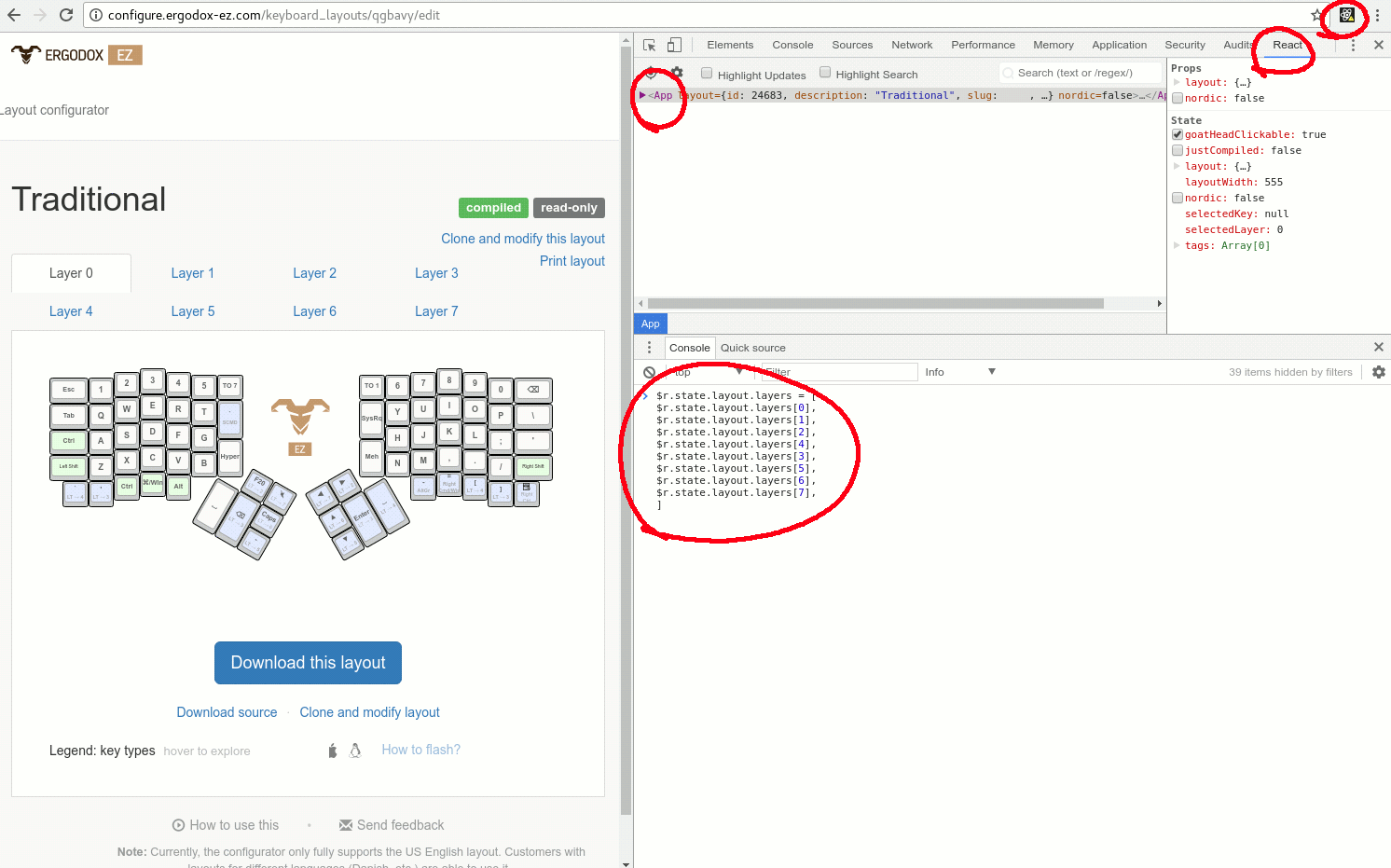
<p>Upon examining the minimized javascript, it was written against the <a href="https://facebook.github.io/react/">React</a> framework. Therefore, I installed the <a href="https://chrome.google.com/webstore/detail/react-developer-tools/fmkadmapgofadopljbjfkapdkoienihi?hl=en">React debugger extension for chrome</a>, in order to find and manipulate the variable that stores the layer information.</p>
<p>Once the extension is installed, reload the page, and open up the Developer Tools in Chrome.</p>
<p>Click on React to open the debugging panel.</p>
<p>Make sure the correct scope &quot;App&quot; is selected.</p>
<p>Now the variable $r will contain the React object, including the state, for editing.</p>
<p>The layers (including all key assignment) information is in the array: <code>$r.state.layout.layers</code></p>
<p>Here's an example of swapping layer 3 and 4.</p>
<pre class="language-javascript"><code class="language-javascript">$r<span class="token punctuation">.</span>state<span class="token punctuation">.</span>layout<span class="token punctuation">.</span>layers <span class="token operator">=</span> <span class="token punctuation">[</span>
  $r<span class="token punctuation">.</span>state<span class="token punctuation">.</span>layout<span class="token punctuation">.</span>layers<span class="token punctuation">[</span><span class="token number">0</span><span class="token punctuation">]</span><span class="token punctuation">,</span>
  $r<span class="token punctuation">.</span>state<span class="token punctuation">.</span>layout<span class="token punctuation">.</span>layers<span class="token punctuation">[</span><span class="token number">1</span><span class="token punctuation">]</span><span class="token punctuation">,</span>
  $r<span class="token punctuation">.</span>state<span class="token punctuation">.</span>layout<span class="token punctuation">.</span>layers<span class="token punctuation">[</span><span class="token number">2</span><span class="token punctuation">]</span><span class="token punctuation">,</span>
  $r<span class="token punctuation">.</span>state<span class="token punctuation">.</span>layout<span class="token punctuation">.</span>layers<span class="token punctuation">[</span><span class="token number">4</span><span class="token punctuation">]</span><span class="token punctuation">,</span>  <span class="token comment">// notice the swapping</span>
  $r<span class="token punctuation">.</span>state<span class="token punctuation">.</span>layout<span class="token punctuation">.</span>layers<span class="token punctuation">[</span><span class="token number">3</span><span class="token punctuation">]</span><span class="token punctuation">,</span>  <span class="token comment">// notice the swapping</span>
  $r<span class="token punctuation">.</span>state<span class="token punctuation">.</span>layout<span class="token punctuation">.</span>layers<span class="token punctuation">[</span><span class="token number">5</span><span class="token punctuation">]</span><span class="token punctuation">,</span>
  $r<span class="token punctuation">.</span>state<span class="token punctuation">.</span>layout<span class="token punctuation">.</span>layers<span class="token punctuation">[</span><span class="token number">6</span><span class="token punctuation">]</span><span class="token punctuation">,</span>
  $r<span class="token punctuation">.</span>state<span class="token punctuation">.</span>layout<span class="token punctuation">.</span>layers<span class="token punctuation">[</span><span class="token number">7</span><span class="token punctuation">]</span><span class="token punctuation">,</span>
<span class="token punctuation">]</span></code></pre>
<p>Note that if there are layer switching keys, you'll also need to manually modify those from the GUI.</p>
<p>I also did some batch editing offline, and then re-assign the whole <code>$r.state.layout.layers</code> by first converting the variable to JSON and write it to a local file, with <a href="http://bgrins.github.io/devtools-snippets/#console-save">this snippet</a>.</p>
<p>Also when you copy/create a layer, make sure to use the GUI to first allocate the variable <code>$r.state.layout.layers[x].keyboard_layout_id</code> on their server and then carefully copy those values.</p>
<p>Here's my <a href="http://configure.ergodox-ez.com/keyboard_layouts/qbbndp/edit">current setup</a>, if you are interested.</p>
<p><a href="https://blog.tklee.org/assets/2017-07-12-0300/ergodox_layers_manipulation.png"><img src="https://blog.tklee.org/assets/2017-07-12-0300/ergodox_layers_manipulation.png" alt="" /></a></p>

    ]]></content>
  </entry><entry>
    <title>[QA] 社經地位</title>
    <link href="https://blog.tklee.org/zh/posts/1657-socio-economic-class-社經地位/"/>
    <updated>2016-08-02T16:57:00Z</updated>
    <id>https://blog.tklee.org/zh/posts/1657-socio-economic-class-社經地位/</id>
    <content type="html"><![CDATA[
      
<div class="post-teaser-box" data-lang="zh">
網友來信討論社經地位中下，但是收入穩定，甚至比一般人薪水還高的職業
</div>
<div class="conversation-other">
<p>※ 引述《omare.》之銘言:</p>
<p>不知道有沒有　社經地位中下<br />
但是收入穩定　甚至比一般人薪水還高的職業<br />
有八卦嗎</p>
</div>
<div class="conversation-author">
<p>幾乎所有我們文化看不起的行業都找得到致富者。我身邊的例子有葬儀業，資源回收，果農，酪農。</p>
<p>話說回來，我認識的這些人雖然都是從低層做起，但每一個都有經營天分。我相信不管把他們丟到哪一行，他們都能經營得很好。</p>
<p>「社『經』地位不高」就代表收入不高了，所以這裡用詞不精確。不過這個詞本身把社會地位和經濟地位綁在一起，其實點出了我們文化的盲點、價值觀的狹隘、以及資本主義下，管理者與勞動者付出與回饋比例的矛盾。</p>
<p>很可惜，我們文化很少去注意到真正活得安心快樂的那些人。即使偶爾新聞報出來，竟然也著眼在這些人低社會地位的反差，用一種「一個人社會低位不高，卻知足常樂，真是難得」的膚淺態度來呈現。從沒想到，這些人的生命品質，實際上到了我們一般人達不到的水準。</p>
</div>


    ]]></content>
  </entry><entry>
    <title>Fixing Lenovo U31-70 Wi Fi Problem</title>
    <link href="https://blog.tklee.org/zh/posts/0624-fixing-lenovo-u31-70-wifi-problem/"/>
    <updated>2016-02-06T06:24:00Z</updated>
    <id>https://blog.tklee.org/zh/posts/0624-fixing-lenovo-u31-70-wifi-problem/</id>
    <content type="html"><![CDATA[
      <p></p>
<div class="post-comments" style="margin-top: 4rem; padding-top: 2rem; border-top: 2px dashed var(--glass-border);">

<h3 class="comments-title" style="font-size: 1.5rem; margin-bottom: 2rem; color: var(--primary-color); text-shadow: 0 0 10px rgba(56,189,248,0.2);">留言</h3>
<p></p><div class="conversation-other"><br />
<div class="comment-meta" style="font-size: 0.9em; color: var(--text-muted); margin-bottom: 0.8rem; display: flex; gap: 0.5rem; align-items: center;"><br />
<strong style="color: var(--text-main); font-weight: 600;"><a href="https://www.blogger.com/profile/11849094639209265284" target="_blank" rel="nofollow">Rui Ramos</a></strong> <span class="comment-date" style="opacity: 0.7;">on Sunday, July 21, 2019 at 10:25:00 AM EDT</span><br />
</div><br />
<div class="comment-body" style="line-height: 1.6; color: var(--text-main); opacity: 0.9;"><br />
<p>Hi there,</p><p></p>
<p>I am doing the same thing.<br />
But I have found 2 models of 3160:</p>
<ul>
<li>NGW</li>
<li>NGFF<br />
How can I know which is right for my u31-70?</li>
</ul>
<p>Thank you.</p>
<p></p></div><br />
</div><p></p>
<p></p><div class="conversation-author"><br />
<div class="comment-meta" style="font-size: 0.9em; color: var(--text-muted); margin-bottom: 0.8rem; display: flex; gap: 0.5rem; align-items: center;"><br />
<strong style="color: var(--text-main); font-weight: 600;"><a href="https://www.blogger.com/profile/11411703278692679285" target="_blank" rel="nofollow">TK</a></strong> <span class="comment-date" style="opacity: 0.7;">on Tuesday, July 23, 2019 at 3:32:00 PM EDT</span><br />
</div><br />
<div class="comment-body" style="line-height: 1.6; color: var(--text-main); opacity: 0.9;"><br />
<p>If you click on the photo that shows the new card, it's the NGW version. I have no idea what the differences are between the two models. I'm using the NGW and it works. Good luck.</p><p></p>
<p></p></div><br />
</div><p></p>
<p></p><div class="conversation-other"><br />
<div class="comment-meta" style="font-size: 0.9em; color: var(--text-muted); margin-bottom: 0.8rem; display: flex; gap: 0.5rem; align-items: center;"><br />
<strong style="color: var(--text-main); font-weight: 600;"><a href="https://www.blogger.com/profile/11849094639209265284" target="_blank" rel="nofollow">Rui Ramos</a></strong> <span class="comment-date" style="opacity: 0.7;">on Tuesday, July 23, 2019 at 5:04:00 PM EDT</span><br />
</div><br />
<div class="comment-body" style="line-height: 1.6; color: var(--text-main); opacity: 0.9;"><br />
<p>Yup, I see it now.<br /><br />
I will test mine when it gets home.<br /><br />
Thank you!</p><p></p>
<p></p></div><br />
</div><p></p>
</div>

    ]]></content>
  </entry><entry>
    <title>Coordinate Transformation Matrix for Touchscreen in multi-screen setup in X11</title>
    <link href="https://blog.tklee.org/zh/posts/0831-coordinate-transformation-matrix-for-touchscreen-in-multi-screen-setup-in-x11/"/>
    <updated>2016-01-30T08:31:00.002Z</updated>
    <id>https://blog.tklee.org/zh/posts/0831-coordinate-transformation-matrix-for-touchscreen-in-multi-screen-setup-in-x11/</id>
    <content type="html"><![CDATA[
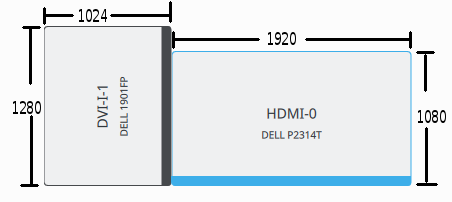
      <p>Currently I have a twin screen setup in Arch Linux, like this:</p>
<p><a href="https://blog.tklee.org/assets/2016-01-30-0831/arrangement_of_screens.png"><img src="https://blog.tklee.org/assets/2016-01-30-0831/arrangement_of_screens.png" alt="" /></a></p>
<p>On the left, DELL 1901FP is turned 90 degree counter-clockwise in its portrait mode. On the right, DELL P2314T, a touch screen, is in its regular landscape orientation, with its bottom line aligning with the bottom of the rotated screen on the left.</p>
<p>Here's my xorg.conf for that. (Although one can also setup screen arrangement in KDE/Plasma/Gnome/etc., for KDM/SDDM/GDM/etc. to recognize it in the login screen, it's important to put this in xorg.conf)</p>
<pre class="language-apacheconf"><code class="language-apacheconf"><span class="token comment"># /etc/X11/xorg.conf</span>
<span class="token comment"># relevant section of screen rotation</span>
Section <span class="token string">"Screen"</span>
Identifier     <span class="token string">"Screen0"</span>
Device         <span class="token string">"Device0"</span>
Monitor        <span class="token string">"Monitor0"</span>
DefaultDepth    24
Option         <span class="token string">"Stereo" "0"</span>
Option         <span class="token string">"nvidiaXineramaInfoOrder" "DFP-2"</span>
Option         <span class="token string">"metamodes" "DVI-I-1: 1280x1024_75 +0+0 {rotation=right}, HDMI-0: nvidia-auto-select +1024+200"</span>
Option         <span class="token string">"SLI" "Off"</span>
Option         <span class="token string">"MultiGPU" "Off"</span>
Option         <span class="token string">"BaseMosaic" "off"</span>
SubSection     <span class="token string">"Display"</span>
Depth       24
EndSubSection
EndSection</code></pre>
<p>X11 sees a <span class="katex"><span class="katex-mathml"><math xmlns="http://www.w3.org/1998/Math/MathML"><semantics><mrow><mo stretchy="false">(</mo><mn>1024</mn><mo>+</mo><mn>1920</mn><mo stretchy="false">)</mo><mtext> wide</mtext><mo>×</mo><mn>1280</mn><mtext> high</mtext></mrow><annotation encoding="application/x-tex">(1024+1920) \text{ wide} \times 1280 \text{ high}</annotation></semantics></math></span><span class="katex-html" aria-hidden="true"><span class="base"><span class="strut" style="height:1em;vertical-align:-0.25em;"></span><span class="mopen">(</span><span class="mord">1</span><span class="mord">0</span><span class="mord">2</span><span class="mord">4</span><span class="mspace" style="margin-right:0.2222222222222222em;"></span><span class="mbin">+</span><span class="mspace" style="margin-right:0.2222222222222222em;"></span></span><span class="base"><span class="strut" style="height:1em;vertical-align:-0.25em;"></span><span class="mord">1</span><span class="mord">9</span><span class="mord">2</span><span class="mord">0</span><span class="mclose">)</span><span class="mord text"><span class="mord"> wide</span></span><span class="mspace" style="margin-right:0.2222222222222222em;"></span><span class="mbin">×</span><span class="mspace" style="margin-right:0.2222222222222222em;"></span></span><span class="base"><span class="strut" style="height:0.8888799999999999em;vertical-align:-0.19444em;"></span><span class="mord">1</span><span class="mord">2</span><span class="mord">8</span><span class="mord">0</span><span class="mord text"><span class="mord"> high</span></span></span></span></span> DISPLAY, with an upper-right corner being invisible.</p>
<p>Since the touchscreen is just a regular pointer device (through its driver), when I put my finger on the left border of the touchscreen on the right, the cursor goes all the way to the very left of the DISPLAY. Touchscreen is only useful if the cursor follows my finger. Therefore, we need to do some Input Coordinate Transformation.</p>
<p><a href="https://wiki.ubuntu.com/X/InputCoordinateTransformation">Coordinate Transformation Matrix</a> is precisely the needed configuration.</p>
<p>From the documentation above, our goal is to map the following coordinates <span class="katex"><span class="katex-mathml"><math xmlns="http://www.w3.org/1998/Math/MathML"><semantics><mrow><mo stretchy="false">(</mo><mi>x</mi><mo separator="true">,</mo><mi>y</mi><mo stretchy="false">)</mo></mrow><annotation encoding="application/x-tex">(x, y)</annotation></semantics></math></span><span class="katex-html" aria-hidden="true"><span class="base"><span class="strut" style="height:1em;vertical-align:-0.25em;"></span><span class="mopen">(</span><span class="mord mathnormal">x</span><span class="mpunct">,</span><span class="mspace" style="margin-right:0.16666666666666666em;"></span><span class="mord mathnormal" style="margin-right:0.03588em;">y</span><span class="mclose">)</span></span></span></span> on the left (X11's default behavior) to the ones on the right:</p>
<p class="katex-block"><span class="katex-display"><span class="katex"><span class="katex-mathml"><math xmlns="http://www.w3.org/1998/Math/MathML" display="block"><semantics><mtable rowspacing="0.15999999999999992em" columnalign="right left center right left" columnspacing="1em"><mtr><mtd><mstyle scriptlevel="0" displaystyle="false"><mrow><mo stretchy="false">(</mo><mn>0</mn><mo separator="true">,</mo></mrow></mstyle></mtd><mtd><mstyle scriptlevel="0" displaystyle="false"><mrow><mn>0</mn><mo stretchy="false">)</mo></mrow></mstyle></mtd><mtd><mstyle scriptlevel="0" displaystyle="false"><mo lspace="0em" rspace="0em">⇒</mo></mstyle></mtd><mtd><mstyle scriptlevel="0" displaystyle="false"><mrow><mo stretchy="false">(</mo><mn>1024</mn><mo separator="true">,</mo></mrow></mstyle></mtd><mtd><mstyle scriptlevel="0" displaystyle="false"><mrow><mn>1280</mn><mo>−</mo><mn>1080</mn><mo stretchy="false">)</mo></mrow></mstyle></mtd></mtr><mtr><mtd><mstyle scriptlevel="0" displaystyle="false"><mrow><mo stretchy="false">(</mo><mn>1024</mn><mo>+</mo><mn>1920</mn><mo>−</mo><mn>1</mn><mo separator="true">,</mo></mrow></mstyle></mtd><mtd><mstyle scriptlevel="0" displaystyle="false"><mrow><mn>1280</mn><mo>−</mo><mn>1</mn><mo stretchy="false">)</mo></mrow></mstyle></mtd><mtd><mstyle scriptlevel="0" displaystyle="false"><mo lspace="0em" rspace="0em">⇒</mo></mstyle></mtd><mtd><mstyle scriptlevel="0" displaystyle="false"><mrow><mo stretchy="false">(</mo><mn>1024</mn><mo>+</mo><mn>1920</mn><mo>−</mo><mn>1</mn><mo separator="true">,</mo></mrow></mstyle></mtd><mtd><mstyle scriptlevel="0" displaystyle="false"><mrow><mn>1280</mn><mo>−</mo><mn>1</mn><mo stretchy="false">)</mo></mrow></mstyle></mtd></mtr><mtr><mtd><mstyle scriptlevel="0" displaystyle="false"><mrow><mo stretchy="false">(</mo><mn>1024</mn><mo>+</mo><mn>1920</mn><mo>−</mo><mn>1</mn><mo separator="true">,</mo></mrow></mstyle></mtd><mtd><mstyle scriptlevel="0" displaystyle="false"><mrow><mn>0</mn><mo stretchy="false">)</mo></mrow></mstyle></mtd><mtd><mstyle scriptlevel="0" displaystyle="false"><mo lspace="0em" rspace="0em">⇒</mo></mstyle></mtd><mtd><mstyle scriptlevel="0" displaystyle="false"><mrow><mo stretchy="false">(</mo><mn>1024</mn><mo>+</mo><mn>1920</mn><mo>−</mo><mn>1</mn><mo separator="true">,</mo></mrow></mstyle></mtd><mtd><mstyle scriptlevel="0" displaystyle="false"><mrow><mn>1280</mn><mo>−</mo><mn>1080</mn><mo stretchy="false">)</mo></mrow></mstyle></mtd></mtr><mtr><mtd><mstyle scriptlevel="0" displaystyle="false"><mrow><mo stretchy="false">(</mo><mn>0</mn><mo separator="true">,</mo></mrow></mstyle></mtd><mtd><mstyle scriptlevel="0" displaystyle="false"><mrow><mn>1280</mn><mo>−</mo><mn>1</mn><mo stretchy="false">)</mo></mrow></mstyle></mtd><mtd><mstyle scriptlevel="0" displaystyle="false"><mo lspace="0em" rspace="0em">⇒</mo></mstyle></mtd><mtd><mstyle scriptlevel="0" displaystyle="false"><mrow><mo stretchy="false">(</mo><mn>1024</mn><mo separator="true">,</mo></mrow></mstyle></mtd><mtd><mstyle scriptlevel="0" displaystyle="false"><mrow><mn>1280</mn><mo>−</mo><mn>1</mn><mo stretchy="false">)</mo></mrow></mstyle></mtd></mtr></mtable><annotation encoding="application/x-tex">\begin{array}{r l c r l}
(0, &amp; 0) &amp; \Rightarrow &amp; (1024, &amp; 1280-1080) \\
(1024+1920-1, &amp; 1280-1) &amp; \Rightarrow &amp; (1024+1920-1, &amp; 1280-1) \\
(1024+1920-1, &amp; 0) &amp; \Rightarrow &amp; (1024+1920-1, &amp; 1280-1080) \\
(0, &amp; 1280-1) &amp; \Rightarrow &amp; (1024, &amp; 1280-1)
\end{array}
</annotation></semantics></math></span><span class="katex-html" aria-hidden="true"><span class="base"><span class="strut" style="height:4.800000000000001em;vertical-align:-2.1500000000000004em;"></span><span class="mord"><span class="mtable"><span class="arraycolsep" style="width:0.5em;"></span><span class="col-align-r"><span class="vlist-t vlist-t2"><span class="vlist-r"><span class="vlist" style="height:2.6500000000000004em;"><span style="top:-4.8100000000000005em;"><span class="pstrut" style="height:3em;"></span><span class="mord"><span class="mopen">(</span><span class="mord">0</span><span class="mpunct">,</span></span></span><span style="top:-3.61em;"><span class="pstrut" style="height:3em;"></span><span class="mord"><span class="mopen">(</span><span class="mord">1</span><span class="mord">0</span><span class="mord">2</span><span class="mord">4</span><span class="mspace" style="margin-right:0.2222222222222222em;"></span><span class="mbin">+</span><span class="mspace" style="margin-right:0.2222222222222222em;"></span><span class="mord">1</span><span class="mord">9</span><span class="mord">2</span><span class="mord">0</span><span class="mspace" style="margin-right:0.2222222222222222em;"></span><span class="mbin">−</span><span class="mspace" style="margin-right:0.2222222222222222em;"></span><span class="mord">1</span><span class="mpunct">,</span></span></span><span style="top:-2.4099999999999997em;"><span class="pstrut" style="height:3em;"></span><span class="mord"><span class="mopen">(</span><span class="mord">1</span><span class="mord">0</span><span class="mord">2</span><span class="mord">4</span><span class="mspace" style="margin-right:0.2222222222222222em;"></span><span class="mbin">+</span><span class="mspace" style="margin-right:0.2222222222222222em;"></span><span class="mord">1</span><span class="mord">9</span><span class="mord">2</span><span class="mord">0</span><span class="mspace" style="margin-right:0.2222222222222222em;"></span><span class="mbin">−</span><span class="mspace" style="margin-right:0.2222222222222222em;"></span><span class="mord">1</span><span class="mpunct">,</span></span></span><span style="top:-1.2099999999999997em;"><span class="pstrut" style="height:3em;"></span><span class="mord"><span class="mopen">(</span><span class="mord">0</span><span class="mpunct">,</span></span></span></span><span class="vlist-s">​</span></span><span class="vlist-r"><span class="vlist" style="height:2.1500000000000004em;"><span></span></span></span></span></span><span class="arraycolsep" style="width:0.5em;"></span><span class="arraycolsep" style="width:0.5em;"></span><span class="col-align-l"><span class="vlist-t vlist-t2"><span class="vlist-r"><span class="vlist" style="height:2.6500000000000004em;"><span style="top:-4.8100000000000005em;"><span class="pstrut" style="height:3em;"></span><span class="mord"><span class="mord">0</span><span class="mclose">)</span></span></span><span style="top:-3.61em;"><span class="pstrut" style="height:3em;"></span><span class="mord"><span class="mord">1</span><span class="mord">2</span><span class="mord">8</span><span class="mord">0</span><span class="mspace" style="margin-right:0.2222222222222222em;"></span><span class="mbin">−</span><span class="mspace" style="margin-right:0.2222222222222222em;"></span><span class="mord">1</span><span class="mclose">)</span></span></span><span style="top:-2.4099999999999997em;"><span class="pstrut" style="height:3em;"></span><span class="mord"><span class="mord">0</span><span class="mclose">)</span></span></span><span style="top:-1.2099999999999997em;"><span class="pstrut" style="height:3em;"></span><span class="mord"><span class="mord">1</span><span class="mord">2</span><span class="mord">8</span><span class="mord">0</span><span class="mspace" style="margin-right:0.2222222222222222em;"></span><span class="mbin">−</span><span class="mspace" style="margin-right:0.2222222222222222em;"></span><span class="mord">1</span><span class="mclose">)</span></span></span></span><span class="vlist-s">​</span></span><span class="vlist-r"><span class="vlist" style="height:2.1500000000000004em;"><span></span></span></span></span></span><span class="arraycolsep" style="width:0.5em;"></span><span class="arraycolsep" style="width:0.5em;"></span><span class="col-align-c"><span class="vlist-t vlist-t2"><span class="vlist-r"><span class="vlist" style="height:2.6500000000000004em;"><span style="top:-4.8100000000000005em;"><span class="pstrut" style="height:3em;"></span><span class="mord"><span class="mrel">⇒</span></span></span><span style="top:-3.61em;"><span class="pstrut" style="height:3em;"></span><span class="mord"><span class="mrel">⇒</span></span></span><span style="top:-2.4099999999999997em;"><span class="pstrut" style="height:3em;"></span><span class="mord"><span class="mrel">⇒</span></span></span><span style="top:-1.2099999999999997em;"><span class="pstrut" style="height:3em;"></span><span class="mord"><span class="mrel">⇒</span></span></span></span><span class="vlist-s">​</span></span><span class="vlist-r"><span class="vlist" style="height:2.1500000000000004em;"><span></span></span></span></span></span><span class="arraycolsep" style="width:0.5em;"></span><span class="arraycolsep" style="width:0.5em;"></span><span class="col-align-r"><span class="vlist-t vlist-t2"><span class="vlist-r"><span class="vlist" style="height:2.6500000000000004em;"><span style="top:-4.8100000000000005em;"><span class="pstrut" style="height:3em;"></span><span class="mord"><span class="mopen">(</span><span class="mord">1</span><span class="mord">0</span><span class="mord">2</span><span class="mord">4</span><span class="mpunct">,</span></span></span><span style="top:-3.61em;"><span class="pstrut" style="height:3em;"></span><span class="mord"><span class="mopen">(</span><span class="mord">1</span><span class="mord">0</span><span class="mord">2</span><span class="mord">4</span><span class="mspace" style="margin-right:0.2222222222222222em;"></span><span class="mbin">+</span><span class="mspace" style="margin-right:0.2222222222222222em;"></span><span class="mord">1</span><span class="mord">9</span><span class="mord">2</span><span class="mord">0</span><span class="mspace" style="margin-right:0.2222222222222222em;"></span><span class="mbin">−</span><span class="mspace" style="margin-right:0.2222222222222222em;"></span><span class="mord">1</span><span class="mpunct">,</span></span></span><span style="top:-2.4099999999999997em;"><span class="pstrut" style="height:3em;"></span><span class="mord"><span class="mopen">(</span><span class="mord">1</span><span class="mord">0</span><span class="mord">2</span><span class="mord">4</span><span class="mspace" style="margin-right:0.2222222222222222em;"></span><span class="mbin">+</span><span class="mspace" style="margin-right:0.2222222222222222em;"></span><span class="mord">1</span><span class="mord">9</span><span class="mord">2</span><span class="mord">0</span><span class="mspace" style="margin-right:0.2222222222222222em;"></span><span class="mbin">−</span><span class="mspace" style="margin-right:0.2222222222222222em;"></span><span class="mord">1</span><span class="mpunct">,</span></span></span><span style="top:-1.2099999999999997em;"><span class="pstrut" style="height:3em;"></span><span class="mord"><span class="mopen">(</span><span class="mord">1</span><span class="mord">0</span><span class="mord">2</span><span class="mord">4</span><span class="mpunct">,</span></span></span></span><span class="vlist-s">​</span></span><span class="vlist-r"><span class="vlist" style="height:2.1500000000000004em;"><span></span></span></span></span></span><span class="arraycolsep" style="width:0.5em;"></span><span class="arraycolsep" style="width:0.5em;"></span><span class="col-align-l"><span class="vlist-t vlist-t2"><span class="vlist-r"><span class="vlist" style="height:2.6500000000000004em;"><span style="top:-4.8100000000000005em;"><span class="pstrut" style="height:3em;"></span><span class="mord"><span class="mord">1</span><span class="mord">2</span><span class="mord">8</span><span class="mord">0</span><span class="mspace" style="margin-right:0.2222222222222222em;"></span><span class="mbin">−</span><span class="mspace" style="margin-right:0.2222222222222222em;"></span><span class="mord">1</span><span class="mord">0</span><span class="mord">8</span><span class="mord">0</span><span class="mclose">)</span></span></span><span style="top:-3.61em;"><span class="pstrut" style="height:3em;"></span><span class="mord"><span class="mord">1</span><span class="mord">2</span><span class="mord">8</span><span class="mord">0</span><span class="mspace" style="margin-right:0.2222222222222222em;"></span><span class="mbin">−</span><span class="mspace" style="margin-right:0.2222222222222222em;"></span><span class="mord">1</span><span class="mclose">)</span></span></span><span style="top:-2.4099999999999997em;"><span class="pstrut" style="height:3em;"></span><span class="mord"><span class="mord">1</span><span class="mord">2</span><span class="mord">8</span><span class="mord">0</span><span class="mspace" style="margin-right:0.2222222222222222em;"></span><span class="mbin">−</span><span class="mspace" style="margin-right:0.2222222222222222em;"></span><span class="mord">1</span><span class="mord">0</span><span class="mord">8</span><span class="mord">0</span><span class="mclose">)</span></span></span><span style="top:-1.2099999999999997em;"><span class="pstrut" style="height:3em;"></span><span class="mord"><span class="mord">1</span><span class="mord">2</span><span class="mord">8</span><span class="mord">0</span><span class="mspace" style="margin-right:0.2222222222222222em;"></span><span class="mbin">−</span><span class="mspace" style="margin-right:0.2222222222222222em;"></span><span class="mord">1</span><span class="mclose">)</span></span></span></span><span class="vlist-s">​</span></span><span class="vlist-r"><span class="vlist" style="height:2.1500000000000004em;"><span></span></span></span></span></span><span class="arraycolsep" style="width:0.5em;"></span></span></span></span></span></span></span></p>
<p>So that means we are solving the following system:</p>
<p class="katex-block"><span class="katex-display"><span class="katex"><span class="katex-mathml"><math xmlns="http://www.w3.org/1998/Math/MathML" display="block"><semantics><mrow><mrow><mo fence="true">[</mo><mtable rowspacing="0.15999999999999992em" columnspacing="1em"><mtr><mtd><mstyle scriptlevel="0" displaystyle="false"><msub><mi>a</mi><mn>1</mn></msub></mstyle></mtd><mtd><mstyle scriptlevel="0" displaystyle="false"><msub><mi>b</mi><mn>1</mn></msub></mstyle></mtd><mtd><mstyle scriptlevel="0" displaystyle="false"><msub><mi>c</mi><mn>1</mn></msub></mstyle></mtd></mtr><mtr><mtd><mstyle scriptlevel="0" displaystyle="false"><msub><mi>a</mi><mn>2</mn></msub></mstyle></mtd><mtd><mstyle scriptlevel="0" displaystyle="false"><msub><mi>b</mi><mn>2</mn></msub></mstyle></mtd><mtd><mstyle scriptlevel="0" displaystyle="false"><msub><mi>c</mi><mn>2</mn></msub></mstyle></mtd></mtr><mtr><mtd><mstyle scriptlevel="0" displaystyle="false"><msub><mi>a</mi><mn>3</mn></msub></mstyle></mtd><mtd><mstyle scriptlevel="0" displaystyle="false"><msub><mi>b</mi><mn>3</mn></msub></mstyle></mtd><mtd><mstyle scriptlevel="0" displaystyle="false"><msub><mi>c</mi><mn>3</mn></msub></mstyle></mtd></mtr></mtable><mo fence="true">]</mo></mrow><mrow><mo fence="true">[</mo><mtable rowspacing="0.15999999999999992em" columnspacing="1em"><mtr><mtd><mstyle scriptlevel="0" displaystyle="false"><mn>0</mn></mstyle></mtd><mtd><mstyle scriptlevel="0" displaystyle="false"><mn>2943</mn></mstyle></mtd><mtd><mstyle scriptlevel="0" displaystyle="false"><mn>2943</mn></mstyle></mtd><mtd><mstyle scriptlevel="0" displaystyle="false"><mn>0</mn></mstyle></mtd></mtr><mtr><mtd><mstyle scriptlevel="0" displaystyle="false"><mn>0</mn></mstyle></mtd><mtd><mstyle scriptlevel="0" displaystyle="false"><mn>1279</mn></mstyle></mtd><mtd><mstyle scriptlevel="0" displaystyle="false"><mn>0</mn></mstyle></mtd><mtd><mstyle scriptlevel="0" displaystyle="false"><mn>1279</mn></mstyle></mtd></mtr><mtr><mtd><mstyle scriptlevel="0" displaystyle="false"><mn>1</mn></mstyle></mtd><mtd><mstyle scriptlevel="0" displaystyle="false"><mn>1</mn></mstyle></mtd><mtd><mstyle scriptlevel="0" displaystyle="false"><mn>1</mn></mstyle></mtd><mtd><mstyle scriptlevel="0" displaystyle="false"><mn>1</mn></mstyle></mtd></mtr></mtable><mo fence="true">]</mo></mrow><mo>=</mo><mrow><mo fence="true">[</mo><mtable rowspacing="0.15999999999999992em" columnspacing="1em"><mtr><mtd><mstyle scriptlevel="0" displaystyle="false"><mn>1024</mn></mstyle></mtd><mtd><mstyle scriptlevel="0" displaystyle="false"><mn>2943</mn></mstyle></mtd><mtd><mstyle scriptlevel="0" displaystyle="false"><mn>2943</mn></mstyle></mtd><mtd><mstyle scriptlevel="0" displaystyle="false"><mn>1024</mn></mstyle></mtd></mtr><mtr><mtd><mstyle scriptlevel="0" displaystyle="false"><mn>200</mn></mstyle></mtd><mtd><mstyle scriptlevel="0" displaystyle="false"><mn>1279</mn></mstyle></mtd><mtd><mstyle scriptlevel="0" displaystyle="false"><mn>200</mn></mstyle></mtd><mtd><mstyle scriptlevel="0" displaystyle="false"><mn>1279</mn></mstyle></mtd></mtr><mtr><mtd><mstyle scriptlevel="0" displaystyle="false"><mn>1</mn></mstyle></mtd><mtd><mstyle scriptlevel="0" displaystyle="false"><mn>1</mn></mstyle></mtd><mtd><mstyle scriptlevel="0" displaystyle="false"><mn>1</mn></mstyle></mtd><mtd><mstyle scriptlevel="0" displaystyle="false"><mn>1</mn></mstyle></mtd></mtr></mtable><mo fence="true">]</mo></mrow></mrow><annotation encoding="application/x-tex">\begin{bmatrix}
a_1 &amp; b_1 &amp; c_1 \\
a_2 &amp; b_2 &amp; c_2 \\
a_3 &amp; b_3 &amp; c_3
\end{bmatrix}
\begin{bmatrix}
0 &amp; 2943 &amp; 2943 &amp; 0 \\
0 &amp; 1279 &amp; 0    &amp; 1279 \\
1 &amp; 1    &amp; 1    &amp; 1
\end{bmatrix}
=
\begin{bmatrix}
1024 &amp; 2943 &amp; 2943 &amp; 1024 \\
200  &amp; 1279 &amp;  200 &amp; 1279 \\
1 &amp; 1    &amp; 1    &amp; 1
\end{bmatrix}
</annotation></semantics></math></span><span class="katex-html" aria-hidden="true"><span class="base"><span class="strut" style="height:3.6010299999999997em;vertical-align:-1.55002em;"></span><span class="minner"><span class="mopen"><span class="delimsizing mult"><span class="vlist-t vlist-t2"><span class="vlist-r"><span class="vlist" style="height:2.0510099999999998em;"><span style="top:-2.2500000000000004em;"><span class="pstrut" style="height:3.1550000000000002em;"></span><span class="delimsizinginner delim-size4"><span>⎣</span></span></span><span style="top:-2.8099900000000004em;"><span class="pstrut" style="height:3.1550000000000002em;"></span><span class="delimsizinginner delim-size4"><span>⎢</span></span></span><span style="top:-4.05101em;"><span class="pstrut" style="height:3.1550000000000002em;"></span><span class="delimsizinginner delim-size4"><span>⎡</span></span></span></span><span class="vlist-s">​</span></span><span class="vlist-r"><span class="vlist" style="height:1.55002em;"><span></span></span></span></span></span></span><span class="mord"><span class="mtable"><span class="col-align-c"><span class="vlist-t vlist-t2"><span class="vlist-r"><span class="vlist" style="height:2.05em;"><span style="top:-4.21em;"><span class="pstrut" style="height:3em;"></span><span class="mord"><span class="mord"><span class="mord mathnormal">a</span><span class="msupsub"><span class="vlist-t vlist-t2"><span class="vlist-r"><span class="vlist" style="height:0.30110799999999993em;"><span style="top:-2.5500000000000003em;margin-left:0em;margin-right:0.05em;"><span class="pstrut" style="height:2.7em;"></span><span class="sizing reset-size6 size3 mtight"><span class="mord mtight">1</span></span></span></span><span class="vlist-s">​</span></span><span class="vlist-r"><span class="vlist" style="height:0.15em;"><span></span></span></span></span></span></span></span></span><span style="top:-3.0099999999999993em;"><span class="pstrut" style="height:3em;"></span><span class="mord"><span class="mord"><span class="mord mathnormal">a</span><span class="msupsub"><span class="vlist-t vlist-t2"><span class="vlist-r"><span class="vlist" style="height:0.30110799999999993em;"><span style="top:-2.5500000000000003em;margin-left:0em;margin-right:0.05em;"><span class="pstrut" style="height:2.7em;"></span><span class="sizing reset-size6 size3 mtight"><span class="mord mtight">2</span></span></span></span><span class="vlist-s">​</span></span><span class="vlist-r"><span class="vlist" style="height:0.15em;"><span></span></span></span></span></span></span></span></span><span style="top:-1.8099999999999994em;"><span class="pstrut" style="height:3em;"></span><span class="mord"><span class="mord"><span class="mord mathnormal">a</span><span class="msupsub"><span class="vlist-t vlist-t2"><span class="vlist-r"><span class="vlist" style="height:0.30110799999999993em;"><span style="top:-2.5500000000000003em;margin-left:0em;margin-right:0.05em;"><span class="pstrut" style="height:2.7em;"></span><span class="sizing reset-size6 size3 mtight"><span class="mord mtight">3</span></span></span></span><span class="vlist-s">​</span></span><span class="vlist-r"><span class="vlist" style="height:0.15em;"><span></span></span></span></span></span></span></span></span></span><span class="vlist-s">​</span></span><span class="vlist-r"><span class="vlist" style="height:1.5500000000000007em;"><span></span></span></span></span></span><span class="arraycolsep" style="width:0.5em;"></span><span class="arraycolsep" style="width:0.5em;"></span><span class="col-align-c"><span class="vlist-t vlist-t2"><span class="vlist-r"><span class="vlist" style="height:2.05em;"><span style="top:-4.21em;"><span class="pstrut" style="height:3em;"></span><span class="mord"><span class="mord"><span class="mord mathnormal">b</span><span class="msupsub"><span class="vlist-t vlist-t2"><span class="vlist-r"><span class="vlist" style="height:0.30110799999999993em;"><span style="top:-2.5500000000000003em;margin-left:0em;margin-right:0.05em;"><span class="pstrut" style="height:2.7em;"></span><span class="sizing reset-size6 size3 mtight"><span class="mord mtight">1</span></span></span></span><span class="vlist-s">​</span></span><span class="vlist-r"><span class="vlist" style="height:0.15em;"><span></span></span></span></span></span></span></span></span><span style="top:-3.0099999999999993em;"><span class="pstrut" style="height:3em;"></span><span class="mord"><span class="mord"><span class="mord mathnormal">b</span><span class="msupsub"><span class="vlist-t vlist-t2"><span class="vlist-r"><span class="vlist" style="height:0.30110799999999993em;"><span style="top:-2.5500000000000003em;margin-left:0em;margin-right:0.05em;"><span class="pstrut" style="height:2.7em;"></span><span class="sizing reset-size6 size3 mtight"><span class="mord mtight">2</span></span></span></span><span class="vlist-s">​</span></span><span class="vlist-r"><span class="vlist" style="height:0.15em;"><span></span></span></span></span></span></span></span></span><span style="top:-1.8099999999999994em;"><span class="pstrut" style="height:3em;"></span><span class="mord"><span class="mord"><span class="mord mathnormal">b</span><span class="msupsub"><span class="vlist-t vlist-t2"><span class="vlist-r"><span class="vlist" style="height:0.30110799999999993em;"><span style="top:-2.5500000000000003em;margin-left:0em;margin-right:0.05em;"><span class="pstrut" style="height:2.7em;"></span><span class="sizing reset-size6 size3 mtight"><span class="mord mtight">3</span></span></span></span><span class="vlist-s">​</span></span><span class="vlist-r"><span class="vlist" style="height:0.15em;"><span></span></span></span></span></span></span></span></span></span><span class="vlist-s">​</span></span><span class="vlist-r"><span class="vlist" style="height:1.5500000000000007em;"><span></span></span></span></span></span><span class="arraycolsep" style="width:0.5em;"></span><span class="arraycolsep" style="width:0.5em;"></span><span class="col-align-c"><span class="vlist-t vlist-t2"><span class="vlist-r"><span class="vlist" style="height:2.05em;"><span style="top:-4.21em;"><span class="pstrut" style="height:3em;"></span><span class="mord"><span class="mord"><span class="mord mathnormal">c</span><span class="msupsub"><span class="vlist-t vlist-t2"><span class="vlist-r"><span class="vlist" style="height:0.30110799999999993em;"><span style="top:-2.5500000000000003em;margin-left:0em;margin-right:0.05em;"><span class="pstrut" style="height:2.7em;"></span><span class="sizing reset-size6 size3 mtight"><span class="mord mtight">1</span></span></span></span><span class="vlist-s">​</span></span><span class="vlist-r"><span class="vlist" style="height:0.15em;"><span></span></span></span></span></span></span></span></span><span style="top:-3.0099999999999993em;"><span class="pstrut" style="height:3em;"></span><span class="mord"><span class="mord"><span class="mord mathnormal">c</span><span class="msupsub"><span class="vlist-t vlist-t2"><span class="vlist-r"><span class="vlist" style="height:0.30110799999999993em;"><span style="top:-2.5500000000000003em;margin-left:0em;margin-right:0.05em;"><span class="pstrut" style="height:2.7em;"></span><span class="sizing reset-size6 size3 mtight"><span class="mord mtight">2</span></span></span></span><span class="vlist-s">​</span></span><span class="vlist-r"><span class="vlist" style="height:0.15em;"><span></span></span></span></span></span></span></span></span><span style="top:-1.8099999999999994em;"><span class="pstrut" style="height:3em;"></span><span class="mord"><span class="mord"><span class="mord mathnormal">c</span><span class="msupsub"><span class="vlist-t vlist-t2"><span class="vlist-r"><span class="vlist" style="height:0.30110799999999993em;"><span style="top:-2.5500000000000003em;margin-left:0em;margin-right:0.05em;"><span class="pstrut" style="height:2.7em;"></span><span class="sizing reset-size6 size3 mtight"><span class="mord mtight">3</span></span></span></span><span class="vlist-s">​</span></span><span class="vlist-r"><span class="vlist" style="height:0.15em;"><span></span></span></span></span></span></span></span></span></span><span class="vlist-s">​</span></span><span class="vlist-r"><span class="vlist" style="height:1.5500000000000007em;"><span></span></span></span></span></span></span></span><span class="mclose"><span class="delimsizing mult"><span class="vlist-t vlist-t2"><span class="vlist-r"><span class="vlist" style="height:2.0510099999999998em;"><span style="top:-2.2500000000000004em;"><span class="pstrut" style="height:3.1550000000000002em;"></span><span class="delimsizinginner delim-size4"><span>⎦</span></span></span><span style="top:-2.8099900000000004em;"><span class="pstrut" style="height:3.1550000000000002em;"></span><span class="delimsizinginner delim-size4"><span>⎥</span></span></span><span style="top:-4.05101em;"><span class="pstrut" style="height:3.1550000000000002em;"></span><span class="delimsizinginner delim-size4"><span>⎤</span></span></span></span><span class="vlist-s">​</span></span><span class="vlist-r"><span class="vlist" style="height:1.55002em;"><span></span></span></span></span></span></span></span><span class="mspace" style="margin-right:0.16666666666666666em;"></span><span class="minner"><span class="mopen"><span class="delimsizing mult"><span class="vlist-t vlist-t2"><span class="vlist-r"><span class="vlist" style="height:2.0510099999999998em;"><span style="top:-2.2500000000000004em;"><span class="pstrut" style="height:3.1550000000000002em;"></span><span class="delimsizinginner delim-size4"><span>⎣</span></span></span><span style="top:-2.8099900000000004em;"><span class="pstrut" style="height:3.1550000000000002em;"></span><span class="delimsizinginner delim-size4"><span>⎢</span></span></span><span style="top:-4.05101em;"><span class="pstrut" style="height:3.1550000000000002em;"></span><span class="delimsizinginner delim-size4"><span>⎡</span></span></span></span><span class="vlist-s">​</span></span><span class="vlist-r"><span class="vlist" style="height:1.55002em;"><span></span></span></span></span></span></span><span class="mord"><span class="mtable"><span class="col-align-c"><span class="vlist-t vlist-t2"><span class="vlist-r"><span class="vlist" style="height:2.05em;"><span style="top:-4.21em;"><span class="pstrut" style="height:3em;"></span><span class="mord"><span class="mord">0</span></span></span><span style="top:-3.0099999999999993em;"><span class="pstrut" style="height:3em;"></span><span class="mord"><span class="mord">0</span></span></span><span style="top:-1.8099999999999994em;"><span class="pstrut" style="height:3em;"></span><span class="mord"><span class="mord">1</span></span></span></span><span class="vlist-s">​</span></span><span class="vlist-r"><span class="vlist" style="height:1.5500000000000007em;"><span></span></span></span></span></span><span class="arraycolsep" style="width:0.5em;"></span><span class="arraycolsep" style="width:0.5em;"></span><span class="col-align-c"><span class="vlist-t vlist-t2"><span class="vlist-r"><span class="vlist" style="height:2.05em;"><span style="top:-4.21em;"><span class="pstrut" style="height:3em;"></span><span class="mord"><span class="mord">2</span><span class="mord">9</span><span class="mord">4</span><span class="mord">3</span></span></span><span style="top:-3.0099999999999993em;"><span class="pstrut" style="height:3em;"></span><span class="mord"><span class="mord">1</span><span class="mord">2</span><span class="mord">7</span><span class="mord">9</span></span></span><span style="top:-1.8099999999999994em;"><span class="pstrut" style="height:3em;"></span><span class="mord"><span class="mord">1</span></span></span></span><span class="vlist-s">​</span></span><span class="vlist-r"><span class="vlist" style="height:1.5500000000000007em;"><span></span></span></span></span></span><span class="arraycolsep" style="width:0.5em;"></span><span class="arraycolsep" style="width:0.5em;"></span><span class="col-align-c"><span class="vlist-t vlist-t2"><span class="vlist-r"><span class="vlist" style="height:2.05em;"><span style="top:-4.21em;"><span class="pstrut" style="height:3em;"></span><span class="mord"><span class="mord">2</span><span class="mord">9</span><span class="mord">4</span><span class="mord">3</span></span></span><span style="top:-3.0099999999999993em;"><span class="pstrut" style="height:3em;"></span><span class="mord"><span class="mord">0</span></span></span><span style="top:-1.8099999999999994em;"><span class="pstrut" style="height:3em;"></span><span class="mord"><span class="mord">1</span></span></span></span><span class="vlist-s">​</span></span><span class="vlist-r"><span class="vlist" style="height:1.5500000000000007em;"><span></span></span></span></span></span><span class="arraycolsep" style="width:0.5em;"></span><span class="arraycolsep" style="width:0.5em;"></span><span class="col-align-c"><span class="vlist-t vlist-t2"><span class="vlist-r"><span class="vlist" style="height:2.05em;"><span style="top:-4.21em;"><span class="pstrut" style="height:3em;"></span><span class="mord"><span class="mord">0</span></span></span><span style="top:-3.0099999999999993em;"><span class="pstrut" style="height:3em;"></span><span class="mord"><span class="mord">1</span><span class="mord">2</span><span class="mord">7</span><span class="mord">9</span></span></span><span style="top:-1.8099999999999994em;"><span class="pstrut" style="height:3em;"></span><span class="mord"><span class="mord">1</span></span></span></span><span class="vlist-s">​</span></span><span class="vlist-r"><span class="vlist" style="height:1.5500000000000007em;"><span></span></span></span></span></span></span></span><span class="mclose"><span class="delimsizing mult"><span class="vlist-t vlist-t2"><span class="vlist-r"><span class="vlist" style="height:2.0510099999999998em;"><span style="top:-2.2500000000000004em;"><span class="pstrut" style="height:3.1550000000000002em;"></span><span class="delimsizinginner delim-size4"><span>⎦</span></span></span><span style="top:-2.8099900000000004em;"><span class="pstrut" style="height:3.1550000000000002em;"></span><span class="delimsizinginner delim-size4"><span>⎥</span></span></span><span style="top:-4.05101em;"><span class="pstrut" style="height:3.1550000000000002em;"></span><span class="delimsizinginner delim-size4"><span>⎤</span></span></span></span><span class="vlist-s">​</span></span><span class="vlist-r"><span class="vlist" style="height:1.55002em;"><span></span></span></span></span></span></span></span><span class="mspace" style="margin-right:0.2777777777777778em;"></span><span class="mrel">=</span><span class="mspace" style="margin-right:0.2777777777777778em;"></span></span><span class="base"><span class="strut" style="height:3.6010299999999997em;vertical-align:-1.55002em;"></span><span class="minner"><span class="mopen"><span class="delimsizing mult"><span class="vlist-t vlist-t2"><span class="vlist-r"><span class="vlist" style="height:2.0510099999999998em;"><span style="top:-2.2500000000000004em;"><span class="pstrut" style="height:3.1550000000000002em;"></span><span class="delimsizinginner delim-size4"><span>⎣</span></span></span><span style="top:-2.8099900000000004em;"><span class="pstrut" style="height:3.1550000000000002em;"></span><span class="delimsizinginner delim-size4"><span>⎢</span></span></span><span style="top:-4.05101em;"><span class="pstrut" style="height:3.1550000000000002em;"></span><span class="delimsizinginner delim-size4"><span>⎡</span></span></span></span><span class="vlist-s">​</span></span><span class="vlist-r"><span class="vlist" style="height:1.55002em;"><span></span></span></span></span></span></span><span class="mord"><span class="mtable"><span class="col-align-c"><span class="vlist-t vlist-t2"><span class="vlist-r"><span class="vlist" style="height:2.05em;"><span style="top:-4.21em;"><span class="pstrut" style="height:3em;"></span><span class="mord"><span class="mord">1</span><span class="mord">0</span><span class="mord">2</span><span class="mord">4</span></span></span><span style="top:-3.0099999999999993em;"><span class="pstrut" style="height:3em;"></span><span class="mord"><span class="mord">2</span><span class="mord">0</span><span class="mord">0</span></span></span><span style="top:-1.8099999999999994em;"><span class="pstrut" style="height:3em;"></span><span class="mord"><span class="mord">1</span></span></span></span><span class="vlist-s">​</span></span><span class="vlist-r"><span class="vlist" style="height:1.5500000000000007em;"><span></span></span></span></span></span><span class="arraycolsep" style="width:0.5em;"></span><span class="arraycolsep" style="width:0.5em;"></span><span class="col-align-c"><span class="vlist-t vlist-t2"><span class="vlist-r"><span class="vlist" style="height:2.05em;"><span style="top:-4.21em;"><span class="pstrut" style="height:3em;"></span><span class="mord"><span class="mord">2</span><span class="mord">9</span><span class="mord">4</span><span class="mord">3</span></span></span><span style="top:-3.0099999999999993em;"><span class="pstrut" style="height:3em;"></span><span class="mord"><span class="mord">1</span><span class="mord">2</span><span class="mord">7</span><span class="mord">9</span></span></span><span style="top:-1.8099999999999994em;"><span class="pstrut" style="height:3em;"></span><span class="mord"><span class="mord">1</span></span></span></span><span class="vlist-s">​</span></span><span class="vlist-r"><span class="vlist" style="height:1.5500000000000007em;"><span></span></span></span></span></span><span class="arraycolsep" style="width:0.5em;"></span><span class="arraycolsep" style="width:0.5em;"></span><span class="col-align-c"><span class="vlist-t vlist-t2"><span class="vlist-r"><span class="vlist" style="height:2.05em;"><span style="top:-4.21em;"><span class="pstrut" style="height:3em;"></span><span class="mord"><span class="mord">2</span><span class="mord">9</span><span class="mord">4</span><span class="mord">3</span></span></span><span style="top:-3.0099999999999993em;"><span class="pstrut" style="height:3em;"></span><span class="mord"><span class="mord">2</span><span class="mord">0</span><span class="mord">0</span></span></span><span style="top:-1.8099999999999994em;"><span class="pstrut" style="height:3em;"></span><span class="mord"><span class="mord">1</span></span></span></span><span class="vlist-s">​</span></span><span class="vlist-r"><span class="vlist" style="height:1.5500000000000007em;"><span></span></span></span></span></span><span class="arraycolsep" style="width:0.5em;"></span><span class="arraycolsep" style="width:0.5em;"></span><span class="col-align-c"><span class="vlist-t vlist-t2"><span class="vlist-r"><span class="vlist" style="height:2.05em;"><span style="top:-4.21em;"><span class="pstrut" style="height:3em;"></span><span class="mord"><span class="mord">1</span><span class="mord">0</span><span class="mord">2</span><span class="mord">4</span></span></span><span style="top:-3.0099999999999993em;"><span class="pstrut" style="height:3em;"></span><span class="mord"><span class="mord">1</span><span class="mord">2</span><span class="mord">7</span><span class="mord">9</span></span></span><span style="top:-1.8099999999999994em;"><span class="pstrut" style="height:3em;"></span><span class="mord"><span class="mord">1</span></span></span></span><span class="vlist-s">​</span></span><span class="vlist-r"><span class="vlist" style="height:1.5500000000000007em;"><span></span></span></span></span></span></span></span><span class="mclose"><span class="delimsizing mult"><span class="vlist-t vlist-t2"><span class="vlist-r"><span class="vlist" style="height:2.0510099999999998em;"><span style="top:-2.2500000000000004em;"><span class="pstrut" style="height:3.1550000000000002em;"></span><span class="delimsizinginner delim-size4"><span>⎦</span></span></span><span style="top:-2.8099900000000004em;"><span class="pstrut" style="height:3.1550000000000002em;"></span><span class="delimsizinginner delim-size4"><span>⎥</span></span></span><span style="top:-4.05101em;"><span class="pstrut" style="height:3.1550000000000002em;"></span><span class="delimsizinginner delim-size4"><span>⎤</span></span></span></span><span class="vlist-s">​</span></span><span class="vlist-r"><span class="vlist" style="height:1.55002em;"><span></span></span></span></span></span></span></span></span></span></span></span></p>
<p>Here's the solution and the approximate float values:</p>
<p class="katex-block"><span class="katex-display"><span class="katex"><span class="katex-mathml"><math xmlns="http://www.w3.org/1998/Math/MathML" display="block"><semantics><mtable rowspacing="0.24999999999999992em" columnalign="right left" columnspacing="0em"><mtr><mtd><mstyle scriptlevel="0" displaystyle="true"><mrow><mo fence="true">[</mo><mtable rowspacing="0.15999999999999992em" columnspacing="1em"><mtr><mtd><mstyle scriptlevel="0" displaystyle="false"><msub><mi>a</mi><mn>1</mn></msub></mstyle></mtd><mtd><mstyle scriptlevel="0" displaystyle="false"><msub><mi>b</mi><mn>1</mn></msub></mstyle></mtd><mtd><mstyle scriptlevel="0" displaystyle="false"><msub><mi>c</mi><mn>1</mn></msub></mstyle></mtd></mtr><mtr><mtd><mstyle scriptlevel="0" displaystyle="false"><msub><mi>a</mi><mn>2</mn></msub></mstyle></mtd><mtd><mstyle scriptlevel="0" displaystyle="false"><msub><mi>b</mi><mn>2</mn></msub></mstyle></mtd><mtd><mstyle scriptlevel="0" displaystyle="false"><msub><mi>c</mi><mn>2</mn></msub></mstyle></mtd></mtr><mtr><mtd><mstyle scriptlevel="0" displaystyle="false"><msub><mi>a</mi><mn>3</mn></msub></mstyle></mtd><mtd><mstyle scriptlevel="0" displaystyle="false"><msub><mi>b</mi><mn>3</mn></msub></mstyle></mtd><mtd><mstyle scriptlevel="0" displaystyle="false"><msub><mi>c</mi><mn>3</mn></msub></mstyle></mtd></mtr></mtable><mo fence="true">]</mo></mrow></mstyle></mtd><mtd><mstyle scriptlevel="0" displaystyle="true"><mrow><mrow></mrow><mo>=</mo><mrow><mo fence="true">[</mo><mtable rowspacing="0.15999999999999992em" columnspacing="1em"><mtr><mtd><mstyle scriptlevel="0" displaystyle="false"><mfrac><mn>1919</mn><mn>2943</mn></mfrac></mstyle></mtd><mtd><mstyle scriptlevel="0" displaystyle="false"><mn>0</mn></mstyle></mtd><mtd><mstyle scriptlevel="0" displaystyle="false"><mn>1024</mn></mstyle></mtd></mtr><mtr><mtd><mstyle scriptlevel="0" displaystyle="false"><mn>0</mn></mstyle></mtd><mtd><mstyle scriptlevel="0" displaystyle="false"><mfrac><mn>1079</mn><mn>1279</mn></mfrac></mstyle></mtd><mtd><mstyle scriptlevel="0" displaystyle="false"><mn>200</mn></mstyle></mtd></mtr><mtr><mtd><mstyle scriptlevel="0" displaystyle="false"><mn>0</mn></mstyle></mtd><mtd><mstyle scriptlevel="0" displaystyle="false"><mn>0</mn></mstyle></mtd><mtd><mstyle scriptlevel="0" displaystyle="false"><mn>1</mn></mstyle></mtd></mtr></mtable><mo fence="true">]</mo></mrow></mrow></mstyle></mtd></mtr><mtr><mtd><mstyle scriptlevel="0" displaystyle="true"><mrow></mrow></mstyle></mtd><mtd><mstyle scriptlevel="0" displaystyle="true"><mrow><mrow></mrow><mo>≈</mo><mrow><mo fence="true">[</mo><mtable rowspacing="0.15999999999999992em" columnspacing="1em"><mtr><mtd><mstyle scriptlevel="0" displaystyle="false"><mn>0.652055725450221</mn></mstyle></mtd><mtd><mstyle scriptlevel="0" displaystyle="false"><mn>0</mn></mstyle></mtd><mtd><mstyle scriptlevel="0" displaystyle="false"><mn>1024</mn></mstyle></mtd></mtr><mtr><mtd><mstyle scriptlevel="0" displaystyle="false"><mn>0</mn></mstyle></mtd><mtd><mstyle scriptlevel="0" displaystyle="false"><mn>0.843627834245504</mn></mstyle></mtd><mtd><mstyle scriptlevel="0" displaystyle="false"><mn>200</mn></mstyle></mtd></mtr><mtr><mtd><mstyle scriptlevel="0" displaystyle="false"><mn>0</mn></mstyle></mtd><mtd><mstyle scriptlevel="0" displaystyle="false"><mn>0</mn></mstyle></mtd><mtd><mstyle scriptlevel="0" displaystyle="false"><mn>1</mn></mstyle></mtd></mtr></mtable><mo fence="true">]</mo></mrow></mrow></mstyle></mtd></mtr></mtable><annotation encoding="application/x-tex">\begin{aligned}
\begin{bmatrix}
a_1 &amp; b_1 &amp; c_1 \\
a_2 &amp; b_2 &amp; c_2 \\
a_3 &amp; b_3 &amp; c_3
\end{bmatrix}
&amp;=
\begin{bmatrix}
\frac{1919}{2943} &amp; 0                 &amp; 1024 \\
0                 &amp; \frac{1079}{1279} &amp; 200 \\
0                 &amp; 0                 &amp; 1
\end{bmatrix}
\\
&amp;\approx
\begin{bmatrix}
0.652055725450221 &amp; 0                 &amp; 1024 \\
0                 &amp; 0.843627834245504 &amp; 200  \\
0                 &amp; 0                 &amp; 1
\end{bmatrix}
\end{aligned}
</annotation></semantics></math></span><span class="katex-html" aria-hidden="true"><span class="base"><span class="strut" style="height:7.811246em;vertical-align:-3.6556229999999994em;"></span><span class="mord"><span class="mtable"><span class="col-align-r"><span class="vlist-t vlist-t2"><span class="vlist-r"><span class="vlist" style="height:4.155623em;"><span style="top:-6.155623em;"><span class="pstrut" style="height:4.055108em;"></span><span class="mord"><span class="minner"><span class="mopen"><span class="delimsizing mult"><span class="vlist-t vlist-t2"><span class="vlist-r"><span class="vlist" style="height:2.0510099999999998em;"><span style="top:-2.2500000000000004em;"><span class="pstrut" style="height:3.1550000000000002em;"></span><span class="delimsizinginner delim-size4"><span>⎣</span></span></span><span style="top:-2.8099900000000004em;"><span class="pstrut" style="height:3.1550000000000002em;"></span><span class="delimsizinginner delim-size4"><span>⎢</span></span></span><span style="top:-4.05101em;"><span class="pstrut" style="height:3.1550000000000002em;"></span><span class="delimsizinginner delim-size4"><span>⎡</span></span></span></span><span class="vlist-s">​</span></span><span class="vlist-r"><span class="vlist" style="height:1.55002em;"><span></span></span></span></span></span></span><span class="mord"><span class="mtable"><span class="col-align-c"><span class="vlist-t vlist-t2"><span class="vlist-r"><span class="vlist" style="height:2.05em;"><span style="top:-4.21em;"><span class="pstrut" style="height:3em;"></span><span class="mord"><span class="mord"><span class="mord mathnormal">a</span><span class="msupsub"><span class="vlist-t vlist-t2"><span class="vlist-r"><span class="vlist" style="height:0.30110799999999993em;"><span style="top:-2.5500000000000003em;margin-left:0em;margin-right:0.05em;"><span class="pstrut" style="height:2.7em;"></span><span class="sizing reset-size6 size3 mtight"><span class="mord mtight">1</span></span></span></span><span class="vlist-s">​</span></span><span class="vlist-r"><span class="vlist" style="height:0.15em;"><span></span></span></span></span></span></span></span></span><span style="top:-3.0099999999999993em;"><span class="pstrut" style="height:3em;"></span><span class="mord"><span class="mord"><span class="mord mathnormal">a</span><span class="msupsub"><span class="vlist-t vlist-t2"><span class="vlist-r"><span class="vlist" style="height:0.30110799999999993em;"><span style="top:-2.5500000000000003em;margin-left:0em;margin-right:0.05em;"><span class="pstrut" style="height:2.7em;"></span><span class="sizing reset-size6 size3 mtight"><span class="mord mtight">2</span></span></span></span><span class="vlist-s">​</span></span><span class="vlist-r"><span class="vlist" style="height:0.15em;"><span></span></span></span></span></span></span></span></span><span style="top:-1.8099999999999994em;"><span class="pstrut" style="height:3em;"></span><span class="mord"><span class="mord"><span class="mord mathnormal">a</span><span class="msupsub"><span class="vlist-t vlist-t2"><span class="vlist-r"><span class="vlist" style="height:0.30110799999999993em;"><span style="top:-2.5500000000000003em;margin-left:0em;margin-right:0.05em;"><span class="pstrut" style="height:2.7em;"></span><span class="sizing reset-size6 size3 mtight"><span class="mord mtight">3</span></span></span></span><span class="vlist-s">​</span></span><span class="vlist-r"><span class="vlist" style="height:0.15em;"><span></span></span></span></span></span></span></span></span></span><span class="vlist-s">​</span></span><span class="vlist-r"><span class="vlist" style="height:1.5500000000000007em;"><span></span></span></span></span></span><span class="arraycolsep" style="width:0.5em;"></span><span class="arraycolsep" style="width:0.5em;"></span><span class="col-align-c"><span class="vlist-t vlist-t2"><span class="vlist-r"><span class="vlist" style="height:2.05em;"><span style="top:-4.21em;"><span class="pstrut" style="height:3em;"></span><span class="mord"><span class="mord"><span class="mord mathnormal">b</span><span class="msupsub"><span class="vlist-t vlist-t2"><span class="vlist-r"><span class="vlist" style="height:0.30110799999999993em;"><span style="top:-2.5500000000000003em;margin-left:0em;margin-right:0.05em;"><span class="pstrut" style="height:2.7em;"></span><span class="sizing reset-size6 size3 mtight"><span class="mord mtight">1</span></span></span></span><span class="vlist-s">​</span></span><span class="vlist-r"><span class="vlist" style="height:0.15em;"><span></span></span></span></span></span></span></span></span><span style="top:-3.0099999999999993em;"><span class="pstrut" style="height:3em;"></span><span class="mord"><span class="mord"><span class="mord mathnormal">b</span><span class="msupsub"><span class="vlist-t vlist-t2"><span class="vlist-r"><span class="vlist" style="height:0.30110799999999993em;"><span style="top:-2.5500000000000003em;margin-left:0em;margin-right:0.05em;"><span class="pstrut" style="height:2.7em;"></span><span class="sizing reset-size6 size3 mtight"><span class="mord mtight">2</span></span></span></span><span class="vlist-s">​</span></span><span class="vlist-r"><span class="vlist" style="height:0.15em;"><span></span></span></span></span></span></span></span></span><span style="top:-1.8099999999999994em;"><span class="pstrut" style="height:3em;"></span><span class="mord"><span class="mord"><span class="mord mathnormal">b</span><span class="msupsub"><span class="vlist-t vlist-t2"><span class="vlist-r"><span class="vlist" style="height:0.30110799999999993em;"><span style="top:-2.5500000000000003em;margin-left:0em;margin-right:0.05em;"><span class="pstrut" style="height:2.7em;"></span><span class="sizing reset-size6 size3 mtight"><span class="mord mtight">3</span></span></span></span><span class="vlist-s">​</span></span><span class="vlist-r"><span class="vlist" style="height:0.15em;"><span></span></span></span></span></span></span></span></span></span><span class="vlist-s">​</span></span><span class="vlist-r"><span class="vlist" style="height:1.5500000000000007em;"><span></span></span></span></span></span><span class="arraycolsep" style="width:0.5em;"></span><span class="arraycolsep" style="width:0.5em;"></span><span class="col-align-c"><span class="vlist-t vlist-t2"><span class="vlist-r"><span class="vlist" style="height:2.05em;"><span style="top:-4.21em;"><span class="pstrut" style="height:3em;"></span><span class="mord"><span class="mord"><span class="mord mathnormal">c</span><span class="msupsub"><span class="vlist-t vlist-t2"><span class="vlist-r"><span class="vlist" style="height:0.30110799999999993em;"><span style="top:-2.5500000000000003em;margin-left:0em;margin-right:0.05em;"><span class="pstrut" style="height:2.7em;"></span><span class="sizing reset-size6 size3 mtight"><span class="mord mtight">1</span></span></span></span><span class="vlist-s">​</span></span><span class="vlist-r"><span class="vlist" style="height:0.15em;"><span></span></span></span></span></span></span></span></span><span style="top:-3.0099999999999993em;"><span class="pstrut" style="height:3em;"></span><span class="mord"><span class="mord"><span class="mord mathnormal">c</span><span class="msupsub"><span class="vlist-t vlist-t2"><span class="vlist-r"><span class="vlist" style="height:0.30110799999999993em;"><span style="top:-2.5500000000000003em;margin-left:0em;margin-right:0.05em;"><span class="pstrut" style="height:2.7em;"></span><span class="sizing reset-size6 size3 mtight"><span class="mord mtight">2</span></span></span></span><span class="vlist-s">​</span></span><span class="vlist-r"><span class="vlist" style="height:0.15em;"><span></span></span></span></span></span></span></span></span><span style="top:-1.8099999999999994em;"><span class="pstrut" style="height:3em;"></span><span class="mord"><span class="mord"><span class="mord mathnormal">c</span><span class="msupsub"><span class="vlist-t vlist-t2"><span class="vlist-r"><span class="vlist" style="height:0.30110799999999993em;"><span style="top:-2.5500000000000003em;margin-left:0em;margin-right:0.05em;"><span class="pstrut" style="height:2.7em;"></span><span class="sizing reset-size6 size3 mtight"><span class="mord mtight">3</span></span></span></span><span class="vlist-s">​</span></span><span class="vlist-r"><span class="vlist" style="height:0.15em;"><span></span></span></span></span></span></span></span></span></span><span class="vlist-s">​</span></span><span class="vlist-r"><span class="vlist" style="height:1.5500000000000007em;"><span></span></span></span></span></span></span></span><span class="mclose"><span class="delimsizing mult"><span class="vlist-t vlist-t2"><span class="vlist-r"><span class="vlist" style="height:2.0510099999999998em;"><span style="top:-2.2500000000000004em;"><span class="pstrut" style="height:3.1550000000000002em;"></span><span class="delimsizinginner delim-size4"><span>⎦</span></span></span><span style="top:-2.8099900000000004em;"><span class="pstrut" style="height:3.1550000000000002em;"></span><span class="delimsizinginner delim-size4"><span>⎥</span></span></span><span style="top:-4.05101em;"><span class="pstrut" style="height:3.1550000000000002em;"></span><span class="delimsizinginner delim-size4"><span>⎤</span></span></span></span><span class="vlist-s">​</span></span><span class="vlist-r"><span class="vlist" style="height:1.55002em;"><span></span></span></span></span></span></span></span></span></span><span style="top:-2.249505em;"><span class="pstrut" style="height:4.055108em;"></span><span class="mord"></span></span></span><span class="vlist-s">​</span></span><span class="vlist-r"><span class="vlist" style="height:3.6556229999999994em;"><span></span></span></span></span></span><span class="col-align-l"><span class="vlist-t vlist-t2"><span class="vlist-r"><span class="vlist" style="height:4.155623em;"><span style="top:-6.155623em;"><span class="pstrut" style="height:4.055108em;"></span><span class="mord"><span class="mord"></span><span class="mspace" style="margin-right:0.2777777777777778em;"></span><span class="mrel">=</span><span class="mspace" style="margin-right:0.2777777777777778em;"></span><span class="minner"><span class="mopen"><span class="delimsizing mult"><span class="vlist-t vlist-t2"><span class="vlist-r"><span class="vlist" style="height:2.0510099999999998em;"><span style="top:-2.2500000000000004em;"><span class="pstrut" style="height:3.1550000000000002em;"></span><span class="delimsizinginner delim-size4"><span>⎣</span></span></span><span style="top:-2.8099900000000004em;"><span class="pstrut" style="height:3.1550000000000002em;"></span><span class="delimsizinginner delim-size4"><span>⎢</span></span></span><span style="top:-4.05101em;"><span class="pstrut" style="height:3.1550000000000002em;"></span><span class="delimsizinginner delim-size4"><span>⎡</span></span></span></span><span class="vlist-s">​</span></span><span class="vlist-r"><span class="vlist" style="height:1.55002em;"><span></span></span></span></span></span></span><span class="mord"><span class="mtable"><span class="col-align-c"><span class="vlist-t vlist-t2"><span class="vlist-r"><span class="vlist" style="height:2.0551079999999997em;"><span style="top:-4.21em;"><span class="pstrut" style="height:3em;"></span><span class="mord"><span class="mord"><span class="mopen nulldelimiter"></span><span class="mfrac"><span class="vlist-t vlist-t2"><span class="vlist-r"><span class="vlist" style="height:0.845108em;"><span style="top:-2.6550000000000002em;"><span class="pstrut" style="height:3em;"></span><span class="sizing reset-size6 size3 mtight"><span class="mord mtight"><span class="mord mtight">2</span><span class="mord mtight">9</span><span class="mord mtight">4</span><span class="mord mtight">3</span></span></span></span><span style="top:-3.23em;"><span class="pstrut" style="height:3em;"></span><span class="frac-line" style="border-bottom-width:0.04em;"></span></span><span style="top:-3.394em;"><span class="pstrut" style="height:3em;"></span><span class="sizing reset-size6 size3 mtight"><span class="mord mtight"><span class="mord mtight">1</span><span class="mord mtight">9</span><span class="mord mtight">1</span><span class="mord mtight">9</span></span></span></span></span><span class="vlist-s">​</span></span><span class="vlist-r"><span class="vlist" style="height:0.345em;"><span></span></span></span></span></span><span class="mclose nulldelimiter"></span></span></span></span><span style="top:-3.0048919999999995em;"><span class="pstrut" style="height:3em;"></span><span class="mord"><span class="mord">0</span></span></span><span style="top:-1.8048919999999995em;"><span class="pstrut" style="height:3em;"></span><span class="mord"><span class="mord">0</span></span></span></span><span class="vlist-s">​</span></span><span class="vlist-r"><span class="vlist" style="height:1.5551080000000006em;"><span></span></span></span></span></span><span class="arraycolsep" style="width:0.5em;"></span><span class="arraycolsep" style="width:0.5em;"></span><span class="col-align-c"><span class="vlist-t vlist-t2"><span class="vlist-r"><span class="vlist" style="height:2.0551079999999997em;"><span style="top:-4.21em;"><span class="pstrut" style="height:3em;"></span><span class="mord"><span class="mord">0</span></span></span><span style="top:-3.0048919999999995em;"><span class="pstrut" style="height:3em;"></span><span class="mord"><span class="mord"><span class="mopen nulldelimiter"></span><span class="mfrac"><span class="vlist-t vlist-t2"><span class="vlist-r"><span class="vlist" style="height:0.845108em;"><span style="top:-2.6550000000000002em;"><span class="pstrut" style="height:3em;"></span><span class="sizing reset-size6 size3 mtight"><span class="mord mtight"><span class="mord mtight">1</span><span class="mord mtight">2</span><span class="mord mtight">7</span><span class="mord mtight">9</span></span></span></span><span style="top:-3.23em;"><span class="pstrut" style="height:3em;"></span><span class="frac-line" style="border-bottom-width:0.04em;"></span></span><span style="top:-3.394em;"><span class="pstrut" style="height:3em;"></span><span class="sizing reset-size6 size3 mtight"><span class="mord mtight"><span class="mord mtight">1</span><span class="mord mtight">0</span><span class="mord mtight">7</span><span class="mord mtight">9</span></span></span></span></span><span class="vlist-s">​</span></span><span class="vlist-r"><span class="vlist" style="height:0.345em;"><span></span></span></span></span></span><span class="mclose nulldelimiter"></span></span></span></span><span style="top:-1.8048919999999995em;"><span class="pstrut" style="height:3em;"></span><span class="mord"><span class="mord">0</span></span></span></span><span class="vlist-s">​</span></span><span class="vlist-r"><span class="vlist" style="height:1.5551080000000006em;"><span></span></span></span></span></span><span class="arraycolsep" style="width:0.5em;"></span><span class="arraycolsep" style="width:0.5em;"></span><span class="col-align-c"><span class="vlist-t vlist-t2"><span class="vlist-r"><span class="vlist" style="height:2.0551079999999997em;"><span style="top:-4.21em;"><span class="pstrut" style="height:3em;"></span><span class="mord"><span class="mord">1</span><span class="mord">0</span><span class="mord">2</span><span class="mord">4</span></span></span><span style="top:-3.0048919999999995em;"><span class="pstrut" style="height:3em;"></span><span class="mord"><span class="mord">2</span><span class="mord">0</span><span class="mord">0</span></span></span><span style="top:-1.8048919999999995em;"><span class="pstrut" style="height:3em;"></span><span class="mord"><span class="mord">1</span></span></span></span><span class="vlist-s">​</span></span><span class="vlist-r"><span class="vlist" style="height:1.5551080000000006em;"><span></span></span></span></span></span></span></span><span class="mclose"><span class="delimsizing mult"><span class="vlist-t vlist-t2"><span class="vlist-r"><span class="vlist" style="height:2.0510099999999998em;"><span style="top:-2.2500000000000004em;"><span class="pstrut" style="height:3.1550000000000002em;"></span><span class="delimsizinginner delim-size4"><span>⎦</span></span></span><span style="top:-2.8099900000000004em;"><span class="pstrut" style="height:3.1550000000000002em;"></span><span class="delimsizinginner delim-size4"><span>⎥</span></span></span><span style="top:-4.05101em;"><span class="pstrut" style="height:3.1550000000000002em;"></span><span class="delimsizinginner delim-size4"><span>⎤</span></span></span></span><span class="vlist-s">​</span></span><span class="vlist-r"><span class="vlist" style="height:1.55002em;"><span></span></span></span></span></span></span></span></span></span><span style="top:-2.249505em;"><span class="pstrut" style="height:4.055108em;"></span><span class="mord"><span class="mord"></span><span class="mspace" style="margin-right:0.2777777777777778em;"></span><span class="mrel">≈</span><span class="mspace" style="margin-right:0.2777777777777778em;"></span><span class="minner"><span class="mopen"><span class="delimsizing mult"><span class="vlist-t vlist-t2"><span class="vlist-r"><span class="vlist" style="height:2.0510099999999998em;"><span style="top:-2.2500000000000004em;"><span class="pstrut" style="height:3.1550000000000002em;"></span><span class="delimsizinginner delim-size4"><span>⎣</span></span></span><span style="top:-2.8099900000000004em;"><span class="pstrut" style="height:3.1550000000000002em;"></span><span class="delimsizinginner delim-size4"><span>⎢</span></span></span><span style="top:-4.05101em;"><span class="pstrut" style="height:3.1550000000000002em;"></span><span class="delimsizinginner delim-size4"><span>⎡</span></span></span></span><span class="vlist-s">​</span></span><span class="vlist-r"><span class="vlist" style="height:1.55002em;"><span></span></span></span></span></span></span><span class="mord"><span class="mtable"><span class="col-align-c"><span class="vlist-t vlist-t2"><span class="vlist-r"><span class="vlist" style="height:2.05em;"><span style="top:-4.21em;"><span class="pstrut" style="height:3em;"></span><span class="mord"><span class="mord">0</span><span class="mord">.</span><span class="mord">6</span><span class="mord">5</span><span class="mord">2</span><span class="mord">0</span><span class="mord">5</span><span class="mord">5</span><span class="mord">7</span><span class="mord">2</span><span class="mord">5</span><span class="mord">4</span><span class="mord">5</span><span class="mord">0</span><span class="mord">2</span><span class="mord">2</span><span class="mord">1</span></span></span><span style="top:-3.0099999999999993em;"><span class="pstrut" style="height:3em;"></span><span class="mord"><span class="mord">0</span></span></span><span style="top:-1.8099999999999994em;"><span class="pstrut" style="height:3em;"></span><span class="mord"><span class="mord">0</span></span></span></span><span class="vlist-s">​</span></span><span class="vlist-r"><span class="vlist" style="height:1.5500000000000007em;"><span></span></span></span></span></span><span class="arraycolsep" style="width:0.5em;"></span><span class="arraycolsep" style="width:0.5em;"></span><span class="col-align-c"><span class="vlist-t vlist-t2"><span class="vlist-r"><span class="vlist" style="height:2.05em;"><span style="top:-4.21em;"><span class="pstrut" style="height:3em;"></span><span class="mord"><span class="mord">0</span></span></span><span style="top:-3.0099999999999993em;"><span class="pstrut" style="height:3em;"></span><span class="mord"><span class="mord">0</span><span class="mord">.</span><span class="mord">8</span><span class="mord">4</span><span class="mord">3</span><span class="mord">6</span><span class="mord">2</span><span class="mord">7</span><span class="mord">8</span><span class="mord">3</span><span class="mord">4</span><span class="mord">2</span><span class="mord">4</span><span class="mord">5</span><span class="mord">5</span><span class="mord">0</span><span class="mord">4</span></span></span><span style="top:-1.8099999999999994em;"><span class="pstrut" style="height:3em;"></span><span class="mord"><span class="mord">0</span></span></span></span><span class="vlist-s">​</span></span><span class="vlist-r"><span class="vlist" style="height:1.5500000000000007em;"><span></span></span></span></span></span><span class="arraycolsep" style="width:0.5em;"></span><span class="arraycolsep" style="width:0.5em;"></span><span class="col-align-c"><span class="vlist-t vlist-t2"><span class="vlist-r"><span class="vlist" style="height:2.05em;"><span style="top:-4.21em;"><span class="pstrut" style="height:3em;"></span><span class="mord"><span class="mord">1</span><span class="mord">0</span><span class="mord">2</span><span class="mord">4</span></span></span><span style="top:-3.0099999999999993em;"><span class="pstrut" style="height:3em;"></span><span class="mord"><span class="mord">2</span><span class="mord">0</span><span class="mord">0</span></span></span><span style="top:-1.8099999999999994em;"><span class="pstrut" style="height:3em;"></span><span class="mord"><span class="mord">1</span></span></span></span><span class="vlist-s">​</span></span><span class="vlist-r"><span class="vlist" style="height:1.5500000000000007em;"><span></span></span></span></span></span></span></span><span class="mclose"><span class="delimsizing mult"><span class="vlist-t vlist-t2"><span class="vlist-r"><span class="vlist" style="height:2.0510099999999998em;"><span style="top:-2.2500000000000004em;"><span class="pstrut" style="height:3.1550000000000002em;"></span><span class="delimsizinginner delim-size4"><span>⎦</span></span></span><span style="top:-2.8099900000000004em;"><span class="pstrut" style="height:3.1550000000000002em;"></span><span class="delimsizinginner delim-size4"><span>⎥</span></span></span><span style="top:-4.05101em;"><span class="pstrut" style="height:3.1550000000000002em;"></span><span class="delimsizinginner delim-size4"><span>⎤</span></span></span></span><span class="vlist-s">​</span></span><span class="vlist-r"><span class="vlist" style="height:1.55002em;"><span></span></span></span></span></span></span></span></span></span></span><span class="vlist-s">​</span></span><span class="vlist-r"><span class="vlist" style="height:3.6556229999999994em;"><span></span></span></span></span></span></span></span></span></span></span></span></p>
<p>Now we can put these numbers into the configuration, as the document instructed.</p>
<pre class="language-bash"><code class="language-bash"><span class="token comment"># This does NOT work</span>
xinput set-prop <span class="token string">"Advanced Silicon S.A CoolTouch(TM) System"</span> <span class="token parameter variable">--type</span><span class="token operator">=</span>float <span class="token string">"Coordinate Transformation Matrix"</span> .652056 <span class="token number">0</span> <span class="token number">1024</span> <span class="token number">0</span> .8436278 <span class="token number">200</span> <span class="token number">0</span> <span class="token number">0</span> <span class="token number">1</span></code></pre>
<p>However, it doesn't work. The cursor stays on the lower right. After some debugging, I found the offsets 1024 and 200 were the culprit. They need to be a percentage, i.e. relative to the full width and height:</p>
<p class="katex-block"><span class="katex-display"><span class="katex"><span class="katex-mathml"><math xmlns="http://www.w3.org/1998/Math/MathML" display="block"><semantics><mtable rowspacing="0.24999999999999992em" columnalign="right left" columnspacing="0em"><mtr><mtd><mstyle scriptlevel="0" displaystyle="true"><mfrac><mn>1024</mn><mrow><mn>1024</mn><mo>+</mo><mn>1920</mn></mrow></mfrac></mstyle></mtd><mtd><mstyle scriptlevel="0" displaystyle="true"><mrow><mrow></mrow><mo>=</mo><mn>0.3478261</mn></mrow></mstyle></mtd></mtr><mtr><mtd><mstyle scriptlevel="0" displaystyle="true"><mfrac><mn>200</mn><mn>1280</mn></mfrac></mstyle></mtd><mtd><mstyle scriptlevel="0" displaystyle="true"><mrow><mrow></mrow><mo>=</mo><mn>0.15625</mn></mrow></mstyle></mtd></mtr></mtable><annotation encoding="application/x-tex">\begin{aligned}
\dfrac{1024}{1024+1920} &amp;= 0.3478261 \\[1em]
\dfrac{200}{1280} &amp;= 0.15625
\end{aligned}
</annotation></semantics></math></span><span class="katex-html" aria-hidden="true"><span class="base"><span class="strut" style="height:5.288880000000001em;vertical-align:-2.394440000000001em;"></span><span class="mord"><span class="mtable"><span class="col-align-r"><span class="vlist-t vlist-t2"><span class="vlist-r"><span class="vlist" style="height:2.89444em;"><span style="top:-4.8944399999999995em;"><span class="pstrut" style="height:3.32144em;"></span><span class="mord"><span class="mord"><span class="mopen nulldelimiter"></span><span class="mfrac"><span class="vlist-t vlist-t2"><span class="vlist-r"><span class="vlist" style="height:1.32144em;"><span style="top:-2.314em;"><span class="pstrut" style="height:3em;"></span><span class="mord"><span class="mord">1</span><span class="mord">0</span><span class="mord">2</span><span class="mord">4</span><span class="mspace" style="margin-right:0.2222222222222222em;"></span><span class="mbin">+</span><span class="mspace" style="margin-right:0.2222222222222222em;"></span><span class="mord">1</span><span class="mord">9</span><span class="mord">2</span><span class="mord">0</span></span></span><span style="top:-3.23em;"><span class="pstrut" style="height:3em;"></span><span class="frac-line" style="border-bottom-width:0.04em;"></span></span><span style="top:-3.677em;"><span class="pstrut" style="height:3em;"></span><span class="mord"><span class="mord">1</span><span class="mord">0</span><span class="mord">2</span><span class="mord">4</span></span></span></span><span class="vlist-s">​</span></span><span class="vlist-r"><span class="vlist" style="height:0.7693300000000001em;"><span></span></span></span></span></span><span class="mclose nulldelimiter"></span></span></span></span><span style="top:-1.9129999999999994em;"><span class="pstrut" style="height:3.32144em;"></span><span class="mord"><span class="mord"><span class="mopen nulldelimiter"></span><span class="mfrac"><span class="vlist-t vlist-t2"><span class="vlist-r"><span class="vlist" style="height:1.32144em;"><span style="top:-2.314em;"><span class="pstrut" style="height:3em;"></span><span class="mord"><span class="mord">1</span><span class="mord">2</span><span class="mord">8</span><span class="mord">0</span></span></span><span style="top:-3.23em;"><span class="pstrut" style="height:3em;"></span><span class="frac-line" style="border-bottom-width:0.04em;"></span></span><span style="top:-3.677em;"><span class="pstrut" style="height:3em;"></span><span class="mord"><span class="mord">2</span><span class="mord">0</span><span class="mord">0</span></span></span></span><span class="vlist-s">​</span></span><span class="vlist-r"><span class="vlist" style="height:0.686em;"><span></span></span></span></span></span><span class="mclose nulldelimiter"></span></span></span></span></span><span class="vlist-s">​</span></span><span class="vlist-r"><span class="vlist" style="height:2.394440000000001em;"><span></span></span></span></span></span><span class="col-align-l"><span class="vlist-t vlist-t2"><span class="vlist-r"><span class="vlist" style="height:2.89444em;"><span style="top:-4.8944399999999995em;"><span class="pstrut" style="height:3.32144em;"></span><span class="mord"><span class="mord"></span><span class="mspace" style="margin-right:0.2777777777777778em;"></span><span class="mrel">=</span><span class="mspace" style="margin-right:0.2777777777777778em;"></span><span class="mord">0</span><span class="mord">.</span><span class="mord">3</span><span class="mord">4</span><span class="mord">7</span><span class="mord">8</span><span class="mord">2</span><span class="mord">6</span><span class="mord">1</span></span></span><span style="top:-1.9129999999999994em;"><span class="pstrut" style="height:3.32144em;"></span><span class="mord"><span class="mord"></span><span class="mspace" style="margin-right:0.2777777777777778em;"></span><span class="mrel">=</span><span class="mspace" style="margin-right:0.2777777777777778em;"></span><span class="mord">0</span><span class="mord">.</span><span class="mord">1</span><span class="mord">5</span><span class="mord">6</span><span class="mord">2</span><span class="mord">5</span></span></span></span><span class="vlist-s">​</span></span><span class="vlist-r"><span class="vlist" style="height:2.394440000000001em;"><span></span></span></span></span></span></span></span></span></span></span></span></p>
<pre class="language-bash"><code class="language-bash"><span class="token comment"># This works</span>
xinput set-prop <span class="token string">"Advanced Silicon S.A CoolTouch(TM) System"</span> <span class="token parameter variable">--type</span><span class="token operator">=</span>float <span class="token string">"Coordinate Transformation Matrix"</span> .652056 <span class="token number">0</span> .3478261 <span class="token number">0</span> .8436278 .15625 <span class="token number">0</span> <span class="token number">0</span> <span class="token number">1</span></code></pre>
<p>I put it in <code>/usr/share/sddm/scripts/Xsetup</code> (or <code>/usr/share/config/kdm/Xsetup</code> if you haven't upgraded to plasma) as well as <code>~/.xprofile</code> so it automatically runs every time.</p>
<p>Edit 2016-02-22: I ended up having 3 screens with two in the portrait orientation. SDDM correctly uses metamodes setting in xorg.conf, regardless of the screen power. However, KDE is more sensitive to that so sometimes the layout is messed up. Here's a script to quickly correct that.</p>
<pre class="language-bash"><code class="language-bash"><span class="token shebang important">#!/bin/sh</span>
<span class="token comment"># my xorg.conf has this line:</span>
<span class="token comment"># Option "metamodes" "DVI-I-1: 1280x1024_75 +0+0 {rotation=right}, HDMI-0: nvidia-auto-select +2944+0 {rotation=right}, DP-1: nvidia-auto-select +1024+200"</span>

gksu <span class="token string">"xrandr --output DP-1 --primary --auto --pos 1024x200 --output DVI-I-1 --auto --pos 0x0 --rotation right --output HDMI-0 --auto --pos 2944x0 --rotation right"</span></code></pre>

    ]]></content>
  </entry><entry>
    <title>Install Sibelius 8.0.1 on a non-C drive in Windows</title>
    <link href="https://blog.tklee.org/zh/posts/2243-install-sibelius-8-0-1-on-a-non-c-drive-in-windows/"/>
    <updated>2015-10-19T22:43:00.002Z</updated>
    <id>https://blog.tklee.org/zh/posts/2243-install-sibelius-8-0-1-on-a-non-c-drive-in-windows/</id>
    <content type="html"><![CDATA[
      <p>Since Sibelius 8.0.0, Avid changed the installer, and it has a serious bug -- it assumes you have a <code>C:</code> drive before letting you choose the installation destination. I figured out <a href="https://blog.tklee.org/posts/2015-08-05-2359-sibelius-8-installation-on-non-standard-windows-system-drive/">a hack to install it</a>. However, it doesn't work for Sibelius 8.0.1, so here's another way to approach it, before Avid's Sibelius team fixes the bug.</p>
<p>I don't have a <code>C:</code> drive, but Sibelius insists that I must do, so what we are trying to do here is to temporarily create a <code>C:</code> drive, and then create a link pointing crucial directories back to my system drive, K:. After Sibelius is successfully installed, we can then safely remove the temporary <code>C:</code> drive.</p>
<p>First, we need to create a Virtual Hard Drive (VHD) as our <code>C:\</code> drive. I learned how to do this via <a href="https://stackoverflow.com/a/18112515/701284">this answer</a>:</p>
<ul>
<li>Start → run → diskmgmt.msc (accept all defaults... I'm not doing anything special below)</li>
<li>From the menu bar select Action → Create VHD</li>
<li>Choose the location and name the file (which will be the vhd) and specify the size and click OK. My file is <code>K:\virtual_drive_c.vhd</code> and the size is 1G, but I made it dynamic so it's actual size is around 16MB.</li>
<li>Right click on the Disk # (underneath will be Unknown and the size and &quot;Not Initialized&quot;). Select &quot;Initialize Disk&quot; and click OK</li>
<li>Right click on the black bar of the unallocated disk space and select &quot;new simple volume&quot;. A wizard opens up an on the second page it lets you assign the drive letter. We want <code>C:</code> here. Complete the wizard and you're done!</li>
</ul>
<p>Now that we have a <code>C:</code> drive, we can link the important folders. I learned how to do that from <a href="http://www.sevenforums.com/tutorials/278262-mklink-create-use-links-windows.html">this post</a>:</p>
<ul>
<li>Start → run → cmd, then right click and choose &quot;Run as Administrator&quot;.</li>
<li>In the prompt, type the following:</li>
</ul>
<pre class="language-cmd"><code class="language-cmd">K:\>mklink /j "C:\Program Files" "K:\Program Files"
Junction created for C:\Program Files <<===>> K:\Program Files

K:\>mklink /j "C:\Program Files (x86)" "K:\Program Files (x86)"
Junction created for C:\Program Files (x86) <<===>> K:\Program Files (x86)</code></pre>
<p>After that, Sibelius installation should run normally. In the installer, I still choose to install the program to K:, to avoid future problems running Sibelius, since the bug is on the installer, not Sibelius itself.</p>
<p>Afterwards, you can reboot, and safely delete the vhd file.</p>

    ]]></content>
  </entry><entry>
    <title>大易二十七年，行列二十七小時</title>
    <link href="https://blog.tklee.org/zh/posts/0519-大易二十七年-行列二十七小時/"/>
    <updated>2015-09-24T05:19:00Z</updated>
    <id>https://blog.tklee.org/zh/posts/0519-大易二十七年-行列二十七小時/</id>
    <content type="html"><![CDATA[
      
<div class="post-teaser-box" data-lang="zh">
我打大易輸入法很快，甚至比一些人用講的還快，但最近考慮換到行列輸入法。
</div>
<h1>我學大易輸入法的歷史</h1>
<p>我小學正是Apple II電腦剛進入台灣的時候。那時候Apple II能插一張「佳佳漢卡」來顯示中文。打字方面只有倉頡與注音。我試學了幾次倉頡，最後都放棄。主要也因為那時候打中文的機會少，所以茍且用注音好多年。</p>
<p>注音很好學，但因為中文同音字太多，選字鍵就只那一排數字鍵，導至最後總鍵數高，輸入速度大大受限。</p>
<p>高一時做科展，要寫一堆文字報告。那時我字寫得難看，於是決定趁機把中打好好學。剛好大易輸入法剛出來，在雜誌上廣告，看到後就決定去他們公司問問看。下課後拎了書包就搭了公車去太易公司在中山北路(?)的辦公室。那時好像只有三位員工。其中一位先生看到高中生想學大易，很興奮。49元賣了我一本原價99的書，給我一疊字根卡，希望我回班上幫忙推廣。</p>
<h1>大易的優點</h1>
<p>大易說真的很了不起。讓我一個晚上就能把規則學完，看字根表打字。一星期內就完全不需要字根表了。我成功的例子也讓身邊很多人學大易用大易至今。那位先生應該覺得很欣慰。:)</p>
<p>用了二十七年的大易，打字速度其實蠻快的，有幾個朋友應該看過我打字追上一些人講話的速度。</p>
<p>我覺得大易的設計很好，字根的分類很直覺。基本上看到字就知道怎麼拆。其實，中文打多了，大部份人應該看到字就直接能跳過拆碼，直接以手指記憶打出來。</p>
<p>另外一個大優點是字根與字鍵的分布很平均，所以在常用字裡，需要選字的機會其實不多。</p>
<h1>一些常見輸入法的問題</h1>
<p>倉頡難學。字鍵數也偏多。</p>
<p>注音的問題上面提過，即使有些朋友熟到連選字鍵選字頁都一起背了起來，總鍵數還是太多，容易疲勞。<br />
現在有很多智慧型輸入法，可以自動選字，或自動選詞，速度很快。但我對打字的需求比較傳統：我需要能夠完全預測什麼鍵會出什麼字。也就是說，我需要不用看瑩幕就能正確地打字。這樣能讓我做筆記時，眼睛不需要去顧打字窗。不管在做筆記或是創作，選字會讓我分心。我覺得這和演奏樂器的原理一樣，一個音彈拉吹敲下去，音高、音色、強弱都應該要能精確預期。</p>
<p>還有這些輸入法大多以詞為單位來做智慧選擇。字詞的頻率在不同軟體版本中會有出入，造成可預測性降低。</p>
<h1>大易的缺點</h1>
<h2>版權的問題</h2>
<p><a href="http://hyperrate.com/thread.php?tid=27654">大易的版權並非完全自由</a>，許多自由軟體無法直接包含大易。網路上流通的合法版本是太易公司多年前釋出的，字數有限。後來雖然有許多熱心人士擴充，但也造成版本間有出入的問題。</p>
<h2>平台的問題</h2>
<p>我常用的作業系統有五個：Linux為主，手機Android，筆記型電腦是OSX，音樂的工作用Windows，以及平版的iOS。各個平台共通內建的繁體中文輸入法，只有注音與倉頡。(其他輸入法有的名稱相同，內容卻不統一)</p>
<p>由於上述的版權問題，軟體無法直接包含大易，所以這個過程只能手動。雖然花點力氣，也能把大易都裝上去(gcin, Lime, Open vanilla, 內建, JB/iAccess)，但辛苦的是，每次系統或是作業環境升級，這個過程就得重來一次。</p>
<h2>選字鍵的問題</h2>
<p>大易的選字鍵和其他輸入法不同。大部份輸入法用上排數字鍵來選字，但大易把上排數字鍵和英文字母鍵都拿來當字根。這個設計，有效地讓總鍵數及選字的頻率都大大減少。但使用非標準選字鍵的缺點是，軟體必須特別設計來支援大易。隨著其他智慧型輸入法普及後，大易的使用族群變為少數，願意為大易特別設計的軟體就變少了。</p>
<h1>可能的解決方案</h1>
<p>最近發現令人驚艷的「<a href="http://www.openfoundry.org/of/projects/1371">瑲珩－－動態拆碼暨動態組字</a>」計畫，也許能解決版權、版本及字數的問題。</p>
<p>但平台的問題，卻是我目前面臨的挑戰。比方說，gcin是很優秀的程式，但在Chromium或是Qt升級間常常造成不相容(問題不一定是gcin本身)。雖然問題總會解決，但發生的頻率高到太不方便。</p>
<p>我考慮用iBus之類較普及的平台，看與其他軟體的相容性會不會好一點。選了軟體後，也要找大部份軟體都支援的輸入法，能直接用標準安裝，不用自己來。也許等大易版權過幾年釋出後，我就不用自己想辦法裝大易。但在那之前怎麼辦？</p>
<p>順道一提，這陣子我開始用手機上 Google 的中文語音輸入，準確度很高，但輸入標點符號很麻煩，而且跨平台很不方便，隱私上也有些顧慮。</p>
<h1>行列輸入法</h1>
<p>前陣子發現<a href="http://www.array.com.tw/company/company.htm">行列輸入法和自由軟體的精神相符</a>：</p>
<blockquote>
<p>開放理念：</p>
<p>中文輸入法必須跟發明人的生命及推廣該輸入法的公司分離，當使用者學會之後，不管發明人是否在世，各系統都要能夠繼續支援，使用者才有永遠的保障，就像倉頡和注音輸入法一樣。</p>
<p>要讓使用者可以永遠使用，只有像倉頡一樣開放授權才可能，因此行列採開放授權，任何一種系統，都可以找工程師把行列寫進系統，成為系統的一部份。</p>
</blockquote>
<p>在生活與工作上，我已儘量使用自由開源軟體，所以行列輸入法發明人廖明德這段話和我很對味。官方網站公布大方公布的內容，就足夠讓我學輸入法。這點令人激賞。</p>
<p>行列的設計和大易一樣好學，一個晚上就能看著字根表打所有字。我相信沒多久就可以把字根表丟掉。目前初步的印象是，行列字根的分類，雖然也很有道理，但感覺上大易保留書寫直覺還是多一點。不過這個問題，應該在熟練之後就會自動消失。</p>
<h1>結(未)論</h1>
<p>老實說，我才剛學行列，還不知道(這篇仍是用大易打的)。也許我最後會放棄大易，完全轉用行列，也許我會發現行列的問題，再回到大易。但行列原發明人的胸襟，讓我很願意下功夫試試。</p>
<p>另外，我這篇也提到使用智慧型輸入法的潛在問題。也許從沒學過字根輸入的人可以試試能完全掌握打字結果的方法。</p>


    ]]></content>
  </entry><entry>
    <title>Sibelius 8 Installation on Non-standard Windows System Drive</title>
    <link href="https://blog.tklee.org/zh/posts/2359-sibelius-8-installation-on-non-standard-windows-system-drive/"/>
    <updated>2015-08-05T23:59:00.001Z</updated>
    <id>https://blog.tklee.org/zh/posts/2359-sibelius-8-installation-on-non-standard-windows-system-drive/</id>
    <content type="html"><![CDATA[
      <p>UPDATE: This doesn't work for Sibelius 8.0.1. See <a href="https://blog.tklee.org/posts/2015-10-19-2243-install-sibelius-8-0-1-on-a-non-c-drive-in-windows/">this post</a> instead for that.</p>
<p>Over the years I have many generations of audio software and plugins installed on Windows, which itself has gone through many version upgrades. I can't remember why but one upgrade called for changing the system drive from C: to K: (probably for a backup reason), and ever since then K: has been my system drive.</p>
<p>Between projects, I decided to give Sibelius 8 a try. However, the installation file (<code>Install_Sibelius.exe</code>, unpacked from <code>Sibelius_8.0.0_Win.zip</code>) downloaded from Avid gave me this error:</p>
<p><code>Error 1327 invalid drive C:\.</code></p>
<p>By inspecting the log, I concluded that was hard-coded in the installer (FAIL! To tell the truth, it has been a familiar feeling ever since Avid acquired Sibelius).</p>
<p>I really don't want to change the system drive again, since it would involve the painful process of re-configuring a million things. It's also after their support hours so I did some <a href="http://avid.force.com/pkb/articles/en_US/How_To/Sibelius-Silent-Install-Procedure">research</a>, and after some trial and error, this is what worked for me:</p>
<ol>
<li>run cmd.exe as Administrator.</li>
<li>Change into the directory where Install_Sibelius.exe resides</li>
<li>Run the following command</li>
</ol>
<p><code>J:\Users\composer\Desktop&gt;J:\Install_Sibelius.exe /s /v&quot;/qn /l*v %temp%\AvidSibeliusx64.log&quot;</code></p>
<ol start="4">
<li>Follow the standard procedure to activate the software</li>
</ol>
<p>That's it.</p>
<p>PS: I very much look forward to <a href="http://blog.steinberg.net/2015/06/development-diary-part-11/">Daniel Spreadbury's new score writer</a>.</p>
<div class="post-comments" style="margin-top: 4rem; padding-top: 2rem; border-top: 2px dashed var(--glass-border);">

<h3 class="comments-title" style="font-size: 1.5rem; margin-bottom: 2rem; color: var(--primary-color); text-shadow: 0 0 10px rgba(56,189,248,0.2);">留言</h3>
<p></p><div class="conversation-other"><br />
<div class="comment-meta" style="font-size: 0.9em; color: var(--text-muted); margin-bottom: 0.8rem; display: flex; gap: 0.5rem; align-items: center;"><br />
<strong style="color: var(--text-main); font-weight: 600;"><a href="https://www.blogger.com/profile/14976089532177772917" target="_blank" rel="nofollow">Ralph</a></strong> <span class="comment-date" style="opacity: 0.7;">on Monday, August 19, 2019 at 6:16:00 PM EDT</span><br />
</div><br />
<div class="comment-body" style="line-height: 1.6; color: var(--text-main); opacity: 0.9;"><br />
<p>I'm still getting this error every time I need to update Sibelius.  It doesn't like ANY of the windows locations (e.g. DOcuments, Photos, Music) being mapped to a NAS drive.  It is massively frustrating and doesn't apply to any other piece of software I use!</p><p></p>
<p></p></div><br />
</div><p></p>
<p></p><div class="conversation-author"><br />
<div class="comment-meta" style="font-size: 0.9em; color: var(--text-muted); margin-bottom: 0.8rem; display: flex; gap: 0.5rem; align-items: center;"><br />
<strong style="color: var(--text-main); font-weight: 600;"><a href="https://www.blogger.com/profile/11411703278692679285" target="_blank" rel="nofollow">TK</a></strong> <span class="comment-date" style="opacity: 0.7;">on Tuesday, August 27, 2019 at 12:12:00 AM EDT</span><br />
</div><br />
<div class="comment-body" style="line-height: 1.6; color: var(--text-main); opacity: 0.9;"><br />
<p>This seems to be such a common requirement and yet they still haven't fixed the installation process.</p><p></p>
<p>However, I do have my score files on a NAS over the years but haven't got problems accessing them. What error messages are you getting?</p>
<p></p></div><br />
</div><p></p>
</div>

    ]]></content>
  </entry><entry>
    <title>X11 Multi-seat running KDE and GNOME</title>
    <link href="https://blog.tklee.org/zh/posts/0243-x11-multi-seat-running-kde-and-gnome/"/>
    <updated>2015-05-07T02:43:00Z</updated>
    <id>https://blog.tklee.org/zh/posts/0243-x11-multi-seat-running-kde-and-gnome/</id>
    <content type="html"><![CDATA[
      <p>I was archiving data on my old machine and decided to share my old multi-seat configurations (I don't need multi-seat anymore), in case somebody out there is trying to do the same thing.</p>
<p>It was a 7-year-old Dell PowerEdge server SC-1430 running dual Xeon (8 virtual cores), excellent for compiling, number crunching (machine learning), and video processing (Cinelerra), and on top of all that, it served as a file/media server running RAID 5 over RAID 0.</p>
<p>It was a power beast, in another sense, too, though -- it consumed a lot of power.</p>
<p>Since it was consuming power anyway, I decided to get rid of other computers and maximize its use, by setting up a multi-seat X11, so two users could use it at the same time. There were two sets of everything: two screens (on two NVIDIA cards), two keyboards, two mouses, and two USB sound cards. It worked just like two independent machines. In fact, one seat ran KDE and the other one ran GNOME. The login screen ran KDM, with two login boxes (default to the regular user login name) on respective screens and matching wallpapers. We were even able to play &quot;networked&quot; game against each other.</p>
<p>(Actually I had three sets of xorg.conf to support multi-seat, left-side dual screen, and right-side dual screen, and I used symlinks to dynamically switch to a different configuration. However, there's more info on dual screen setups out there so I skipped those here.)</p>
<p>For me, there were a few files to configure. These are the ones relevant to most people:</p>
<ul>
<li>/etc/X11/xorg.conf</li>
<li>/etc/kde/kdm/kdmrc</li>
<li>/etc/kde/kdm/backgroundrc.seat0</li>
<li>/etc/kde/kdm/backgroundrc.seat1</li>
<li>/etc/udev/rules.d/60-dell-keyboards.rules (omit here; see my <a href="https://blog.tklee.org/posts/2011-09-25-0400-create-distinguishable-device-ids-for-two-dell-keyboards/">other post on udev</a> for that)</li>
<li>/etc/udev/rules.d/90-creative-xmod.rules</li>
</ul>
<p>For the sound cards, I just used the GUI setup in KDM and Gnome, respectively, to choose the right pulse audio sound device. I did use the udev to make the names easier to tell them apart.</p>
<p>I ran Arch Linux 64 on that one so the paths may be different if you use a different distro. I apologize in advance for not explaining the details here, many of which were specific to my system back then. I also wish I had time to dig out the document sources for these configs.</p>
<details>
<summary>/etc/X11/xorg.conf</summary>
<pre class="language-apacheconf"><code class="language-apacheconf"><span class="token comment"># File: /etc/X11/xorg.conf</span>

<span class="token comment"># nvidia-settings: X configuration file generated by nvidia-settings</span>
<span class="token comment"># nvidia-settings:  version 280.11  (mockbuild@hephaestus.wilsonet.com)  Sun Jul 31 18:18:43 EDT 2011</span>

<span class="token comment">#Section "ServerLayout"</span>
<span class="token comment">#    Identifier     "Layout0"</span>
<span class="token comment">#    Screen      0  "Screen0" 0 0</span>
<span class="token comment">#    Screen      1  "Screen1" RightOf "Screen0"</span>
<span class="token comment">#    InputDevice    "Keyboard0" "CoreKeyboard"</span>
<span class="token comment">#    InputDevice    "Mouse0" "CorePointer"</span>
<span class="token comment">#    Option         "Xinerama" "0"</span>
<span class="token comment">#EndSection</span>

Section <span class="token string">"ServerLayout"</span>
Identifier     <span class="token string">"Seat0"</span>
Screen      0  <span class="token string">"Screen0"</span> 0 0
InputDevice    <span class="token string">"Keyboard0" "CoreKeyboard"</span>
InputDevice    <span class="token string">"Keyboard0.1"</span>
InputDevice    <span class="token string">"webcam_Button"</span>
<span class="token comment">#InputDevice    "X10_Lola.keyboard"</span>
InputDevice    <span class="token string">"XmodControl.0"</span>
InputDevice    <span class="token string">"Mouse0.Naga" "CorePointer"</span>
InputDevice    <span class="token string">"MouseKeys0a.Naga"</span>
InputDevice    <span class="token string">"Mouse0.1"</span>
<span class="token comment">#InputDevice    "MouseKeys0b.Naga"</span>
Option         <span class="token string">"Xinerama" "0"</span>
Option         <span class="token string">"AutoEnableDevices" "false"</span>
Option         <span class="token string">"AutoAddDevices"   "false"</span>
Option         <span class="token string">"AllowEmptyInput" "true"</span>
EndSection

Section <span class="token string">"ServerLayout"</span>
Identifier     <span class="token string">"Seat1"</span>
Screen      0  <span class="token string">"Screen1"</span> 0 0
InputDevice    <span class="token string">"Keyboard1" "CoreKeyboard"</span>
InputDevice    <span class="token string">"XmodControl.1"</span>
InputDevice    <span class="token string">"Mouse1.Salmosa" "CorePointer"</span>
Option         <span class="token string">"Xinerama" "0"</span>
Option         <span class="token string">"AutoEnableDevices" "false"</span>
Option         <span class="token string">"AutoAddDevices"   "false"</span>
Option         <span class="token string">"AllowEmptyInput" "true"</span>
EndSection

Section <span class="token string">"Files"</span>
FontPath        <span class="token string">"/usr/share/fonts/default/Type1"</span>
EndSection

Section <span class="token string">"InputDevice"</span>
Identifier     <span class="token string">"Mouse0.Naga"</span>
Driver         <span class="token string">"evdev"</span>
Option         <span class="token string">"GrabDevice" "true"</span>
Option         <span class="token string">"Protocol" "auto"</span>
Option   <span class="token string">"Device" "/dev/input/by-id/usb-Razer_Razer_Naga-event-mouse"</span>
Option         <span class="token string">"Emulate3Buttons" "no"</span>
Option         <span class="token string">"ZAxisMapping" "4 5"</span>
EndSection
Section <span class="token string">"InputDevice"</span>
Identifier     <span class="token string">"MouseKeys0a.Naga"</span>
Driver         <span class="token string">"evdev"</span>
Option     <span class="token string">"Device" "/dev/input/by-id/usb-Razer_Razer_Naga-event-kbd"</span>
EndSection
Section <span class="token string">"InputDevice"</span>
Identifier     <span class="token string">"MouseKeys0b.Naga"</span>
Driver         <span class="token string">"evdev"</span>
Option     <span class="token string">"Device" "/dev/input/by-id/usb-Razer_Razer_Naga-if01-event-kbd"</span>
EndSection
Section <span class="token string">"InputDevice"</span>
Identifier     <span class="token string">"Mouse0.1"</span>
Driver         <span class="token string">"evdev"</span>
Option     <span class="token string">"Device" "/dev/input/by-id/usb-Logitech_USB_Receiver-event-mouse"</span>
EndSection

Section <span class="token string">"InputDevice"</span>
Identifier     <span class="token string">"Mouse1.Salmosa"</span>
Driver         <span class="token string">"evdev"</span>
Option         <span class="token string">"GrabDevice" "true"</span>
Option         <span class="token string">"Protocol" "auto"</span>
Option   <span class="token string">"Device" "/dev/input/by-id/usb-Razer_Razer_Salmosa-event-mouse"</span>
Option         <span class="token string">"Emulate3Buttons" "no"</span>
Option         <span class="token string">"ZAxisMapping" "4 5"</span>
EndSection

<span class="token comment">#Section "InputDevice"</span>
<span class="token comment">#    # generated from data in "/etc/sysconfig/keyboard"</span>
<span class="token comment">#    Identifier     "Keyboard0"</span>
<span class="token comment">#    Driver         "keyboard"</span>
<span class="token comment">#    Option         "XkbLayout" "us"</span>
<span class="token comment">#    Option         "XkbModel" "pc105"</span>
<span class="token comment">#EndSection</span>


Section <span class="token string">"InputDevice"</span>
Identifier     <span class="token string">"Keyboard0"</span>
Driver         <span class="token string">"evdev"</span>
Option     <span class="token string">"Device" "/dev/input/dell_keyboard_2003"</span>
Option         <span class="token string">"XkbLayout" "us"</span>
Option         <span class="token string">"XkbModel" "pc105"</span>
EndSection

Section <span class="token string">"InputDevice"</span>
Identifier     <span class="token string">"Keyboard0.1"</span>
Driver         <span class="token string">"evdev"</span>
Option     <span class="token string">"Device" "/dev/input/by-id/usb-Logitech_USB_Receiver-event-kbd"</span>
Option         <span class="token string">"XkbLayout" "us"</span>
Option         <span class="token string">"XkbModel" "pc105"</span>
EndSection

Section <span class="token string">"InputDevice"</span>
Identifier     <span class="token string">"Keyboard1"</span>
Driver         <span class="token string">"evdev"</span>
Option     <span class="token string">"Device" "/dev/input/dell_keyboard_2105"</span>
Option         <span class="token string">"XkbLayout" "us"</span>
Option         <span class="token string">"XkbModel" "pc105"</span>
EndSection

Section <span class="token string">"InputDevice"</span>
Identifier     <span class="token string">"webcam_Button"</span>
Driver         <span class="token string">"evdev"</span>
Option     <span class="token string">"Device" "/dev/input/by-id/usb-046d_0809_BD4BC0AA-event-if00"</span>
EndSection

Section <span class="token string">"InputDevice"</span>
Identifier     <span class="token string">"X10_Lola.keyboard"</span>
Driver         <span class="token string">"evdev"</span>
Option     <span class="token string">"Device" "/dev/input/x10_lola"</span>
EndSection
Section <span class="token string">"InputDevice"</span>
Identifier     <span class="token string">"XmodControl.0"</span>
Driver         <span class="token string">"evdev"</span>
Option     <span class="token string">"Device" "/dev/input/by-path/pci-0000:00:1d.2-usb-0:1.2:1.3-event"</span>
EndSection

Section <span class="token string">"InputDevice"</span>
Identifier     <span class="token string">"XmodControl.1"</span>
Driver         <span class="token string">"evdev"</span>
Option     <span class="token string">"Device" "/dev/input/by-path/pci-0000:00:1d.0-usb-0:1:1.3-event"</span>
EndSection

<span class="token comment">#Section "Monitor"</span>
<span class="token comment">#    # HorizSync source: edid, VertRefresh source: edid</span>
<span class="token comment">#    Identifier     "Monitor0"</span>
<span class="token comment">#    VendorName     "Unknown"</span>
<span class="token comment">#    ModelName      "DELL 1907FP"</span>
<span class="token comment">#    HorizSync       30.0 - 81.0</span>
<span class="token comment">#    VertRefresh     56.0 - 76.0</span>
<span class="token comment">#    Option         "DPMS"</span>
<span class="token comment">#EndSection</span>
Section <span class="token string">"Monitor"</span>
<span class="token comment"># HorizSync source: edid, VertRefresh source: edid</span>
Identifier     <span class="token string">"Monitor0"</span>
VendorName     <span class="token string">"Unknown"</span>
ModelName      <span class="token string">"ViewSonic VA2431 Series"</span>
HorizSync       24.0 - 82.0
VertRefresh     50.0 - 75.0
Option         <span class="token string">"DPMS"</span>
<span class="token comment">#Option          "BlankTime"     "4"</span>
<span class="token comment">#Option          "StandbyTime"   "1"</span>
<span class="token comment">#Option          "SuspendTime"   "1"</span>
<span class="token comment">#Option          "OffTime"       "5"</span>
EndSection

Section <span class="token string">"Monitor"</span>
<span class="token comment"># HorizSync source: edid, VertRefresh source: edid</span>
Identifier     <span class="token string">"Monitor1"</span>
VendorName     <span class="token string">"Unknown"</span>
ModelName      <span class="token string">"DELL 1901FP"</span>
HorizSync       30.0 - 80.0
VertRefresh     56.0 - 76.0
Option         <span class="token string">"DPMS"</span>
Option          <span class="token string">"BlankTime"     "4"</span>
Option          <span class="token string">"StandbyTime"   "1"</span>
Option          <span class="token string">"SuspendTime"   "1"</span>
Option          <span class="token string">"OffTime"       "5"</span>

EndSection

Section <span class="token string">"Device"</span>
Identifier     <span class="token string">"Device0"</span>
Driver         <span class="token string">"nvidia"</span>
VendorName     <span class="token string">"NVIDIA Corporation"</span>
BoardName      <span class="token string">"GeForce 8500 GT"</span>
BusID          <span class="token string">"PCI:4:0:0"</span>
EndSection

Section <span class="token string">"Device"</span>
Identifier     <span class="token string">"Device1"</span>
Driver         <span class="token string">"nvidia"</span>
VendorName     <span class="token string">"NVIDIA Corporation"</span>
BoardName      <span class="token string">"ION"</span>
BusID          <span class="token string">"PCI:7:0:0"</span>
EndSection

Section <span class="token string">"Screen"</span>
Identifier     <span class="token string">"Screen0"</span>
Device         <span class="token string">"Device0"</span>
Monitor        <span class="token string">"Monitor0"</span>
DefaultDepth    24
Option         <span class="token string">"TwinView" "0"</span>
Option         <span class="token string">"metamodes" "nvidia-auto-select +0+0"</span>
SubSection     <span class="token string">"Display"</span>
Depth       24
EndSubSection
EndSection

Section <span class="token string">"Screen"</span>
Identifier     <span class="token string">"Screen1"</span>
Device         <span class="token string">"Device1"</span>
Monitor        <span class="token string">"Monitor1"</span>
DefaultDepth    24
Option         <span class="token string">"TwinView" "0"</span>
Option         <span class="token string">"metamodes" "nvidia-auto-select +0+0"</span>
SubSection     <span class="token string">"Display"</span>
Depth       24
EndSubSection
EndSection

<span class="token comment">#Section "ServerFlags"</span>
<span class="token comment"># # Even if mouse detection fails, X will start</span>
<span class="token comment"># Option "AllowMouseOpenFail" "yes"</span>
<span class="token comment">#</span>
<span class="token comment"># # VT switching is disabled</span>
<span class="token comment"># Option "DontVTSwitch" "yes"</span>
<span class="token comment">#</span>
<span class="token comment"># # X restart (Ctrl+Alt+Backspace) is disabled</span>
<span class="token comment"># # For some reason, this would cause Ctrl-C to terminate X</span>
<span class="token comment"># #Option "DontZap" "yes"</span>
<span class="token comment">#EndSection</span></code></pre>
</details>
<details>
<summary>/usr/share/config/kdm/kdmrc</summary>
<pre class="language-apacheconf"><code class="language-apacheconf"><span class="token comment"># File: /usr/share/config/kdm/kdmrc</span>
<span class="token comment">#</span>
<span class="token comment"># KDM master configuration file</span>
<span class="token comment">#</span>
<span class="token comment"># Definition: the greeter is the login dialog, i.e., the part of KDM</span>
<span class="token comment"># which the user sees.</span>
<span class="token comment">#</span>
<span class="token comment"># You can configure every X-display individually.</span>
<span class="token comment"># Every display has a display name, which consists of a host name</span>
<span class="token comment"># (which is empty for local displays specified in {Static|Reserve}Servers),</span>
<span class="token comment"># a colon, and a display number. Additionally, a display belongs to a</span>
<span class="token comment"># display class (which can be ignored in most cases; the control center</span>
<span class="token comment"># does not support this feature at all).</span>
<span class="token comment"># Sections with display-specific settings have the formal syntax</span>
<span class="token comment"># "[X-" host [":" number [ "_" class ]] "-" sub-section "]"</span>
<span class="token comment"># You can use the "*" wildcard for host, number, and class. You may omit</span>
<span class="token comment"># trailing components; they are assumed to be "*" then.</span>
<span class="token comment"># The host part may be a domain specification like ".inf.tu-dresden.de".</span>
<span class="token comment"># It may also be "+", which means non-empty, i.e. remote displays only.</span>
<span class="token comment"># From which section a setting is actually taken is determined by these</span>
<span class="token comment"># rules:</span>
<span class="token comment"># - an exact match takes precedence over a partial match (for the host part),</span>
<span class="token comment">#   which in turn takes precedence over a wildcard ("+" taking precedence</span>
<span class="token comment">#   over "*")</span>
<span class="token comment"># - precedence decreases from left to right for equally exact matches</span>
<span class="token comment"># Example: display name "myhost:0", class "dpy".</span>
<span class="token comment"># [X-myhost:0_dpy] precedes</span>
<span class="token comment"># [X-myhost:0_*] (same as [X-myhost:0]) precedes</span>
<span class="token comment"># [X-myhost:*_dpy] precedes</span>
<span class="token comment"># [X-myhost:*_*] (same as [X-myhost]) precedes</span>
<span class="token comment"># [X-+:0_dpy] precedes</span>
<span class="token comment"># [X-*:0_dpy] precedes</span>
<span class="token comment"># [X-*:0_*] (same as [X-*:0]) precedes</span>
<span class="token comment"># [X-*:*_*] (same as [X-*])</span>
<span class="token comment"># These sections do NOT match this display:</span>
<span class="token comment"># [X-hishost], [X-myhost:0_dec], [X-*:1], [X-:*]</span>
<span class="token comment"># If a setting is not found in any matching section, the default is used.</span>
<span class="token comment">#</span>
<span class="token comment"># Every comment applies to the following section or key. Note that all</span>
<span class="token comment"># comments will be lost if you change this file with the systemsettings frontend.</span>
<span class="token comment"># The defaults refer to KDM's built-in values, not anything set in this file.</span>
<span class="token comment">#</span>
<span class="token comment"># Special characters need to be backslash-escaped (leading and trailing</span>
<span class="token comment"># spaces (\s), tab (\t), linefeed (\n), carriage return (\r) and the</span>
<span class="token comment"># backslash itself (\\)).</span>
<span class="token comment"># In lists, fields are separated with commas without whitespace in between.</span>
<span class="token comment"># Some command strings are subject to simplified sh-style word splitting:</span>
<span class="token comment"># single quotes (') and double quotes (") have the usual meaning; the backslash</span>
<span class="token comment"># quotes everything (not only special characters). Note that the backslashes</span>
<span class="token comment"># need to be doubled because of the two levels of quoting.</span>

<span class="token directive-flags keyword">[General]</span>
<span class="token comment"># This option exists solely for the purpose of a clean automatic upgrade.</span>
<span class="token comment"># Do not even think about changing it!</span>
ConfigVersion=2.4
<span class="token comment"># List of permanent displays. Displays with a hostname are foreign. A display</span>
<span class="token comment"># class may be specified separated by an underscore.</span>
<span class="token comment"># Default is ":0"</span>
StaticServers=:0,:1
<span class="token comment"># List of on-demand displays. See StaticServers for syntax.</span>
<span class="token comment"># Default is ""</span>
ReserveServers=:2,:3,:4
<span class="token comment"># VTs to allocate to X-servers. A negative number means that the VT will be</span>
<span class="token comment"># used only if it is free. If all VTs in this list are used up, the next free</span>
<span class="token comment"># one greater than the last one in this list will be allocated.</span>
<span class="token comment"># Default is ""</span>
ServerVTs=-1
<span class="token comment"># TTYs (without /dev/) to monitor for activity while in console mode.</span>
<span class="token comment"># Default is ""</span>
ConsoleTTYs=tty1,tty2,tty3,tty4,tty5,tty6
<span class="token comment"># Where KDM should store its PID (do not store if empty).</span>
<span class="token comment"># Default is ""</span>
<span class="token directive-inline property">PidFile</span>=/var/run/kdm.pid
<span class="token comment"># Whether KDM should lock the PID file to prevent having multiple KDM</span>
<span class="token comment"># instances running at once. Do not change unless you are brave.</span>
<span class="token comment"># Default is true</span>
<span class="token comment">#LockPidFile=false</span>
<span class="token comment"># Where to store authorization files.</span>
<span class="token comment"># Default is "/var/run/xauth"</span>
<span class="token comment">#AuthDir=/tmp</span>
<span class="token comment"># Whether KDM should automatically re-read configuration files, if it</span>
<span class="token comment"># finds them having changed.</span>
<span class="token comment"># Default is true</span>
<span class="token comment">#AutoRescan=false</span>
<span class="token comment"># Additional environment variables KDM should pass on to all programs it runs.</span>
<span class="token comment"># LD_LIBRARY_PATH and XCURSOR_THEME are good candidates;</span>
<span class="token comment"># otherwise, it should not be necessary very often.</span>
<span class="token comment"># Default is ""</span>
<span class="token comment">#ExportList=LD_LIBRARY_PATH,ANOTHER_IMPORTANT_VAR</span>
<span class="token comment"># A character device KDM should read entropy from.</span>
<span class="token comment"># Empty means use the system's preferred entropy device.</span>
<span class="token comment"># Default is ""</span>
<span class="token comment">#RandomDevice=/dev/altrandom</span>
<span class="token comment"># Where the command sockets should be created; make it empty to disable</span>
<span class="token comment"># them.</span>
<span class="token comment"># Default is "/var/run/xdmctl"</span>
<span class="token comment">#FifoDir=/tmp</span>
<span class="token comment"># The group to which the global command socket should belong;</span>
<span class="token comment"># can be either a name or a numerical ID.</span>
<span class="token comment"># Default is 0</span>
<span class="token comment">#FifoGroup=xdmctl</span>
<span class="token comment"># The user the greeter should run as. Empty results in root.</span>
<span class="token comment"># Consider the impact on LogSource when setting it.</span>
<span class="token comment"># Default is ""</span>
GreeterUID=kdm
<span class="token comment"># The directory in which KDM should store persistent working data.</span>
<span class="token comment"># Default is "/var/lib/kdm"</span>
<span class="token comment">#DataDir=</span>
<span class="token comment"># The directory in which KDM should store users' .dmrc files. This is only</span>
<span class="token comment"># needed if the home directories are not readable before actually logging in</span>
<span class="token comment"># (like with AFS).</span>
<span class="token comment"># Default is ""</span>
<span class="token comment">#DmrcDir=/nfs-shared/var/dmrcs</span>

<span class="token directive-flags keyword">[Xdmcp]</span>
<span class="token comment"># Whether KDM should listen to incoming XDMCP requests.</span>
<span class="token comment"># Default is true</span>
Enable=false
<span class="token comment"># The UDP port on which KDM should listen for XDMCP requests. Do not change.</span>
<span class="token comment"># Default is 177</span>
<span class="token comment">#Port=177</span>
<span class="token comment"># File with the private keys of X-terminals. Required for XDM authentication.</span>
<span class="token comment"># Default is ""</span>
<span class="token comment">#KeyFile=/usr/share/config/kdm/kdmkeys</span>
<span class="token comment"># XDMCP access control file in the usual XDM-Xaccess format.</span>
<span class="token comment"># Default is "/usr/share/config/kdm/Xaccess"</span>
Xaccess=/usr/share/config/kdm/Xaccess
<span class="token comment"># Number of seconds to wait for display to respond after the user has</span>
<span class="token comment"># selected a host from the chooser.</span>
<span class="token comment"># Default is 15</span>
<span class="token comment">#ChoiceTimeout=10</span>
<span class="token comment"># Strip domain name from remote display names if it is equal to the local</span>
<span class="token comment"># domain.</span>
<span class="token comment"># Default is true</span>
<span class="token comment">#RemoveDomainname=false</span>
<span class="token comment"># Use the numeric IP address of the incoming connection on multihomed hosts</span>
<span class="token comment"># instead of the host name.</span>
<span class="token comment"># Default is false</span>
<span class="token comment">#SourceAddress=true</span>
<span class="token comment"># The program which is invoked to dynamically generate replies to XDMCP</span>
<span class="token comment"># DirectQuery or BroadcastQuery requests.</span>
<span class="token comment"># If empty, no program is invoked and "Willing to manage" is sent.</span>
<span class="token comment"># Default is ""</span>
Willing=/usr/share/config/kdm/Xwilling

<span class="token directive-flags keyword">[Shutdown]</span>
<span class="token comment"># The command (subject to word splitting) to run to halt the system.</span>
<span class="token comment"># Default is "/sbin/shutdown -h -P now"</span>
HaltCmd=/sbin/poweroff
<span class="token comment"># The command (subject to word splitting) to run to reboot the system.</span>
<span class="token comment"># Default is "/sbin/shutdown -r now"</span>
RebootCmd=/sbin/shutdown -r now
<span class="token comment"># Whether it is allowed to shut down the system via the global command socket.</span>
<span class="token comment"># Default is false</span>
<span class="token comment">#AllowFifo=true</span>
<span class="token comment"># Whether it is allowed to abort active sessions when shutting down the</span>
<span class="token comment"># system via the global command socket.</span>
<span class="token comment"># Default is true</span>
<span class="token comment">#AllowFifoNow=false</span>
<span class="token comment"># The boot manager KDM should use for offering boot options in the</span>
<span class="token comment"># shutdown dialog.</span>
<span class="token comment"># "None" - no boot manager</span>
<span class="token comment"># "Grub" - Grub boot manager</span>
<span class="token comment"># "Grub2" - Grub2 boot manager</span>
<span class="token comment"># "Burg" - Burg boot manager</span>
<span class="token comment"># "Lilo" - Lilo boot manager (Linux on i386 &amp; x86-64 only)</span>
<span class="token comment"># Default is None</span>
<span class="token comment">#BootManager=Grub</span>

<span class="token comment"># Rough estimations about how many seconds KDM will spend at most on</span>
<span class="token comment"># - opening a connection to the X-server (OpenTime) if the attempt</span>
<span class="token comment">#   - times out: OpenTimeout</span>
<span class="token comment">#   - is refused: OpenRepeat * OpenDelay</span>
<span class="token comment"># - starting a local X-server (ServerTime):</span>
<span class="token comment">#   ServerAttempts * (ServerTimeout + OpenDelay)</span>
<span class="token comment"># - starting a display:</span>
<span class="token comment">#   - local display: ServerTime + OpenTime</span>
<span class="token comment">#   - foreign display: StartAttempts * OpenTime</span>
<span class="token comment">#   - XDMCP display: OpenTime (repeated indefinitely by client)</span>

<span class="token comment"># Core config for all displays</span>
[X-*-Core]
<span class="token comment"># How long to wait before retrying to connect a display.</span>
<span class="token comment"># Default is 15</span>
<span class="token comment">#OpenDelay=15</span>
<span class="token comment"># How long to wait before timing out a display connection attempt.</span>
<span class="token comment"># Default is 120</span>
<span class="token comment">#OpenTimeout=120</span>
<span class="token comment"># How many connection attempts to make during a start attempt. Note that</span>
<span class="token comment"># a timeout aborts the entire start attempt.</span>
<span class="token comment"># Default is 5</span>
<span class="token comment">#OpenRepeat=5</span>
<span class="token comment"># Try at most that many times to start a display. If this fails, the display</span>
<span class="token comment"># is disabled.</span>
<span class="token comment"># Default is 4</span>
<span class="token comment">#StartAttempts=4</span>
<span class="token comment"># Ping remote display every that many minutes.</span>
<span class="token comment"># Default is 5</span>
<span class="token comment">#PingInterval=5</span>
<span class="token comment"># Wait for a Pong that many minutes.</span>
<span class="token comment"># Default is 5</span>
<span class="token comment">#PingTimeout=5</span>
<span class="token comment"># The name of this X-server's Xauth file.</span>
<span class="token comment"># If empty, a random name in the AuthDir directory will be used.</span>
<span class="token comment"># Default is ""</span>
<span class="token comment">#AuthFile=</span>
<span class="token comment"># Specify a file with X-resources for the greeter, chooser and background.</span>
<span class="token comment"># The KDE frontend does not use this file, so you do not need it unless you</span>
<span class="token comment"># use another background generator than krootimage.</span>
<span class="token comment"># Default is ""</span>
<span class="token comment">#Resources=</span>
<span class="token comment"># The xrdb program to use to read the above specified recources.</span>
<span class="token comment"># Subject to word splitting.</span>
<span class="token comment"># Default is "/usr/bin/xrdb"</span>
<span class="token comment">#Xrdb=</span>
<span class="token comment"># A program to run before the greeter is shown. Can be used to start an</span>
<span class="token comment"># xconsole or an alternative background generator. Subject to word splitting.</span>
<span class="token comment"># Default is ""</span>
Setup=/usr/share/config/kdm/Xsetup
<span class="token comment"># A program to run before a user session starts. Subject to word splitting.</span>
<span class="token comment"># Default is ""</span>
Startup=/usr/share/config/kdm/Xstartup
<span class="token comment"># A program to run after a user session exits. Subject to word splitting.</span>
<span class="token comment"># Default is ""</span>
Reset=/usr/share/config/kdm/Xreset
<span class="token comment"># The program which is run as the user which logs in. It is supposed to</span>
<span class="token comment"># interpret the session argument (see SessionsDirs) and start an appropriate</span>
<span class="token comment"># session according to it. Subject to word splitting.</span>
<span class="token comment"># Default is "/usr/bin/xterm -ls -T"</span>
<span class="token directive-inline property">Session</span>=/usr/share/config/kdm/Xsession
<span class="token comment"># The program to run if Session fails.</span>
<span class="token comment"># Default is "/usr/bin/xterm"</span>
<span class="token comment">#FailsafeClient=</span>
<span class="token comment"># The PATH for the Session program.</span>
<span class="token comment"># Default is "/usr/local/bin:/usr/bin:/bin:/usr/games"</span>
<span class="token comment">#UserPath=</span>
<span class="token comment"># The PATH for Setup, Startup and Reset, etc.</span>
<span class="token comment"># Default is "/usr/local/sbin:/usr/local/bin:/usr/sbin:/usr/bin:/sbin:/bin"</span>
<span class="token comment">#SystemPath=</span>
<span class="token comment"># The default system shell.</span>
<span class="token comment"># Default is "/bin/sh"</span>
<span class="token comment">#SystemShell=/bin/bash</span>
<span class="token comment"># Where to put the user's X-server authorization file if ~/.Xauthority</span>
<span class="token comment"># cannot be created.</span>
<span class="token comment"># Default is "/tmp"</span>
<span class="token comment">#UserAuthDir=</span>
<span class="token comment"># If true, UserAuthDir will be used unconditionally.</span>
<span class="token comment"># Default is false</span>
<span class="token comment">#ForceUserAuthDir=true</span>
<span class="token comment"># Whether to automatically restart sessions after X-server crashes.</span>
<span class="token comment"># Note that enabling this makes circumventing screen lockers other than</span>
<span class="token comment"># KDE's built-in one possible!</span>
<span class="token comment"># Default is false</span>
<span class="token comment">#AutoReLogin=true</span>
<span class="token comment"># Allow root logins?</span>
<span class="token comment"># Default is true</span>
AllowRootLogin=false
<span class="token comment"># Allow to log in, when user has set an empty password?</span>
<span class="token comment"># Default is true</span>
AllowNullPasswd=false
<span class="token comment"># Who is allowed to shut down the system. This applies both to the</span>
<span class="token comment"># greeter and to the command sockets.</span>
<span class="token comment"># "None" - no "Shutdown..." menu entry is shown at all</span>
<span class="token comment"># "Root" - the root password must be entered to shut down</span>
<span class="token comment"># "All" - everybody can shut down the machine</span>
<span class="token comment"># Default is All</span>
AllowShutdown=Root
<span class="token comment"># Who is allowed to abort active sessions when shutting down.</span>
<span class="token comment"># "None" - no forced shutdown is allowed at all</span>
<span class="token comment"># "Root" - the root password must be entered to shut down forcibly</span>
<span class="token comment"># "All" - everybody can shut down the machine forcibly</span>
<span class="token comment"># Default is All</span>
<span class="token comment">#AllowSdForceNow=Root</span>
<span class="token comment"># The default choice for the shutdown condition/timing.</span>
<span class="token comment"># "Schedule" - shut down after all active sessions exit (possibly at once)</span>
<span class="token comment"># "TryNow" - shut down, if no active sessions are open; otherwise, do nothing</span>
<span class="token comment"># "ForceNow" - shut down unconditionally</span>
<span class="token comment"># Default is Schedule</span>
<span class="token comment">#DefaultSdMode=ForceNow</span>
<span class="token comment"># How to offer shutdown scheduling options:</span>
<span class="token comment"># "Never" - not at all</span>
<span class="token comment"># "Optional" - as a button in the simple shutdown dialogs</span>
<span class="token comment"># "Always" - instead of the simple shutdown dialogs</span>
<span class="token comment"># Default is Never</span>
<span class="token comment">#ScheduledSd=Optional</span>
<span class="token comment"># The directories containing session type definitions in .desktop format,</span>
<span class="token comment"># ordered by falling priority.</span>
<span class="token comment"># Default is "/usr/share/apps/kdm/sessions"</span>
SessionsDirs=/usr/share/config/kdm/sessions,/usr/share/apps/kdm/sessions
<span class="token comment"># The file (relative to $HOME) to redirect the session output to. The</span>
<span class="token comment"># following character pairs are replaced:</span>
<span class="token comment"># - %d -> current display</span>
<span class="token comment"># - %u -> current user</span>
<span class="token comment"># - %r -> empty at first. See below.</span>
<span class="token comment"># - %% -> a single %</span>
<span class="token comment"># When the constructed filename cannot be used safely and the specification</span>
<span class="token comment"># contains %&lt;stuff>r, other names will be tried - this time expanding %&lt;stuff>r</span>
<span class="token comment"># to &lt;stuff> followed by a random number.</span>
<span class="token comment"># Default is ".xsession-errors"</span>
ClientLogFile=.xsession-errors-<span class="token variable">%d</span>
<span class="token comment"># Fallback when ClientLogFile cannot be used. The same expansions are</span>
<span class="token comment"># supported. DO NOT use relative paths here.</span>
<span class="token comment"># Default is "/tmp/xerr-%u-%d%-r"</span>
<span class="token comment">#ClientLogFallback=/var/log/xsession-errors/%u-%d%-r</span>
<span class="token comment"># Whether KDM's built-in utmp/wtmp/lastlog registration should be used.</span>
<span class="token comment"># Default is true</span>
<span class="token comment">#UseSessReg=false</span>

<span class="token comment"># Greeter config for all displays</span>
[X-*-Greeter]
<span class="token comment"># Specify the widget style for the greeter. Empty means to use the</span>
<span class="token comment"># built-in default which currently is "Oxygen-air".</span>
<span class="token comment"># Default is ""</span>
<span class="token comment">#GUIStyle=Plastique</span>
<span class="token comment"># Specify the widget color scheme for the greeter. Empty means to use the</span>
<span class="token comment"># built-in default which currently is "Oxygen-air".</span>
<span class="token comment"># Default is ""</span>
<span class="token comment">#ColorScheme=MidnightMeadow</span>
<span class="token comment"># What should be shown in the greeter's logo are:</span>
<span class="token comment"># "None" - nothing</span>
<span class="token comment"># "Logo" - the image specified by LogoPixmap</span>
<span class="token comment"># "Clock" - a neat analog clock</span>
<span class="token comment"># Default is Clock</span>
LogoArea=Logo
<span class="token comment"># The image to show when LogoArea=Logo.</span>
<span class="token comment"># Default is ""</span>
LogoPixmap=/usr/share/apps/kdm/pics/kdelogo.png
<span class="token comment"># The relative coordinates (X,Y in percent) of the center of the greeter.</span>
<span class="token comment"># Default is "50,50"</span>
<span class="token comment">#GreeterPos=30,40</span>
<span class="token comment"># The screen the greeter should be displayed on in multi-headed and Xinerama</span>
<span class="token comment"># setups. The numbering starts with 0. For Xinerama, it corresponds to the</span>
<span class="token comment"># listing order in the active ServerLayout section of XF86Config; -1 means</span>
<span class="token comment"># to use the upper-left screen, -2 means to use the upper-right screen.</span>
<span class="token comment"># Default is 0</span>
<span class="token comment">#GreeterScreen=-1</span>
<span class="token comment"># The headline in the greeter. The following character pairs are replaced:</span>
<span class="token comment"># - %d -> current display</span>
<span class="token comment"># - %h -> host name, possibly with domain name</span>
<span class="token comment"># - %n -> node name, most probably the host name without domain name</span>
<span class="token comment"># - %s -> the operating system</span>
<span class="token comment"># - %r -> the operating system's version</span>
<span class="token comment"># - %m -> the machine (hardware) type</span>
<span class="token comment"># - %% -> a single %</span>
<span class="token comment"># Default is "Welcome to %s at %n"</span>
GreetString=Bending Fern Glade
<span class="token comment"># Whether the fonts used in the greeter should be antialiased.</span>
<span class="token comment"># Default is false</span>
AntiAliasing=true
<span class="token comment"># The font for the greeter headline. The value is encoded.</span>
<span class="token comment"># Default is "Serif 20pt bold"</span>
GreetFont=Serif,16,-1,5,50,0,0,0,0,0
<span class="token comment"># The normal font used in the greeter. The value is encoded.</span>
<span class="token comment"># Default is "Sans Serif 10pt"</span>
StdFont=Sans Serif,10,-1,5,50,0,0,0,0,0
<span class="token comment"># The font used for the "Login Failed" message. The value is encoded.</span>
<span class="token comment"># Default is "Sans Serif 10pt bold"</span>
FailFont=Sans Serif,10,-1,5,75,0,0,0,0,0
<span class="token comment"># What to do with the Num Lock modifier for the time the greeter is running:</span>
<span class="token comment"># "Off" - turn off</span>
<span class="token comment"># "On" - turn on</span>
<span class="token comment"># "Keep" - do not change the state</span>
<span class="token comment"># Default is Keep</span>
<span class="token comment">#NumLock=Off</span>
<span class="token comment"># Language and locale to use in the greeter, encoded like $LANGUAGE.</span>
<span class="token comment"># If empty, the settings from the environment are used.</span>
<span class="token comment"># Default is ""</span>
<span class="token comment">#Language=de_DE</span>
<span class="token comment"># Enable autocompletion in the username line edit.</span>
<span class="token comment"># Default is false</span>
UserCompletion=true
<span class="token comment"># Enable user list (names along with images) in the greeter.</span>
<span class="token comment"># Default is true</span>
<span class="token comment">#UserList=false</span>
<span class="token comment"># User selection for UserCompletion and UserList:</span>
<span class="token comment"># "NotHidden" - all users except those listed in HiddenUsers</span>
<span class="token comment"># "Selected" - only the users listed in SelectedUsers</span>
<span class="token comment"># Default is NotHidden</span>
<span class="token comment">#ShowUsers=Selected</span>
<span class="token comment"># For ShowUsers=Selected. @&lt;group> means all users in that group.</span>
<span class="token comment"># Default is ""</span>
<span class="token comment">#SelectedUsers=root,johndoe</span>
<span class="token comment"># For ShowUsers=NotHidden. @&lt;group> means all users in that group.</span>
<span class="token comment"># Default is ""</span>
HiddenUsers=root
<span class="token comment"># Special case of HiddenUsers: users with a non-zero UID less than this number</span>
<span class="token comment"># will not be shown as well.</span>
<span class="token comment"># Default is 0</span>
MinShowUID=1000
<span class="token comment"># Complement to MinShowUID: users with a UID greater than this number will</span>
<span class="token comment"># not be shown as well.</span>
<span class="token comment"># Default is 65535</span>
MaxShowUID=65000
<span class="token comment"># If false, the users are listed in the order they appear in /etc/passwd.</span>
<span class="token comment"># If true, they are sorted alphabetically.</span>
<span class="token comment"># Default is true</span>
<span class="token comment">#SortUsers=false</span>
<span class="token comment"># Specify, where the users' pictures should be taken from.</span>
<span class="token comment"># "AdminOnly" - from &lt;facedir>/$USER.face[.icon]</span>
<span class="token comment"># "PreferAdmin" - prefer &lt;facedir>, fallback on $HOME</span>
<span class="token comment"># "PreferUser" - ... and the other way round</span>
<span class="token comment"># "UserOnly" - from the user's $HOME/.face[.icon]</span>
<span class="token comment"># Default is AdminOnly</span>
FaceSource=PreferUser
<span class="token comment"># The directory containing the user images if FaceSource is not UserOnly.</span>
<span class="token comment"># Default is "/usr/share/apps/kdm/faces"</span>
<span class="token comment">#FaceDir=/usr/share/faces</span>
<span class="token comment"># Specify, if/which user should be preselected for log in.</span>
<span class="token comment"># "None" - do not preselect any user</span>
<span class="token comment"># "Previous" - the user which successfully logged in last time</span>
<span class="token comment"># "Default" - the user specified in the DefaultUser option</span>
<span class="token comment"># Default is None</span>
<span class="token comment">#PreselectUser=Previous</span>
<span class="token comment"># If this is true, the password input line is focused automatically if</span>
<span class="token comment"># a user is preselected.</span>
<span class="token comment"># Default is false</span>
FocusPasswd=true
<span class="token comment"># If this is true, the entered password is echoed as bullets. Otherwise,</span>
<span class="token comment"># no feedback is given at all.</span>
<span class="token comment"># Default is true</span>
<span class="token comment">#EchoPasswd=false</span>
<span class="token comment"># If true, krootimage will be automatically started by KDM; otherwise, the</span>
<span class="token comment"># Setup script should be used to setup the background.</span>
<span class="token comment"># Default is true</span>
<span class="token comment">#UseBackground=false</span>
<span class="token comment"># The configuration file to be used by krootimage.</span>
<span class="token comment"># Default is "/usr/share/config/kdm/backgroundrc"</span>
BackgroundCfg=/usr/share/config/kdm/backgroundrc
<span class="token comment"># Whether to grab keyboard and mouse while the greeter is visible. Grabs</span>
<span class="token comment"># may improve security, but make on-screen keyboards, etc. unusable.</span>
<span class="token comment"># "Never" - never grab</span>
<span class="token comment"># "IfNoAuth" - grab if the display requires no X authorization</span>
<span class="token comment"># "Always" - always grab</span>
<span class="token comment"># Default is IfNoAuth</span>
<span class="token comment">#GrabInput=Always</span>
<span class="token comment"># Hold the X-server grabbed the whole time the greeter is visible. This</span>
<span class="token comment"># may be more secure, but it will disable any background and other</span>
<span class="token comment"># X-clients started from the Setup script.</span>
<span class="token comment"># Default is false</span>
<span class="token comment">#GrabServer=true</span>
<span class="token comment"># How many seconds to wait for grab to succeed.</span>
<span class="token comment"># Default is 3</span>
<span class="token comment">#GrabTimeout=3</span>
<span class="token comment"># Warn, if display has no X-authorization (local auth cannot be created,</span>
<span class="token comment"># XDMCP display wants no auth, or display is foreign from StaticServers).</span>
<span class="token comment"># Default is true</span>
<span class="token comment">#AuthComplain=false</span>
<span class="token comment"># Random seed for forging saved session types, etc. of unknown users.</span>
<span class="token comment"># This value should be random but constant across the login domain.</span>
<span class="token comment"># Default is 0</span>
ForgingSeed=1386325123
<span class="token comment"># Specify conversation plugins for the login dialog. Each plugin can be</span>
<span class="token comment"># specified as a base name (which expands to $kde_modulesdir/kgreet_$base)</span>
<span class="token comment"># or as a full pathname.</span>
<span class="token comment"># Default is "classic"</span>
<span class="token comment">#PluginsLogin=sign</span>
<span class="token comment"># Same as PluginsLogin, but for the shutdown dialog.</span>
<span class="token comment"># Default is "classic"</span>
<span class="token comment">#PluginsShutdown=modern</span>
<span class="token comment"># A list of options of the form Key=Value. The conversation plugins can query</span>
<span class="token comment"># these settings; it is up to them what possible keys are.</span>
<span class="token comment"># Default is ""</span>
<span class="token comment">#PluginOptions=SomeKey=randomvalue,Foo=bar</span>
<span class="token comment"># Show the "Console Login" action in the greeter (if ServerTTY/ConsoleTTYs</span>
<span class="token comment"># is configured).</span>
<span class="token comment"># Default is true</span>
<span class="token comment">#AllowConsole=false</span>
<span class="token comment"># A program to run while the greeter is visible. It is supposed to preload</span>
<span class="token comment"># as much as possible of the session that is going to be started (most</span>
<span class="token comment"># probably).</span>
<span class="token comment"># Default is ""</span>
Preloader=/usr/bin/preloadkde
<span class="token comment"># Whether the greeter should be themed.</span>
<span class="token comment"># Default is false</span>
UseTheme=true
<span class="token comment"># The theme to use for the greeter. Can point to either a directory or an XML</span>
<span class="token comment"># file.</span>
<span class="token comment"># Default is ""</span>
Theme=/usr/share/apps/kdm/themes/elarun
<span class="token comment"># Enable the Alt-Ctrl-D shortcut to toggle greeter theme debugging.</span>
<span class="token comment"># Default is false</span>
<span class="token comment">#AllowThemeDebug=true</span>

<span class="token comment"># Core config for local displays</span>
[X-:*-Core]
<span class="token comment"># How often to try to run the X-server. Running includes executing it and</span>
<span class="token comment"># waiting for it to come up.</span>
<span class="token comment"># Default is 1</span>
<span class="token comment">#ServerAttempts=1</span>
<span class="token comment"># How long to wait for a local X-server to come up.</span>
<span class="token comment"># Default is 30</span>
<span class="token comment">#ServerTimeout=30</span>
<span class="token comment"># The command line to start the X-server, without display number and VT spec.</span>
<span class="token comment"># This string is subject to word splitting.</span>
<span class="token comment"># Default is "/usr/bin/X"</span>
ServerCmd=/usr/bin/X -br -novtswitch -quiet
<span class="token comment"># Additional arguments for the X-servers for local sessions.</span>
<span class="token comment"># This string is subject to word splitting.</span>
<span class="token comment"># Default is ""</span>
ServerArgsLocal=-background none -nolisten tcp
<span class="token comment"># Additional arguments for the X-servers for remote sessions.</span>
<span class="token comment"># This string is subject to word splitting.</span>
<span class="token comment"># Default is ""</span>
<span class="token comment">#ServerArgsRemote=</span>
<span class="token comment"># The user the X-server should run as. Empty results in root.</span>
<span class="token comment"># Default is ""</span>
<span class="token comment">#ServerUID=_x11</span>
<span class="token comment"># Restart instead of resetting the local X-server after session exit.</span>
<span class="token comment"># Use it if the server leaks memory etc.</span>
<span class="token comment"># Default is true</span>
<span class="token comment">#TerminateServer=false</span>
<span class="token comment"># Create X-authorizations for local displays.</span>
<span class="token comment"># Default is true</span>
<span class="token comment">#Authorize=false</span>
<span class="token comment"># Which X-authorization mechanisms should be used.</span>
<span class="token comment"># Default is "MIT-MAGIC-COOKIE-1"</span>
<span class="token comment">#AuthNames=</span>
<span class="token comment"># Need to reset the X-server to make it read initial Xauth file.</span>
<span class="token comment"># Default is false</span>
<span class="token comment">#ResetForAuth=true</span>
<span class="token comment"># See above</span>
AllowNullPasswd=false
<span class="token comment"># See above</span>
AllowShutdown=All
<span class="token comment"># Enable password-less logins on this display. USE WITH EXTREME CARE!</span>
<span class="token comment"># Default is false</span>
<span class="token comment">#NoPassEnable=true</span>
<span class="token comment"># The users that do not need to provide a password to log in. NEVER list root!</span>
<span class="token comment"># "*" means all non-root users. @&lt;group> means all users in that group.</span>
<span class="token comment"># Default is ""</span>
<span class="token comment">#NoPassUsers=fred,ethel</span>

<span class="token comment"># Greeter config for local displays</span>
[X-:*-Greeter]
<span class="token comment"># See above</span>
PreselectUser=Previous
<span class="token comment"># See above</span>
FocusPasswd=true
<span class="token comment"># Specify whether the greeter of local displays should start up in host chooser</span>
<span class="token comment"># (remote) or login (local) mode and whether it is allowed to switch to the</span>
<span class="token comment"># other mode.</span>
<span class="token comment"># "LocalOnly" - only local login possible</span>
<span class="token comment"># "DefaultLocal" - start up in local mode, but allow switching to remote mode</span>
<span class="token comment"># "DefaultRemote" - ... and the other way round</span>
<span class="token comment"># "RemoteOnly" - only choice of remote host possible</span>
<span class="token comment"># Default is LocalOnly</span>
LoginMode=DefaultLocal
<span class="token comment"># A list of hosts to be automatically added to the remote login menu. The</span>
<span class="token comment"># special name "*" means broadcast.</span>
<span class="token comment"># Default is "*"</span>
<span class="token comment">#ChooserHosts=*,host1,host2,host3.local,login.domain.com</span>
<span class="token comment"># Show the "Restart X Server"/"Close Connection" action in the greeter.</span>
<span class="token comment"># Default is true</span>
AllowClose=false

<span class="token comment"># Core config for 1st local display</span>
[X-:0-Core]
<span class="token comment"># The VT the X-server should run on; auto-assign if zero, don't assign if -1.</span>
<span class="token comment"># Better leave it zero and use ServerVTs.</span>
<span class="token comment"># Default is 0</span>
ServerVT=7
<span class="token comment"># Enable automatic login. USE WITH EXTREME CARE!</span>
<span class="token comment"># Default is false</span>
<span class="token comment">#AutoLoginEnable=true</span>
<span class="token comment"># If true, auto-login after logout. If false, auto-login is performed only</span>
<span class="token comment"># when a display session starts up.</span>
<span class="token comment"># Default is false</span>
<span class="token comment">#AutoLoginAgain=true</span>
<span class="token comment"># The delay in seconds before automatic login kicks in.</span>
<span class="token comment"># Default is 0</span>
<span class="token comment">#AutoLoginDelay=10</span>
<span class="token comment"># The user to log in automatically. NEVER specify root!</span>
<span class="token comment"># Default is ""</span>
<span class="token comment">#AutoLoginUser=fred</span>
<span class="token comment"># The password for the user to log in automatically. This is NOT required</span>
<span class="token comment"># unless the user is logged into a NIS or Kerberos domain. If you use this</span>
<span class="token comment"># option, you should "chmod 600 kdmrc" for obvious reasons.</span>
<span class="token comment"># Default is ""</span>
<span class="token comment">#AutoLoginPass=secret!</span>
<span class="token comment"># Immediately lock the automatically started session. This works only with</span>
<span class="token comment"># KDE sessions.</span>
<span class="token comment"># Default is false</span>
<span class="token comment">#AutoLoginLocked=true</span>
<span class="token comment"># See above</span>
ClientLogFile=.xsession-errors
<span class="token comment"># See above</span>
ServerArgsLocal=-nolisten tcp -novtswitch -keeptty -config xorg.conf -layout Seat0

<span class="token comment"># Greeter config for 1st local display</span>
[X-:0-Greeter]
<span class="token comment"># See above</span>
PreselectUser=Default
<span class="token comment"># The user to preselect if PreselectUser=Default.</span>
<span class="token comment"># Default is ""</span>
DefaultUser=user1
<span class="token comment"># See above</span>
BackgroundCfg=/usr/share/config/kdm/backgroundrc.seat0
<span class="token comment"># See above</span>
FocusPasswd=true
<span class="token comment"># See above</span>
GreeterPos=0,100
<span class="token comment"># See above</span>
LoginMode=DefaultLocal
<span class="token comment"># See above</span>
LogoArea=None
<span class="token comment"># See above</span>
UserCompletion=false
<span class="token comment"># See above</span>
UserList=false
<span class="token comment"># See above</span>
Preloader=/usr/bin/preloadkde

[X-:1-Greeter]
<span class="token comment"># See above</span>
BackgroundCfg=/usr/share/config/kdm/backgroundrc.seat1
<span class="token comment"># See above</span>
DefaultUser=user2
<span class="token comment"># See above</span>
FocusPasswd=true
<span class="token comment"># See above</span>
GreeterPos=100,100
<span class="token comment"># See above</span>
LoginMode=DefaultLocal
<span class="token comment"># See above</span>
LogoArea=None
<span class="token comment"># See above</span>
PreselectUser=Default
<span class="token comment"># See above</span>
UserCompletion=false
<span class="token comment"># See above</span>
UserList=false

[X-:1-Core]
<span class="token comment"># See above</span>
AutoLoginEnable=false
<span class="token comment"># See above</span>
AutoLoginLocked=false
<span class="token comment"># See above</span>
AutoLoginUser=
<span class="token comment"># See above</span>
ServerArgsLocal=-nolisten tcp -sharevts -keeptty -config xorg.conf -layout Seat1
<span class="token comment"># See above</span>
ServerVT=9</code></pre>
</details>
<details>
<summary>/usr/share/config/kdm/backgroundrc.seat0</summary>
<pre class="language-apacheconf"><code class="language-apacheconf"><span class="token comment"># File: /usr/share/config/kdm/backgroundrc.seat0</span>

<span class="token directive-flags keyword">[Desktop0]</span>
BackgroundMode=Flat
BlendBalance=100
BlendMode=NoBlending
ChangeInterval=60
Color1=0,0,200
Color2=192,192,0
CurrentWallpaper=/usr/share/config/kdm/20100519-190000.jpg
LastChange=0
MinOptimizationDepth=1
MultiWallpaperMode=NoMulti
Pattern=fish
Program=
ReverseBlending=false
UseSHM=false
Wallpaper=/usr/share/config/kdm/20100519-190000.jpg
WallpaperMode=ScaleAndCrop</code></pre>
</details>
<details>
<summary>/usr/share/config/kdm/backgroundrc.seat1</summary>
<pre class="language-apacheconf"><code class="language-apacheconf"><span class="token comment"># File: /usr/share/config/kdm/backgroundrc.seat1</span>

<span class="token directive-flags keyword">[Desktop0]</span>
BackgroundMode=Flat
BlendBalance=100
BlendMode=NoBlending
ChangeInterval=60
Color1=0,0,200
Color2=192,192,192
CurrentWallpaper=/usr/share/config/kdm/20100519-185835.jpg
LastChange=0
MinOptimizationDepth=1
MultiWallpaperMode=NoMulti
Pattern=fish
Program=
ReverseBlending=false
UseSHM=false
Wallpaper=/usr/share/config/kdm/20100519-185835.jpg
WallpaperMode=ScaleAndCrop</code></pre>
</details>
<details>
<summary>/etc/udev/rules.d/90-creative-xmod.rules</summary>
<pre class="language-apacheconf"><code class="language-apacheconf"><span class="token comment"># File: /etc/udev/rules.d/90-creative-xmod.rules</span>

<span class="token comment"># udev rules to disginguish the two Creative usb sound cards that plug into the usb hub</span>

<span class="token comment">#DEVPATH=="/devices/pci0000:00/0000:00:1d.7/usb1/1-6/1-6.7/1-6.7.1*", GOTO="CreativeXmodLEFT"</span>
<span class="token comment">#DEVPATH=="/devices/pci0000:00/0000:00:1d.7/usb1/1-6/1-6.4*", GOTO="CreativeXmodRIGHT"</span>

DEVPATH==<span class="token string">"/devices/pci0000:00/0000:00:1d.7/usb*/*-6/*-6.7/*-6.7.1*", GOTO="CreativeXmodLEFT"</span>
DEVPATH==<span class="token string">"/devices/pci0000:00/0000:00:1d.7/usb*/*-6/*-6.4*", GOTO="CreativeXmodRIGHT"</span>

GOTO=<span class="token string">"CreativeXmodEnd"</span>

<span class="token comment">##### LEFT SEAT</span>
LABEL=<span class="token string">"CreativeXmodLEFT"</span>

ENV{ID_MODEL}=<span class="token string">"Creative_Xmod_LeftSeat", ENV{ID_MODEL_ENC}="Creative\x20Xmod\x20LeftSeat", ENV{ID_SERIAL}="Creative_Technology_Ltd_Creative_Xmod_LeftSeat", ENV{NAME}="Creative Xmod leftSeat"</span>
SYMLINK==<span class="token string">"input/by-path/pci-0000:00:1d.7-usb-0:6.7.1:1.3-event", SYMLINK+="input/by-id/CreativeXmod-Button-LeftSeat"</span>
SYMLINK==<span class="token string">"snd/by-path/pci-0000:00:1d.7-usb-0:6.7.1:1.0", SYMLINK+="snd/by-id/usb-Creative_Technology_Ltd_Creative_Xmod-LeftSeat"</span>

<span class="token comment">#ENV{ID_MODEL}="Creative_Xmod", SYMLINK+="snd/by-id/usb-Creative_Technology_Ltd_Creative_Xmod-LeftSeat"</span>

GOTO=<span class="token string">"CreativeXmodEnd"</span>
<span class="token comment">### END LEFT ###</span>

<span class="token comment"># RIGHT SEAT</span>
LABEL=<span class="token string">"CreativeXmodRIGHT"</span>

ENV{ID_MODEL}=<span class="token string">"Creative_Xmod_RightSeat", ENV{ID_MODEL_ENC}="Creative\x20Xmod\x20RightSeat", ENV{ID_SERIAL}="Creative_Technology_Ltd_Creative_Xmod_RightSeat", NAME="Creative Xmod RightSeat"</span>
SYMLINK==<span class="token string">"input/by-path/pci-0000:00:1d.7-usb-0:6.4:1.3-event", SYMLINK+="input/by-id/CreativeXmod-Button-RightSeat"</span>
SYMLINK==<span class="token string">"snd/by-path/pci-0000:00:1d.7-usb-0:6.4:1.0", SYMLINK+="snd/by-id/usb-Creative_Technology_Ltd_Creative_Xmod-RightSeat"</span>

<span class="token comment">### END RIGHT ###</span>

<span class="token comment">### common ened</span>

LABEL=<span class="token string">"CreativeXmodEnd"</span></code></pre>
</details>

    ]]></content>
  </entry><entry>
    <title>憶老方</title>
    <link href="https://blog.tklee.org/zh/posts/0543-憶老方/"/>
    <updated>2015-03-06T05:43:00.001Z</updated>
    <id>https://blog.tklee.org/zh/posts/0543-憶老方/</id>
    <content type="html"><![CDATA[
      <div class="post-teaser-box" data-lang="zh">
老方是我師大附中三年的導師。年初他病逝，我們694班同學在臉書上私人社團裡，紛紛表達對他的懷念。我人在遠方，無法親自參加公祭，託同學把我對他的懷念和感謝帶上。
</div>
<p>憶老方</p>
<p>老方是我師大附中三年的導師。年初他病逝，我們694班同學在臉書上私人社團裡，紛紛表達對他的懷念。我人在遠方，無法親自參加公祭，託同學把我對他的懷念和感謝帶上。</p>
<p>在那個時代，給老師取綽號算是不敬。老方知道我們在背後這麼叫他，卻一笑置之。回想起來，「老方」的暱稱，和益師益友的他其實很相襯。</p>
<p>老方教數學，扎實的數學底子，讓我一生受益無窮。但我特別欣賞的，是他在課堂上不做作的態度。有時候他導公式寫了滿黑板，最後發現結果不對，他會請同學幫忙一起看，然後發現之前錯了一步時，他會拍頭一笑，回過重來。這種和學生一起探索的態度，和我與國外博士班指導教授討論想法，竟有異曲同工之妙。後來在工作上，我也用一樣的態度來帶新進的人員。我帶出來的人，特別有實驗精神，敢於表達意見，也讓我的團隊贏得最有創意的名聲。</p>
<p>老方對同學們一視同仁，但我個人有個印象深刻的小故事。</p>
<p>社團是附中特色之一。學生們在社團裡學習經營，發揮創意，結交朋友。但不少社團幹部會因此而影響學業，所以如果成績太離譜，學校會發一張「紅單子」，讓學業成績太離譜的學生不得再擔任幹部。有趣的是，在社聯會（所有社團幹部的聯誼會）裡，「拿紅單子」有時候反而被視為努力經營社團的光榮象徵。</p>
<p>高二時我擔任社團社長，把大部分心力都用在社團經營上，成績一度跌落谷底。有一天，老方把我叫到他辦公室；我當然知道他要說什麼，但我覺得反正他不可能了解社團人的執著，準備好硬著頭皮聽訓，聽完就算了。</p>
<p>進到他辦公室，他看著我笑了笑，問我知不知道他為什麼叫我來。我點了點頭。沒想到他說，「那就好。沒其他事了。」</p>
<p>霎時間，所有我事前的心戰策略全無用武之地。他輕輕一點，讓簡單的真理乍現：你成績怎樣是你的事，你知道自己在幹什麼就好。</p>
<p>雖然這好像是廢話，但我之前在一個逼讀文化（不管是當面逼，還是用制度逼）下成長學習，這是第一次看到師長直接移步側站，讓我自己去面對問題、抉擇及後果。</p>
<p>老方那句話，是我這輩子最後一次讓別人來擔心我的學業。</p>
<p>傳道，授業，解惑，老方也。</p>
<p>(My high school homeroom teacher passed away, and this is my tribute and eulogy to him. There's no English translation from me, yet.)</p>

    ]]></content>
  </entry><entry>
    <title>Sage Math Live CD for VirtualBox</title>
    <link href="https://blog.tklee.org/zh/posts/0624-sage-math-live-cd-for-virtualbox/"/>
    <updated>2015-02-21T06:24:00.003Z</updated>
    <id>https://blog.tklee.org/zh/posts/0624-sage-math-live-cd-for-virtualbox/</id>
    <content type="html"><![CDATA[
      <p><a href="http://www.sagemath.org/">Sage Math</a> consists of many mathematical and scientific tools and therefore the library dependencies can be quite hairy. Live CD makes it easier to do some quick and dirty job. However, booting into a live CD is quite inconvenient as far as data transportation goes, so I was trying to use VirtualBox to run a server and connect to it from the host computer.</p>
<p>There's a slight problem though. The <a href="http://www.sagemath.org/download-livecd.html">Live CD image listed on the official download page</a> is actually a raw image to write into a USB thumb drive. VirtualBox does not support mounting a image as a USB drive. Therefore, we need to convert the bootable USB thumb drive image to another format. I converted it to a hard drive image for more flexibility.</p>
<p>Here's how (I found it in <a href="http://www.macfreek.nl/memory/Mounting_a_USB_stick_with_VirtualBox">this guide</a>):</p>
<pre><code>$ VBoxManage convertfromraw -format VDI 2014-11-16-sage_6.4-debian_wheezy-live_3.0.5-1.img 2014-11-16-sage_6.4-debian_wheezy-live_3.0.5-1.vdi
</code></pre>
<p>By the way, 2014-11-16-sage_6.4-debian_wheezy-live_3.0.5-1.img is a 64-bit Debian image, which needs to be configured properly in VirtualBox.</p>

    ]]></content>
  </entry><entry>
    <title></title>
    <link href="https://blog.tklee.org/zh/posts/0300-use-802-11n-on-asus-rt-n16-with-openwrt/"/>
    <updated>2014-11-28T03:00:00Z</updated>
    <id>https://blog.tklee.org/zh/posts/0300-use-802-11n-on-asus-rt-n16-with-openwrt/</id>
    <content type="html"><![CDATA[
      <p></p>
<div class="post-comments" style="margin-top: 4rem; padding-top: 2rem; border-top: 2px dashed var(--glass-border);">

<h3 class="comments-title" style="font-size: 1.5rem; margin-bottom: 2rem; color: var(--primary-color); text-shadow: 0 0 10px rgba(56,189,248,0.2);">留言</h3>
<p></p><div class="conversation-other"><br />
<div class="comment-meta" style="font-size: 0.9em; color: var(--text-muted); margin-bottom: 0.8rem; display: flex; gap: 0.5rem; align-items: center;"><br />
<strong style="color: var(--text-main); font-weight: 600;">Anonymous</strong> <span class="comment-date" style="opacity: 0.7;">on Sunday, March 22, 2015 at 3:15:00 PM EDT</span><br />
</div><br />
<div class="comment-body" style="line-height: 1.6; color: var(--text-main); opacity: 0.9;"><br />
<p>Thank you!  Your workaround for the Broadcom proprietary driver helped me finish my configuration.</p><p></p>
<p></p></div><br />
</div><p></p>
<p></p><div class="conversation-author"><br />
<div class="comment-meta" style="font-size: 0.9em; color: var(--text-muted); margin-bottom: 0.8rem; display: flex; gap: 0.5rem; align-items: center;"><br />
<strong style="color: var(--text-main); font-weight: 600;"><a href="https://www.blogger.com/profile/11411703278692679285" target="_blank" rel="nofollow">TK</a></strong> <span class="comment-date" style="opacity: 0.7;">on Thursday, March 26, 2015 at 12:19:00 AM EDT</span><br />
</div><br />
<div class="comment-body" style="line-height: 1.6; color: var(--text-main); opacity: 0.9;"><br />
<p>I'm glad that this guide helped you. Thank you for letting me know.</p><p></p>
<p></p></div><br />
</div><p></p>
<p></p><div class="conversation-other"><br />
<div class="comment-meta" style="font-size: 0.9em; color: var(--text-muted); margin-bottom: 0.8rem; display: flex; gap: 0.5rem; align-items: center;"><br />
<strong style="color: var(--text-main); font-weight: 600;">StratoS</strong> <span class="comment-date" style="opacity: 0.7;">on Monday, March 30, 2015 at 7:22:00 AM EDT</span><br />
</div><br />
<div class="comment-body" style="line-height: 1.6; color: var(--text-main); opacity: 0.9;"><br />
<p>You have to install utility called nas to get wifi authentication working:</p><p></p>
<pre><code>opkg update
opkg install nas
</code></pre>
<p></p></div><br />
</div><p></p>
<p></p><div class="conversation-author"><br />
<div class="comment-meta" style="font-size: 0.9em; color: var(--text-muted); margin-bottom: 0.8rem; display: flex; gap: 0.5rem; align-items: center;"><br />
<strong style="color: var(--text-main); font-weight: 600;"><a href="https://www.blogger.com/profile/11411703278692679285" target="_blank" rel="nofollow">TK</a></strong> <span class="comment-date" style="opacity: 0.7;">on Monday, April 13, 2015 at 12:40:00 AM EDT</span><br />
</div><br />
<div class="comment-body" style="line-height: 1.6; color: var(--text-main); opacity: 0.9;"><br />
<p>Thanks a lot, StratoS. I've updated the post to include your info. I already had that installed so I didn't realize its dependency.</p><p></p>
<p></p></div><br />
</div><p></p>
<p></p><div class="conversation-other"><br />
<div class="comment-meta" style="font-size: 0.9em; color: var(--text-muted); margin-bottom: 0.8rem; display: flex; gap: 0.5rem; align-items: center;"><br />
<strong style="color: var(--text-main); font-weight: 600;">Anonymous</strong> <span class="comment-date" style="opacity: 0.7;">on Wednesday, June 10, 2015 at 3:36:00 PM EDT</span><br />
</div><br />
<div class="comment-body" style="line-height: 1.6; color: var(--text-main); opacity: 0.9;"><br />
<p>Thank you for the info! I was not able to get a stable connection using the kmod-brcmsmac driver but 'kmod-brcm-wl' driver is rock solid!</p><p></p>
<p></p></div><br />
</div><p></p>
<p></p><div class="conversation-other"><br />
<div class="comment-meta" style="font-size: 0.9em; color: var(--text-muted); margin-bottom: 0.8rem; display: flex; gap: 0.5rem; align-items: center;"><br />
<strong style="color: var(--text-main); font-weight: 600;">Anonymous</strong> <span class="comment-date" style="opacity: 0.7;">on Friday, June 26, 2015 at 1:37:00 AM EDT</span><br />
</div><br />
<div class="comment-body" style="line-height: 1.6; color: var(--text-main); opacity: 0.9;"><br />
<p>Thank you! I also had to switch the operating frequency in the wifi settings<br /><br />
<a href="https://i.imgur.com/IIqwRfI.png">https://i.imgur.com/IIqwRfI.png</a></p><p></p>
<p></p></div><br />
</div><p></p>
<p></p><div class="conversation-author"><br />
<div class="comment-meta" style="font-size: 0.9em; color: var(--text-muted); margin-bottom: 0.8rem; display: flex; gap: 0.5rem; align-items: center;"><br />
<strong style="color: var(--text-main); font-weight: 600;"><a href="https://www.blogger.com/profile/11411703278692679285" target="_blank" rel="nofollow">TK</a></strong> <span class="comment-date" style="opacity: 0.7;">on Saturday, June 27, 2015 at 3:05:00 AM EDT</span><br />
</div><br />
<div class="comment-body" style="line-height: 1.6; color: var(--text-main); opacity: 0.9;"><br />
<p>Thanks for letting me know, my anonymous friend.</p><p></p>
<p>badineu, I added a note at the end of the post to mention that. Thank you for adding that info.</p>
<p></p></div><br />
</div><p></p>
<p></p><div class="conversation-other"><br />
<div class="comment-meta" style="font-size: 0.9em; color: var(--text-muted); margin-bottom: 0.8rem; display: flex; gap: 0.5rem; align-items: center;"><br />
<strong style="color: var(--text-main); font-weight: 600;">Anonymous</strong> <span class="comment-date" style="opacity: 0.7;">on Saturday, September 12, 2015 at 1:13:00 PM EDT</span><br />
</div><br />
<div class="comment-body" style="line-height: 1.6; color: var(--text-main); opacity: 0.9;"><br />
<p>Directions worked perfectly on the latest release, Chaos Calmer 15.05. Thanks for the info!</p><p></p>
<p></p></div><br />
</div><p></p>
<p></p><div class="conversation-author"><br />
<div class="comment-meta" style="font-size: 0.9em; color: var(--text-muted); margin-bottom: 0.8rem; display: flex; gap: 0.5rem; align-items: center;"><br />
<strong style="color: var(--text-main); font-weight: 600;"><a href="https://www.blogger.com/profile/11411703278692679285" target="_blank" rel="nofollow">TK</a></strong> <span class="comment-date" style="opacity: 0.7;">on Sunday, September 13, 2015 at 7:33:00 AM EDT</span><br />
</div><br />
<div class="comment-body" style="line-height: 1.6; color: var(--text-main); opacity: 0.9;"><br />
<p>Wonderful. Glad it helped.</p><p></p>
<p></p></div><br />
</div><p></p>
<p></p><div class="conversation-other"><br />
<div class="comment-meta" style="font-size: 0.9em; color: var(--text-muted); margin-bottom: 0.8rem; display: flex; gap: 0.5rem; align-items: center;"><br />
<strong style="color: var(--text-main); font-weight: 600;"><a href="https://www.blogger.com/profile/05147563059517422720" target="_blank" rel="nofollow">Unknown</a></strong> <span class="comment-date" style="opacity: 0.7;">on Monday, October 12, 2015 at 10:11:00 AM EDT</span><br />
</div><br />
<div class="comment-body" style="line-height: 1.6; color: var(--text-main); opacity: 0.9;"><br />
<p>Thank u, it is working great!!</p><p></p>
<p></p></div><br />
</div><p></p>
<p></p><div class="conversation-author"><br />
<div class="comment-meta" style="font-size: 0.9em; color: var(--text-muted); margin-bottom: 0.8rem; display: flex; gap: 0.5rem; align-items: center;"><br />
<strong style="color: var(--text-main); font-weight: 600;"><a href="https://www.blogger.com/profile/11411703278692679285" target="_blank" rel="nofollow">TK</a></strong> <span class="comment-date" style="opacity: 0.7;">on Sunday, October 25, 2015 at 3:01:00 AM EDT</span><br />
</div><br />
<div class="comment-body" style="line-height: 1.6; color: var(--text-main); opacity: 0.9;"><br />
<p>You are welcome! Glad I could help.</p><p></p>
<p></p></div><br />
</div><p></p>
<p></p><div class="conversation-other"><br />
<div class="comment-meta" style="font-size: 0.9em; color: var(--text-muted); margin-bottom: 0.8rem; display: flex; gap: 0.5rem; align-items: center;"><br />
<strong style="color: var(--text-main); font-weight: 600;"><a href="https://www.blogger.com/profile/09148945559718153623" target="_blank" rel="nofollow">Unknown</a></strong> <span class="comment-date" style="opacity: 0.7;">on Thursday, October 15, 2015 at 8:45:00 AM EDT</span><br />
</div><br />
<div class="comment-body" style="line-height: 1.6; color: var(--text-main); opacity: 0.9;"><br />
<p>I use N16 both as Client and Master. With what you gave</p><p></p>
<pre><code>/sbin/wifi down
/bin/sleep 1
/sbin/wifi up
</code></pre>
<p>Client mode works perfectly after reboot but Master mode does not. As you said, while a client can connect to the router with 802.11n, the DHCP failed to issue IPs.</p>
<p></p></div><br />
</div><p></p>
<p></p><div class="conversation-author"><br />
<div class="comment-meta" style="font-size: 0.9em; color: var(--text-muted); margin-bottom: 0.8rem; display: flex; gap: 0.5rem; align-items: center;"><br />
<strong style="color: var(--text-main); font-weight: 600;"><a href="https://www.blogger.com/profile/11411703278692679285" target="_blank" rel="nofollow">TK</a></strong> <span class="comment-date" style="opacity: 0.7;">on Thursday, October 22, 2015 at 7:25:00 PM EDT</span><br />
</div><br />
<div class="comment-body" style="line-height: 1.6; color: var(--text-main); opacity: 0.9;"><br />
<p>Hero, my setting works for me on the Master (AP) mode, which is probably what most people use here, so I assume it works for most people on the Master mode. I'm therefore a bit surprised that you client mode works but master doesn't. I wish I could be of more help.</p><p></p>
<p></p></div><br />
</div><p></p>
<p></p><div class="conversation-other"><br />
<div class="comment-meta" style="font-size: 0.9em; color: var(--text-muted); margin-bottom: 0.8rem; display: flex; gap: 0.5rem; align-items: center;"><br />
<strong style="color: var(--text-main); font-weight: 600;"><a href="https://www.blogger.com/profile/09148945559718153623" target="_blank" rel="nofollow">Unknown</a></strong> <span class="comment-date" style="opacity: 0.7;">on Thursday, October 15, 2015 at 9:01:00 AM EDT</span><br />
</div><br />
<div class="comment-body" style="line-height: 1.6; color: var(--text-main); opacity: 0.9;"><br />
<p><a href="http://screenshot.net/y2jolsp.jpg">http://screenshot.net/y2jolsp.jpg</a></p><p></p>
<p></p></div><br />
</div><p></p>
<p></p><div class="conversation-other"><br />
<div class="comment-meta" style="font-size: 0.9em; color: var(--text-muted); margin-bottom: 0.8rem; display: flex; gap: 0.5rem; align-items: center;"><br />
<strong style="color: var(--text-main); font-weight: 600;"><a href="https://www.blogger.com/profile/07747476594484639108" target="_blank" rel="nofollow">Brain2000</a></strong> <span class="comment-date" style="opacity: 0.7;">on Sunday, February 7, 2016 at 6:43:00 PM EST</span><br />
</div><br />
<div class="comment-body" style="line-height: 1.6; color: var(--text-main); opacity: 0.9;"><br />
<p>Be careful using kmod-brcmsmac with the RT-N16.  It uses 100% of the CPU at under 20mbits.  The kmod-b43 works perfectly at 5% at about 20mbits, but unfortunately it doesn't support N.  For me the Broadcom-wl proprietary driver isn't a solution because it doesn't support 802.1X authentication.</p><p></p>
<p></p></div><br />
</div><p></p>
<p></p><div class="conversation-author"><br />
<div class="comment-meta" style="font-size: 0.9em; color: var(--text-muted); margin-bottom: 0.8rem; display: flex; gap: 0.5rem; align-items: center;"><br />
<strong style="color: var(--text-main); font-weight: 600;"><a href="https://www.blogger.com/profile/11411703278692679285" target="_blank" rel="nofollow">TK</a></strong> <span class="comment-date" style="opacity: 0.7;">on Tuesday, February 9, 2016 at 10:29:00 PM EST</span><br />
</div><br />
<div class="comment-body" style="line-height: 1.6; color: var(--text-main); opacity: 0.9;"><br />
<p>Thanks for the information. My router CPU level is very low though. I wonder what made the difference on your side.</p><p></p>
<p></p></div><br />
</div><p></p>
<p></p><div class="conversation-other"><br />
<div class="comment-meta" style="font-size: 0.9em; color: var(--text-muted); margin-bottom: 0.8rem; display: flex; gap: 0.5rem; align-items: center;"><br />
<strong style="color: var(--text-main); font-weight: 600;"><a href="https://www.blogger.com/profile/16442311390044085557" target="_blank" rel="nofollow">Chen</a></strong> <span class="comment-date" style="opacity: 0.7;">on Wednesday, July 13, 2016 at 1:40:00 AM EDT</span><br />
</div><br />
<div class="comment-body" style="line-height: 1.6; color: var(--text-main); opacity: 0.9;"><br />
<p>Thanks. You saved my day. Unable to get 11n has been a huge trouble since i flashed my RT-N16 to OpenWrt</p><p></p>
<p></p></div><br />
</div><p></p>
<p></p><div class="conversation-author"><br />
<div class="comment-meta" style="font-size: 0.9em; color: var(--text-muted); margin-bottom: 0.8rem; display: flex; gap: 0.5rem; align-items: center;"><br />
<strong style="color: var(--text-main); font-weight: 600;"><a href="https://www.blogger.com/profile/11411703278692679285" target="_blank" rel="nofollow">TK</a></strong> <span class="comment-date" style="opacity: 0.7;">on Friday, July 15, 2016 at 2:13:00 PM EDT</span><br />
</div><br />
<div class="comment-body" style="line-height: 1.6; color: var(--text-main); opacity: 0.9;"><br />
<p>You are welcome. I'm glad it was helpful for you.</p><p></p>
<p></p></div><br />
</div><p></p>
<p></p><div class="conversation-other"><br />
<div class="comment-meta" style="font-size: 0.9em; color: var(--text-muted); margin-bottom: 0.8rem; display: flex; gap: 0.5rem; align-items: center;"><br />
<strong style="color: var(--text-main); font-weight: 600;"><a href="https://www.blogger.com/profile/13627121710692026878" target="_blank" rel="nofollow">Garrett</a></strong> <span class="comment-date" style="opacity: 0.7;">on Tuesday, December 27, 2016 at 12:12:00 PM EST</span><br />
</div><br />
<div class="comment-body" style="line-height: 1.6; color: var(--text-main); opacity: 0.9;"><br />
<p>works with current release of 15.05.1. Thank you!</p><p></p>
<p>Note: the 2nd line of your instructions is missing 'install' after opkg...</p>
<p>opkg install kmod-brcm-wl wl wlc</p>
<p></p></div><br />
</div><p></p>
<p></p><div class="conversation-author"><br />
<div class="comment-meta" style="font-size: 0.9em; color: var(--text-muted); margin-bottom: 0.8rem; display: flex; gap: 0.5rem; align-items: center;"><br />
<strong style="color: var(--text-main); font-weight: 600;"><a href="https://www.blogger.com/profile/11411703278692679285" target="_blank" rel="nofollow">TK</a></strong> <span class="comment-date" style="opacity: 0.7;">on Sunday, January 1, 2017 at 10:35:00 PM EST</span><br />
</div><br />
<div class="comment-body" style="line-height: 1.6; color: var(--text-main); opacity: 0.9;"><br />
<p>Thank you! Updated.</p><p></p>
<p></p></div><br />
</div><p></p>
<p></p><div class="conversation-other"><br />
<div class="comment-meta" style="font-size: 0.9em; color: var(--text-muted); margin-bottom: 0.8rem; display: flex; gap: 0.5rem; align-items: center;"><br />
<strong style="color: var(--text-main); font-weight: 600;"><a href="https://www.blogger.com/profile/15762438477235511121" target="_blank" rel="nofollow">Gene</a></strong> <span class="comment-date" style="opacity: 0.7;">on Sunday, February 20, 2022 at 5:26:00 PM EST</span><br />
</div><br />
<div class="comment-body" style="line-height: 1.6; color: var(--text-main); opacity: 0.9;"><br />
<p>plcphdr makes absolutely no sense as it's absent from broadcom.sh script, that is mapping uci config to wlc command.</p><p></p>
<p></p></div><br />
</div><p></p>
</div>

    ]]></content>
  </entry><entry>
    <title></title>
    <link href="https://blog.tklee.org/zh/posts/0438-arduino-ide-1-5-8-on-banana-pi/"/>
    <updated>2014-10-12T04:38:00Z</updated>
    <id>https://blog.tklee.org/zh/posts/0438-arduino-ide-1-5-8-on-banana-pi/</id>
    <content type="html"><![CDATA[
      <p></p>

    ]]></content>
  </entry><entry>
    <title>Control Arduino IDE 1.5.8 with command line</title>
    <link href="https://blog.tklee.org/zh/posts/0013-control-arduino-ide-1-5-8-with-command-line/"/>
    <updated>2014-10-11T00:13:00Z</updated>
    <id>https://blog.tklee.org/zh/posts/0013-control-arduino-ide-1-5-8-with-command-line/</id>
    <content type="html"><![CDATA[
      <p>My workbench for Arduino development does not have enough space for a high power PC so I use lower power Arm devices (<a href="http://www.raspberrypi.org/">Raspberry Pi</a>, <a href="http://www.bananapi.org/">Banana Pi</a>, and <a href="http://www.dragino.com/products/yunshield/item/86-yun-shield.html">Yun Shield</a>) instead. However, Arduino IDE 1.5.x is not well supported yet (Raspbery Pi has a working version but not the other two, which I prefer. UPDATE: I <a href="https://blog.tklee.org/posts/2014-10-12-0438-arduino-ide-1-5-8-on-banana-pi/">figured it out</a>.), and several Makefile solutions are still buggy against 1.5.x's libraries.</p>
<p>My temporary solution is to outsource the compiling to the more powerful machine (my i7-4770 running Arch 64 finishes compilation almost instantly, as opposed to 40 seconds on Raspberry Pi), and grab the compiled *.hex file back to these Arm devices to upload to Arduino via the USB serial connection.</p>
<p>As of October 4, 2014, Arduino IDE 1.5.8 has a buggy command line parameter passing, so I cannot compile the code remotely without doing a remote X session, and I want to avoid having to run an X server on these Arm devices (although Banana Pi actually runs X quite well). Therefore, I use the following hack to trigger the compiling via the command line.</p>
<pre><code>DISPLAY=:0 xdotool search --name &quot;Arduino 1.5.8&quot; windowactivate --sync windowfocus mousemove --window %1 10 30 click 1
</code></pre>
<p><em>xdotool</em> searches for a window whose title contains &quot;Arduino 1.5.8&quot;, activates the virtual desktop it's on, focuses on the window, moves the mouse cursor to coordinates (10,30) relative to the application window (where the &quot;Verify/Compile&quot; button is) and then click on it to trigger the compilation.</p>
<p>For some reason sending <kbd>ctrl</kbd>+<kbd>R</kbd> doesn't work for me. If anyone knows why, I'd love to know.</p>
<pre><code># this doesn't work
DISPLAY=:0 xdotool search --name &quot;Arduino 1.5.8&quot; windowactivate --sync windowfocus key ctrl+r
</code></pre>

    ]]></content>
  </entry>
</feed>